
ESP32 UNO RS232
Need your ESP32 Uno to talk to a PLC, a scanner or an old PC over a DB9 port? Connect a TTL to RS232 module to the ESP32 Uno form board and it can send and receive real RS232 data. The code below echoes back every character it gets, so you can test the link in minutes.
By the end, you can:
- Connect the TTL to RS232 board to the ESP32 Uno header
- Receive bytes from a serial device with Serial.read()
- Send bytes back with Serial.print()
- Use Serial2 on any two pins instead of SoftwareSerial
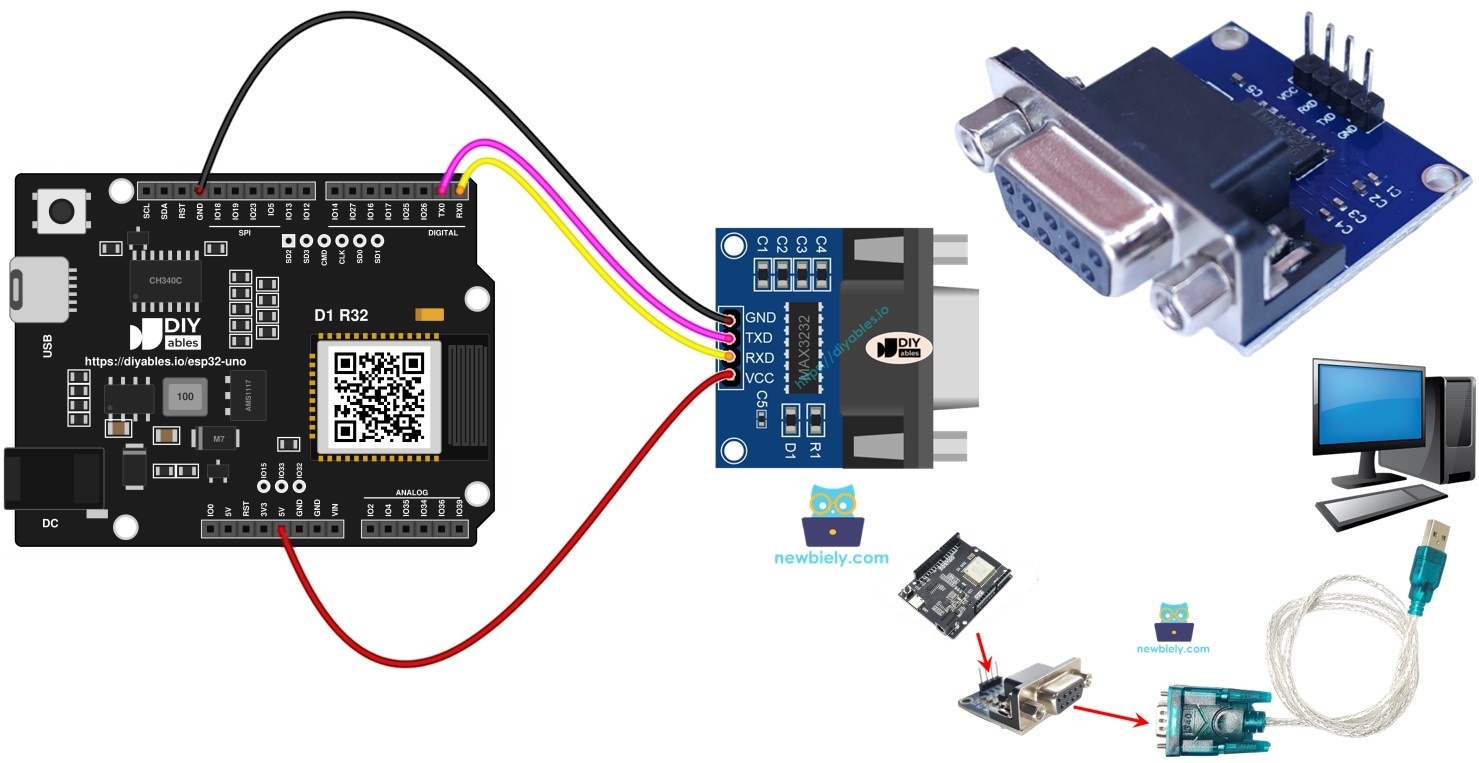
Components You Need
Or you can buy the following kits:
| 1 | × | DIYables Sensor Kit (18 sensors/displays) |
Additionally, some of these links are for products from our own brand, DIYables .
Overview of the TTL to RS232 Module
By the end of this part, you know why the module is needed and what each pin does.
Serial functions on the ESP32 Uno send bits at TTL level (0V and 3.3V). That level only works on short wires. Long cables need a stronger standard such as RS232, RS485 or RS422. The TTL to RS232 module converts the board's TTL signal to RS232 levels, and it converts incoming RS232 back to TTL.
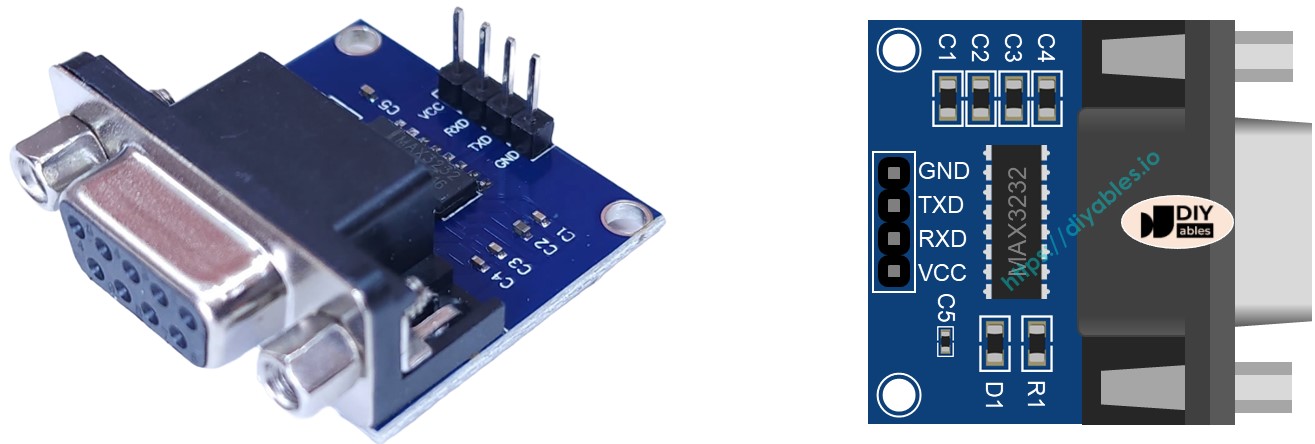
Pinout
The module has a TTL side for the board and an RS232 side for your device.
| TTL Pin | Role |
|---|---|
| VCC | Power input. Use 3.3V on the ESP32 Uno |
| GND | Ground (0V) |
| RXD | Data pin. Wire it as shown in the tables below |
| TXD | Data pin. Wire it as shown in the tables below |
The other side has a female DB9 socket. Your serial device, or an RS232 to USB cable, plugs in there.
WARNING
Logic on this board is 3.3V and the pins cannot take 5V. Feed the module with 3.3V so its TXD output stays at 3.3V. At 5V, that pin can push 5V into the board and damage it.
Good to know: MAX3232 based modules run from 3.3V to 5V, so 3.3V is a safe choice here.
ESP32 Uno Pinout
Every Uno header pin on the ESP32 Uno form board has its own GPIO number, and your code uses that number. Compare the diagram with your wires before you power the board.

How to Connect
By the end of this part, the module is wired in one of two ways: on the D0/D1 pins or on the D7/D6 pins.
Option 1 - D0/D1 pins (Serial)
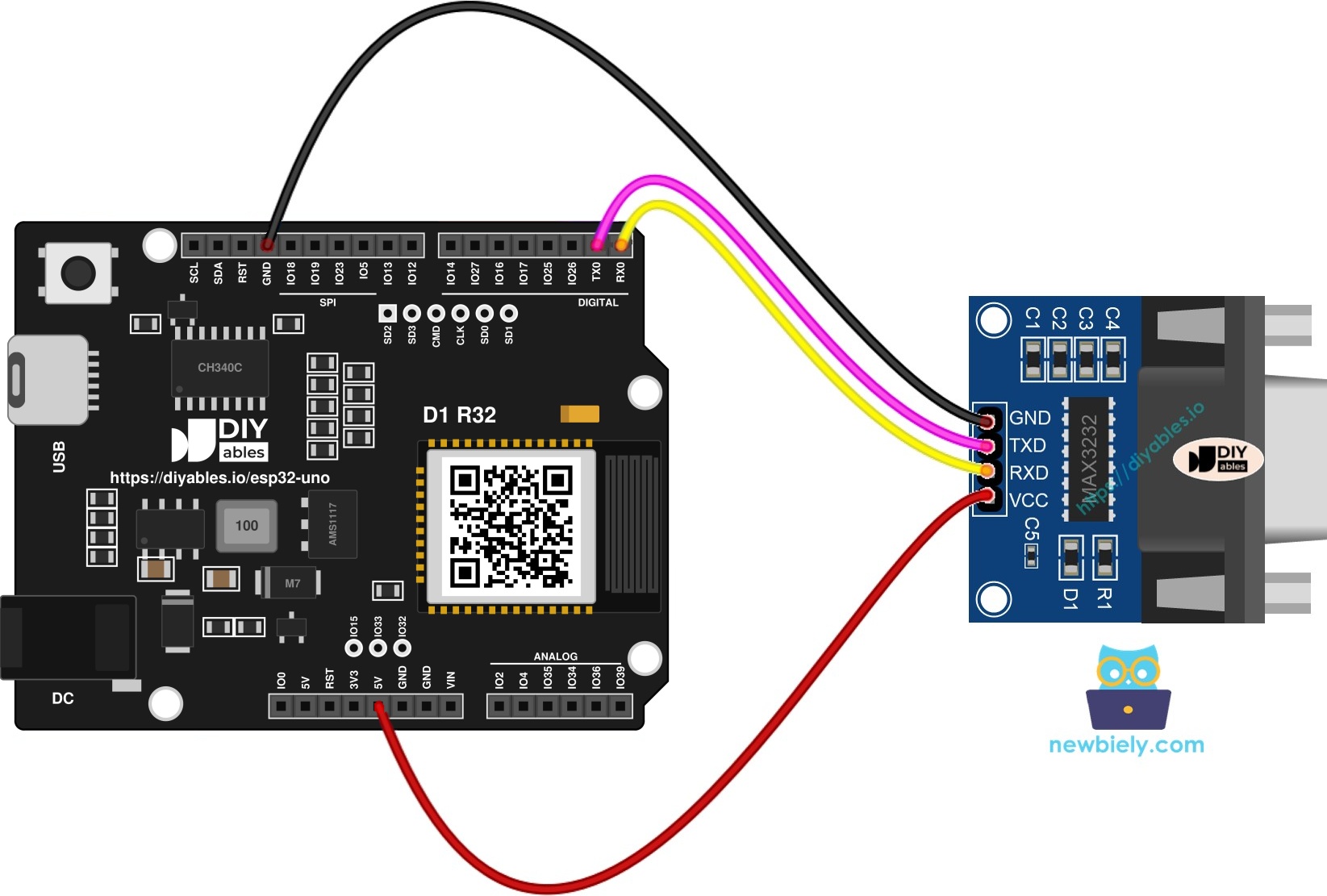
This image is created using Fritzing. Click to enlarge image
※ NOTE THAT:
The wiring diagram may not show the correct wiring for the ESP32 Uno. The first picture shows the module on D0 and D1 (Option 1). On the ESP32 Uno these pins are the USB serial pins, and they can block the upload. We suggest Option 2, with Serial2 on D6 and D7. We will update the diagram soon. Until then, follow the wiring table and the text on this page, not the picture.
| Component Pin | ESP32 Uno Pin |
|---|---|
| VCC | 3.3V |
| GND | GND |
| RXD | D0 (GPIO3) |
| TXD | D1 (GPIO1) |
WARNING
D0 (GPIO3) and D1 (GPIO1) carry UART0. The same lines are also wired to the CH340 chip that uploads code and drives the Serial Monitor. Unplug the module wires from D0 and D1 before each upload, and plug them back afterward. You cannot use the Serial Monitor at the same time on these pins. Option 2 avoids this problem.
Option 2 - D7 and D6 pins (Serial2)
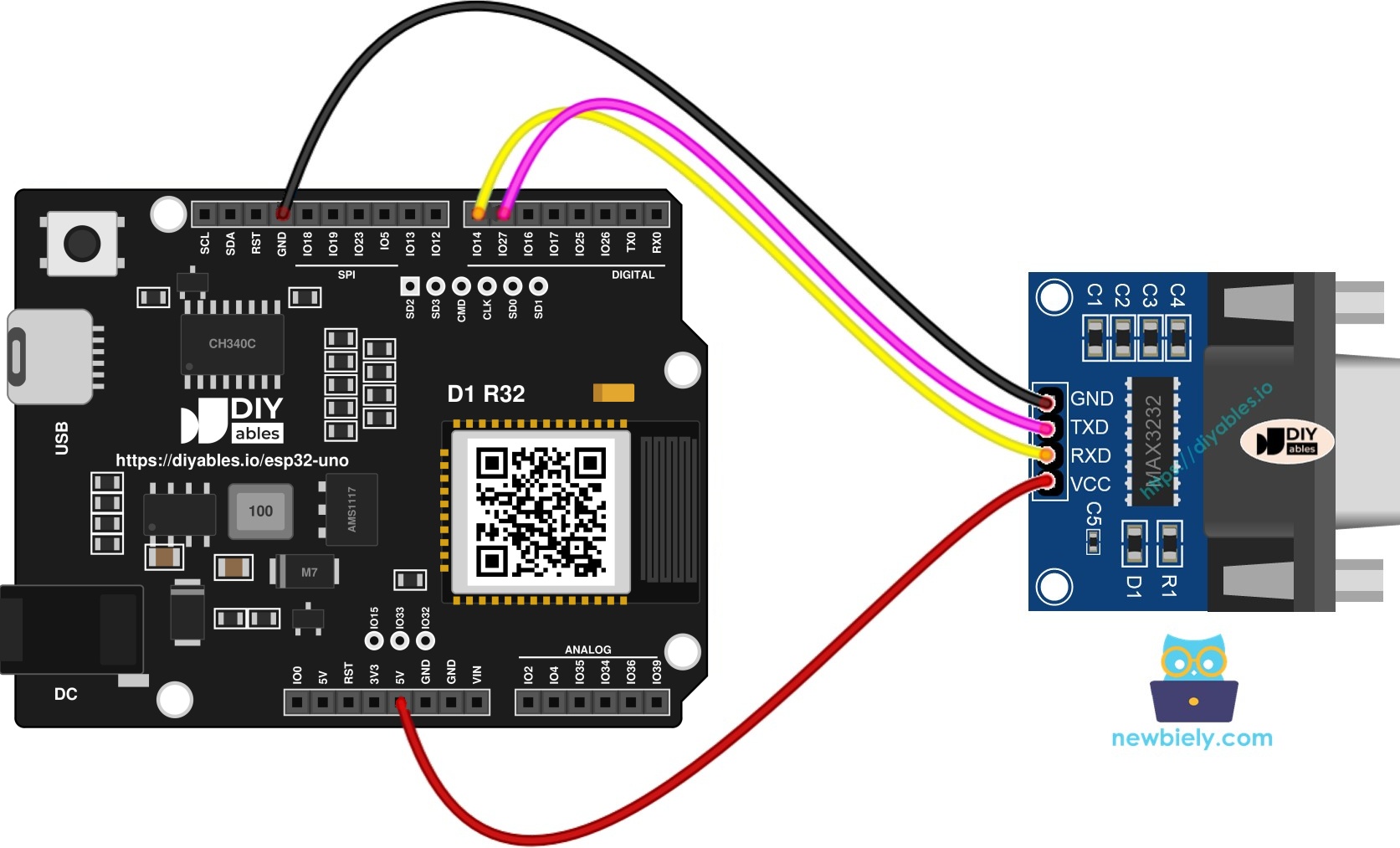
This image is created using Fritzing. Click to enlarge image
| Component Pin | ESP32 Uno Pin |
|---|---|
| VCC | 3.3V |
| GND | GND |
| RXD | D7 (GPIO14) |
| TXD | D6 (GPIO27) |
Good to know: Option 2 does not touch the USB serial lines, so uploads and the Serial Monitor keep working.
Programming the RS232 Link
By the end of this part, you know which calls start a port and move data.
Start a port
Option 1 uses the normal Serial object:
Option 2 has no SoftwareSerial. Use Serial2 and give it the RX and TX GPIO numbers:
Read and send
These calls are shown for Serial, and they work the same on Serial2.
- To read data, use:
- To send data, use:
More calls are listed in the Serial reference.
ESP32 Uno Code for Option 1 (Serial)
This sketch waits for a character on UART0 and sends the same character back.
| Code Part | What It Does |
|---|---|
| Serial.begin(9600) | Opens UART0 at 9600 baud |
| Serial.available() | Checks if a byte has arrived |
| Serial.read() | Takes one character from the buffer |
| Serial.print(data) | Sends the character back to the sender |
The result: whatever the other device sends comes straight back to it.
ESP32 Uno Code for Option 2 (Serial2)
This sketch does the same echo on the spare port Serial2, using D7 (GPIO14) for RX and D6 (GPIO27) for TX.
| Code Part | What It Does |
|---|---|
| RS232_RX_PIN, RS232_TX_PIN | GPIO numbers for the RX and TX lines |
| Serial2.begin(9600, SERIAL_8N1, ...) | Starts UART2 on those two pins |
| Serial2.available() | Checks if a byte has arrived |
| Serial2.print(data) | Echoes the character back |
Upload and Test
Upload a sketch first, then send some text from your PC and watch it return.
- First time with this board? Set it up with ESP32 Uno - Getting Started before you continue.
- Build the circuit by following the wiring table above.
- Plug in the USB Type-C cable between the ESP32 Uno and your computer.
- Select the board in Arduino IDE: pick ESP32 Dev Module and the COM port of the board (CH340).
- Paste the sketch that matches your wiring option into a new Arduino IDE window.
- Click Upload. With Option 1, unplug the D0 and D1 wires first, then plug them back after the upload ends.
Now test the RS232 link with your PC:
- Link the DB9 side of the module to your PC through the RS232 to USB cable.
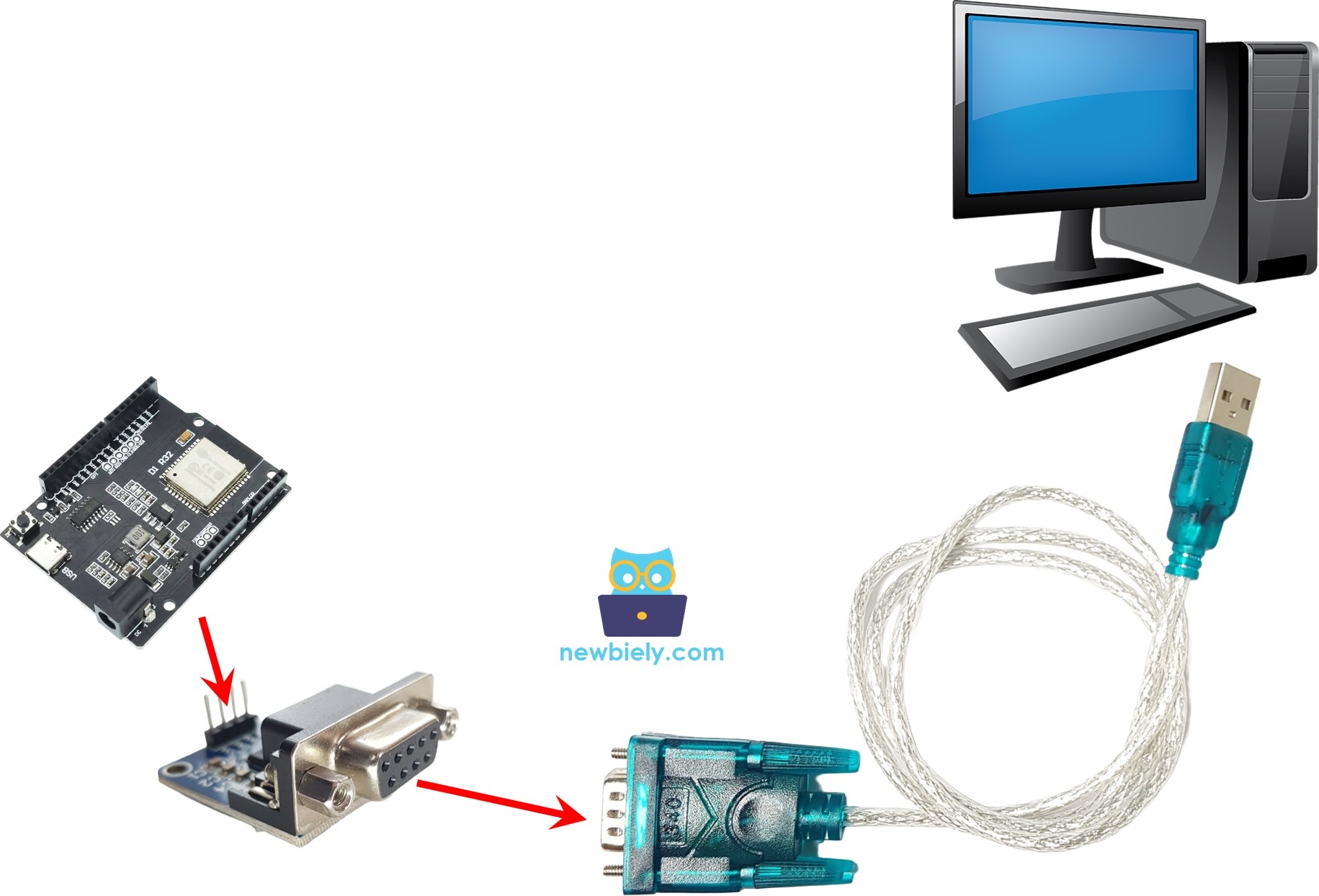
- Open the cable's COM port, not the board's port. Set 9600 baud, 8 data bits, no parity and 1 stop bit.
- Type a few characters. Each one comes back in the terminal, because the board echoes it.
- Pro tip: type a long sentence quickly. If every letter returns in order, the baud rate and the wiring are right.
Video Tutorial
See the ESP32 Uno build in action in the video below.
ESP32 Uno vs UNO R4 for This Project
By the end of this part, you know what changes when the RS232 project moves to the ESP32 Uno.
| Item | Arduino UNO R4 | ESP32 Uno |
|---|---|---|
| Logic voltage | 5V | 3.3V |
| Option 1 pins | D0 and D1 with Serial | D0 (GPIO3) and D1 (GPIO1) with Serial |
| Option 2 pins | D7 and D6 with SoftwareSerial | D7 (GPIO14) and D6 (GPIO27) with Serial2 |
| Library | SoftwareSerial.h | none, Serial2 is built in |
| Module power | 5V or 3.3V | 3.3V only |
| Arduino IDE board | Arduino UNO R4 WiFi | ESP32 Dev Module |
The same wiring positions work as they are. Just power the module from 3.3V so its TXD pin never sends 5V to the ESP32 Uno.
Go Wireless: Serial Data Over WiFi
By the end of this part, you have an idea to read RS232 data from your phone.
The ESP32 Uno has WiFi and Bluetooth, so the device on the RS232 line does not need a cable to your PC. You can forward the bytes you receive to a web page and watch them live. You can also send text from your phone to the RS232 device.
Troubleshooting
| Problem | Possible Cause | Solution |
|---|---|---|
| No COM port in Arduino IDE | CH340 driver missing or a charge-only USB cable | Install the CH340 driver and use a data USB cable |
| Failed to connect or Waiting for download | Board is not in upload mode | Hold the BOOT button when the upload starts |
| Upload fails with Option 1 | Module wires on D0 and D1 block the USB serial lines | Unplug D0 and D1 during upload, or use Option 2 |
| Nothing comes back | RXD and TXD are swapped or GND is missing | Check the table, swap RXD and TXD, and join GND |
| Garbled characters | Baud rate or frame settings differ | Set the terminal to 9600, 8N1 like the code |
| Each letter appears twice | Local echo is on in the terminal | Turn local echo off in Tera Term or PuTTY |
| Board gets warm or resets | Module powered from 5V | Power the module from 3.3V |
| Terminal shows nothing at all | Wrong COM port picked | Choose the port of the RS232 to USB cable |
FAQ
Can I use SoftwareSerial with the ESP32 Uno?
No. SoftwareSerial is made for AVR style boards. The ESP32 Uno has hardware UARTs, so use Serial2.begin(baud, SERIAL_8N1, RX, TX) on the two GPIOs you want.
Why does the RS232 module need a MAX3232 chip?
Real RS232 swings between about -15V and +15V. A microcontroller pin cannot handle that. The chip shifts those levels to 0V and 3.3V and back again.
Is 3.3V or 5V right for the module supply?
Choose 3.3V. The module still works, and its TXD pin stays at a level the board can take. Inputs here do not tolerate 5V.
Can I plug the board directly into a PC's DB9 port?
No. The negative RS232 voltages can destroy the pins. Always put the TTL to RS232 module between them.
What baud rate should I choose?
Both sides must match. The code uses 9600 baud with 8 data bits, no parity and 1 stop bit. Change the number in begin() for another speed, and change the terminal too.
Why does upload fail when wires are on D0 and D1?
Those pins are GPIO3 and GPIO1, shared with the CH340 USB chip. The module signal collides with upload data. Unplug them for the upload.
Which Arduino IDE board do I select?
Pick ESP32 Dev Module from the esp32 by Espressif Systems core, then choose the CH340 COM port.
Is the ESP32 Uno different from the UNO R4 for this code?
Option 1 is the same code. Option 2 swaps SoftwareSerial for Serial2 with GPIO numbers instead of Uno pin labels. The wiring positions stay the same.
Can I show the received data on a web page?
Yes. The ESP32 Uno has WiFi and Bluetooth, so you can forward the bytes to a web monitor. See the Go Wireless part above.
What if the Uno headers run out of pins for my build?
Near the power header you find extra holes: GPIO32 and GPIO33 (I/O, PWM, analog on ADC1, so they also work while WiFi is on) and GPIO15 (I/O, PWM, analog on ADC2). Solder headers into them, then use the GPIO number in your sketch. For a second RS232 port on Serial2 pins, GPIO32 and GPIO33 are the best choice. Two warnings. First, GPIO15 and GPIO0 (the IO0 pin at the unused Uno NC position) are boot strapping pins, so a wrong connection can stop the board from booting or uploading code. Use GPIO32 and GPIO33 first. Second, never use the six holes under the digital header (SD0 to SD3, CMD, CLK = GPIO6 to GPIO11). They are wired to the flash chip, and using them crashes the board.