
ESP32 UNO - LDR Module
Need your project to know when the lights go off? Hook an ESP32 Uno LDR module to the ESP32 Uno form board and it can tell day from night in a few lines of Arduino code. The board on the module, often sold as a photoresistor module or photocell module, sends out a light/dark signal and a light level you can turn into a number.
By the end, you can:
- Connect a photoresistor light sensor module to the ESP32 Uno
- Sense light or darkness with the DO pin and digitalRead()
- Measure brightness as a 0–4095 number with the AO pin and analogRead()
- Set the dark/light switch point with the small trimmer on the module
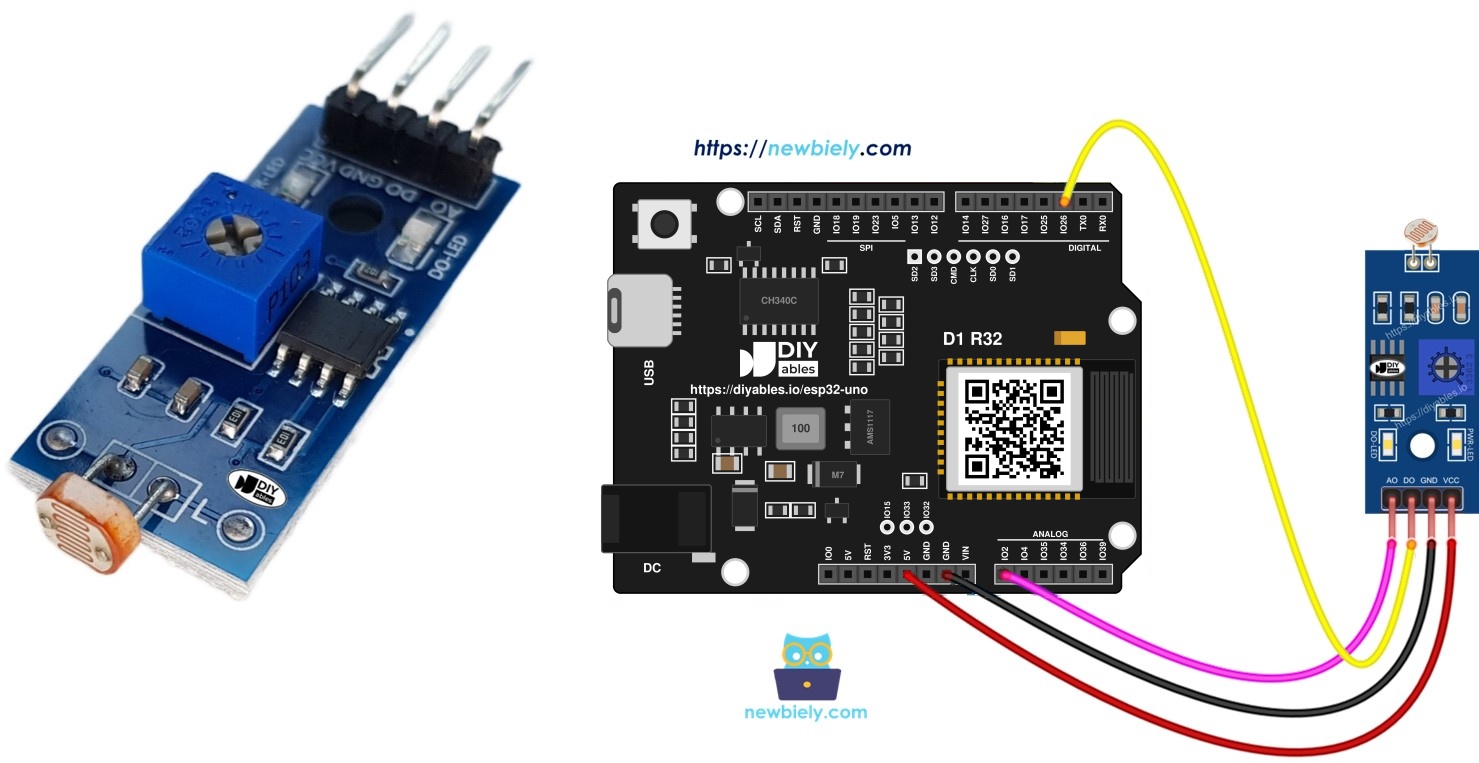
Components You Need
| 1 | × | ESP32 Uno-form Board | |
| 1 | × | USB Cable Type-A to Type-C (for USB-A PC) | |
| 1 | × | USB Cable Type-C to Type-C (for USB-C PC) | |
| 1 | × | LDR Light Sensor Module | |
| 1 | × | Jumper Wires |
Or you can buy the following kits:
| 1 | × | DIYables Sensor Kit (18 sensors/displays) |
Additionally, some of these links are for products from our own brand, DIYables .
Meet the LDR Light Sensor Module
After this part, you know what each pin and LED on the module is for.
The module carries a light-dependent resistor (LDR), a comparator chip and a trimmer potentiometer. Its resistance drops as more light hits it. The board turns that change into two signals at once.
| Output | Type | Best For |
|---|---|---|
| DO | Digital, HIGH or LOW | Simple "is it dark?" checks, night lights, alarms |
| AO | Analog voltage | Light level readings, smooth dimming, logging |
Pinout
Four pins sit on the header. Two give power, two give the light signal.
| Pin | Role | Notes |
|---|---|---|
| VCC | Power in | Accepts 3.3V to 5V; wire it to 3.3V here |
| GND | Ground | 0V |
| DO | Digital out | Goes HIGH in the dark and LOW in the light |
| AO | Analog out | Voltage falls with more light and rises with less light |
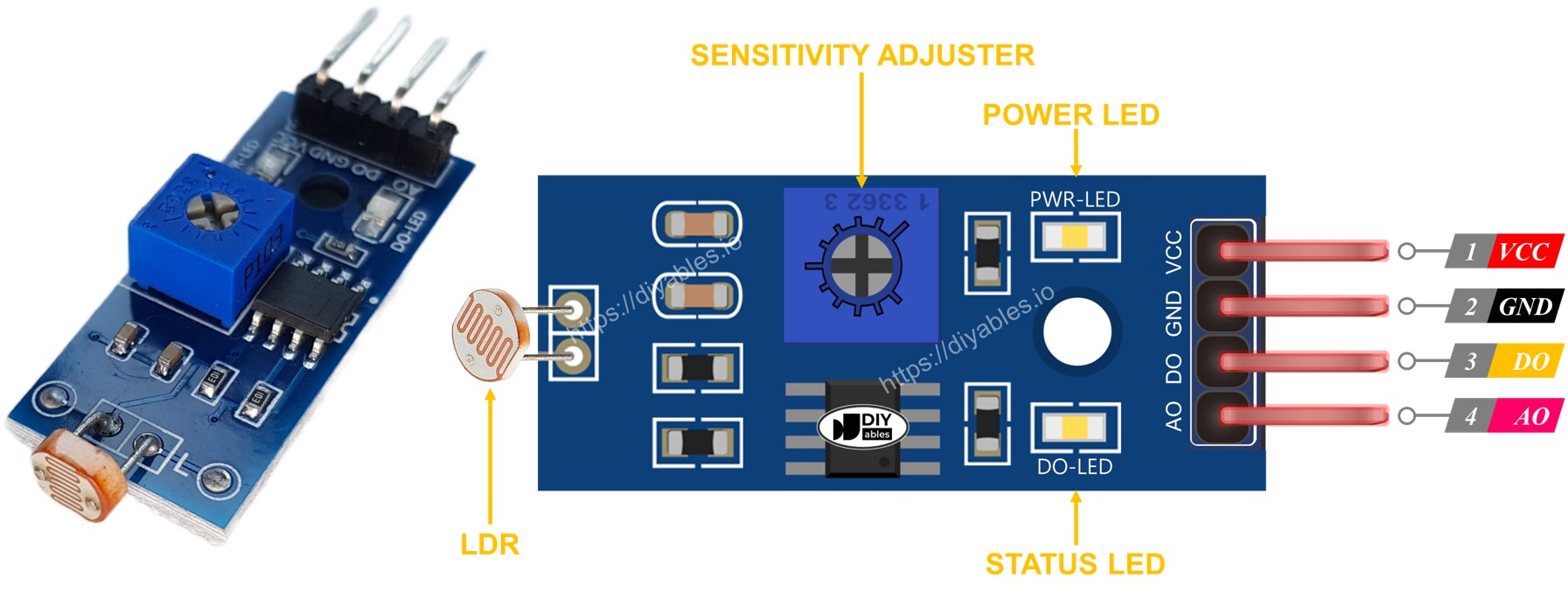
Two tiny LEDs help you debug:
| LED | When It Is On |
|---|---|
| PWR-LED | The module gets power |
| DO-LED | The sensor sees more light than the set threshold |
How It Works
Here you learn how the trimmer and the two outputs depend on each other.
DO output
The comparator checks the LDR signal against the level set by the trimmer.
| Room Light | DO Pin | DO-LED |
|---|---|---|
| Brighter than the threshold | LOW | Off |
| Darker than the threshold | HIGH | On |
AO output
The AO pin follows the light level all the time. A bright spot gives a small reading. A dark spot gives a large reading. Turning the trimmer does not change AO at all; it only moves the DO switch point.
Good to know: you can tune DO for a yes/no check and still read the exact brightness from AO in the same sketch.
ESP32 Uno Pinout
Your code talks to GPIO numbers, while the board prints Uno labels like D2 and A0 on the headers. Look at the diagram below to find the matching GPIO for every header pin before you plug in any wire.

How to Connect
When you finish this step, both module outputs reach the board, so you can run either sketch without moving a wire.
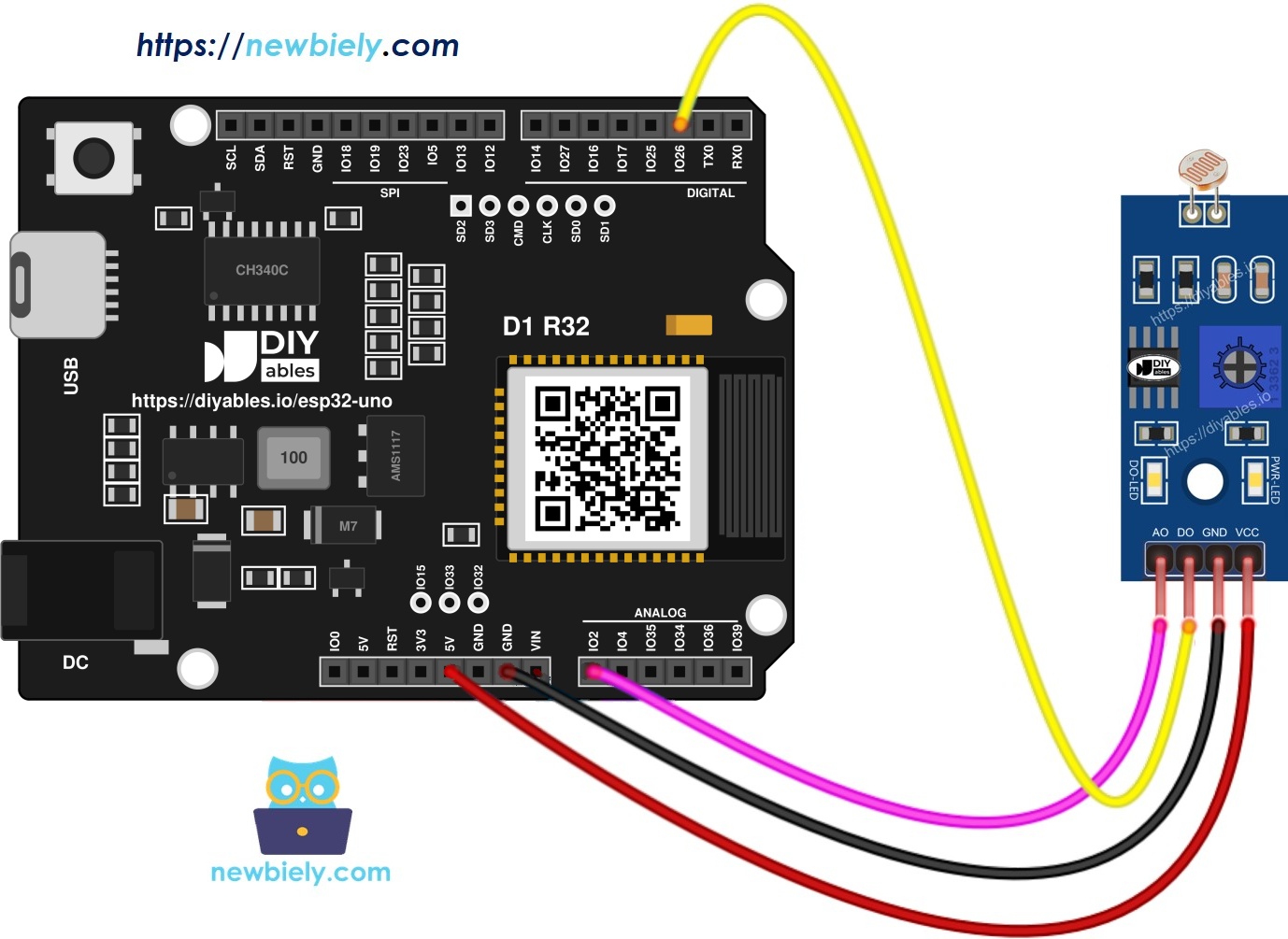
This image is created using Fritzing. Click to enlarge image
| Module Pin | ESP32 Uno Header (GPIO) |
|---|---|
| VCC | 3.3V |
| GND | GND |
| DO | D2 (GPIO26) |
| AO | A0 (GPIO2) |
WARNING
A0 is GPIO2, a boot strapping pin of the ESP32 Uno. The chip reads it at startup to choose the boot mode. The LDR module normally leaves it alone, but if the board will not boot or will not take new code, pull the AO wire out while you upload, then put it back. Also, GPIO2 is an ADC2 pin: analogRead() on it stops working when WiFi is on.
WARNING
The ESP32 Uno is NOT 5V tolerant; every pin expects 3.3V at most. With VCC on 5V, the DO and AO outputs can reach 5V and harm the board. Keep the module on the 3.3V pin; it runs well there.
Good to know: you only need one output for each sketch, but wiring both now saves time later.
ESP32 Uno Code - Light or Dark from the DO Pin
This sketch checks D2 (GPIO26) again and again and prints if light is there or not.
| Code Part | What It Does |
|---|---|
| #define DO_PIN 26 | Names the GPIO wired to the DO pin |
| pinMode(DO_PIN, INPUT) | Makes GPIO26 an input |
| digitalRead(DO_PIN) | Gets HIGH (dark) or LOW (light) |
| Serial.println(...) | Prints the light state to the Serial Monitor |
The result is a light detector that reports its state many times per second.
Upload and Test
- First time with this board? Set it up with ESP32 Uno - Getting Started before you continue.
- Build the circuit by following the wiring table above.
- Plug in the USB Type-C cable between the ESP32 Uno and your computer.
- Select the board in Arduino IDE: pick ESP32 Dev Module and the COM port of the board (CH340).
- Paste the code into a new sketch in Arduino IDE.
- Press Upload (Upload button) and wait for "Done uploading".
- Open the Serial Monitor at 9600 baud.
- Shade the sensor with a piece of paper, then remove it.
- Pro tip: Shine a phone flashlight on the LDR from about 20 cm. If the message does not flip, the trimmer is set too far one way.
If the DO-LED stays lit all the time, or never lights in the dark, turn the trimmer a little at a time until it changes right at the light level you want. From here, you can switch an LED, a relay lamp or a servo based on the light state. The tutorials linked at the end show how.
ESP32 Uno Code - Light Level from the AO Pin
This sketch reads A0 (GPIO2) and prints the raw brightness value.
| Code Part | What It Does |
|---|---|
| #define AO_PIN 2 | Names the GPIO wired to the AO pin |
| analogSetAttenuation(ADC_11db) | Widens the ADC input range to about 3.3V |
| analogRead(AO_PIN) | Returns 0 (very bright) to 4095 (very dark) |
| Serial.println(light_value) | Prints the number on its own line |
Good to know: the 11 dB attenuation lets the ESP32 Uno analog pin read the full range, from 0V up to about 3.3V. Without it, the value hits 4095 in normal room light and the readings look wrong.
Upload and Test
- Paste the code into Arduino IDE.
- Click Upload and wait until the IDE says it is done.
- Open the Serial Monitor at 9600 baud.
- Cover the LDR slowly with your palm, then open your hand again.
- Pro tip: Note the number at your desk and the number with the sensor fully covered. The middle of the two is a good starting threshold for your own code.
Video Tutorial
See the ESP32 Uno build in action in the video below.
The demo uses the sketch below. It reads AO, smooths the value with an EMA filter, and fades an extra LED on D9 (GPIO13) up as the room gets darker. Its limits (2000, 2200, 2400) fit the 12-bit range.
Code Explanation
This table sums up the demo sketch so you can change it with confidence.
| Code Part | What It Does |
|---|---|
| ALPHA = 0.1 | Sets how strong the smoothing is. Smaller means slower and calmer |
| emaValue = ALPHA * rawValue + ... | Mixes the new reading into the running average |
| if (emaValue < 2000) ... | Maps the average to four brightness levels |
| currentPWM++ / currentPWM-- | Fades one step per loop, so the LED never jumps |
| analogWrite(LED_PIN, currentPWM) | Sends the PWM level to D9 (GPIO13) |
With a 20 ms delay, a full fade from off to full takes about 5 seconds.
ESP32 Uno vs UNO R4 for This Project
This shows what changes when the same LDR project moves from the UNO R4 to the ESP32 Uno.
| Item | Arduino UNO R4 | ESP32 Uno |
|---|---|---|
| Logic voltage | 5V | 3.3V |
| Module VCC | 5V or 3.3V | 3.3V only |
| DO pin | D2 | D2 (GPIO26) |
| AO pin | A0 | A0 (GPIO2) |
| ADC range | 0 to 1023 | 0 to 4095 |
| Extra code line | none | analogSetAttenuation(ADC_11db) |
| Arduino IDE board | Arduino UNO R4 WiFi | ESP32 Dev Module |
The wiring stays on the same header pins, so the same diagram works. Just move VCC to 3.3V and multiply any old analog thresholds by about 4.
Go Wireless: Light Meter on Your Phone
Here is one way to put the light level on your phone.
The ESP32 Uno has WiFi and Bluetooth on board. Send the AO value to a phone page and you get a live light meter or a graph of the day turning into night. Note that A0 is an ADC2 pin, so for a WiFi version, move the AO wire to A2 (GPIO35) and change AO_PIN to 35. Bluetooth works with A0 as it is.
Function References
Troubleshooting
| Problem | Possible Cause | Solution |
|---|---|---|
| Arduino IDE lists no COM port | CH340 driver missing or a charge-only cable | Install the CH340 driver and try a USB cable that carries data |
| Upload stops at "Failed to connect" or "Waiting for download" | Board did not enter download mode | Hold the BOOT button when the upload starts, release it once writing begins |
| Board does not boot or upload with the module connected | A0 (GPIO2) is a boot strapping pin and is pulled the wrong way | Unplug the AO wire while uploading, then plug it back in |
| PWR-LED on the module is dark | VCC or GND wire is loose | Push both wires in firmly and check they go to 3.3V and GND |
| Serial Monitor always shows "The light is NOT present" | Trimmer set for too much light | Turn the trimmer slowly while the sensor sits in normal light |
| AO reading sits at 4095 in a lit room | Attenuation line removed or AO on a wrong pin | Keep analogSetAttenuation(ADC_11db) and check that AO goes to A0 |
| AO reading freezes after you add WiFi | GPIO2 is ADC2 and WiFi blocks it | Move AO to A2 (GPIO35) and set AO_PIN to 35 |
| Serial Monitor prints random symbols | Baud rate mismatch | Use 9600 baud for the DO and AO sketches and 115200 for the demo |
| Values jump up and down under a lamp | Mains flicker or a noisy LED bulb | Average several readings, or use the EMA filter from the demo |
FAQ
What does an LDR light sensor module actually measure?
It measures how much light falls on its light-dependent resistor. It gives a relative value, not lux. The reading depends on the part, its temperature and the supply voltage.
Do I need a resistor to wire this module to the ESP32 Uno?
No. The module already has the resistor divider and the comparator on board. Just connect VCC, GND, DO and AO with jumper wires.
Is it safe to run the module from the 5V pin?
Not with the ESP32 Uno. At 5V, the DO and AO pins can output up to 5V, and the board pins are 3.3V only. Run the module from 3.3V and both outputs stay safe.
How do I use two LDR modules in one sketch?
Give each one its own pins and its own #define. For example, put the second DO on D3 (GPIO25) and the second AO on A2 (GPIO35). Then read both inside loop().
My old sketch used 1023 as the top value. What do I change?
The ESP32 Uno ADC is 12-bit, so analogRead() returns 0 to 4095 instead of 0 to 1023. Multiply your old thresholds by about 4, and add analogSetAttenuation(ADC_11db) in setup().
What is the analogSetAttenuation(ADC_11db) line in setup() for?
The line tells the ESP32 Uno ADC to accept inputs from 0V up to roughly 3.3V, so every AO voltage gets its own number between 0 and 4095. With a smaller range, the reading saturates early and dim and bright rooms look the same. The UNO R4 has no such setting, so this line is only needed on the ESP32 Uno. Never let the AO signal go above 3.3V.
Can I read the AO pin while the ESP32 Uno is on WiFi?
Not on A0. A0 (GPIO2) and A1 (GPIO4) are ADC2 pins, and ADC2 cannot be read while WiFi is on. For a WiFi project, move the AO wire to A2–A5 (GPIO35, 34, 36, 39) or GPIO32/33, and change the pin number in the code.
Why does the board refuse to start when the sensor is plugged in?
A0 is GPIO2, one of the pins the chip checks at power-on. If something pulls it the wrong way, the board can fail to boot or upload. Unplug AO during the upload, or move it to A2 (GPIO35) and change the code.
I ran out of Uno header pins. Where can I find more?
The ESP32 Uno has a few extra holes near the power header: GPIO32 and GPIO33 (I/O, PWM, analog on ADC1, so they work while WiFi is on) and GPIO15 (I/O, PWM, analog on ADC2). Add pin headers with a soldering iron, then put the bare GPIO number in your sketch. For a second LDR in a WiFi project, GPIO32 or GPIO33 is the best AO pin. Two warnings: (1) GPIO15 and GPIO0 (the IO0 pin at the unused Uno NC position) are boot strapping pins, and a wrong connection can stop the board from booting or uploading code, so use GPIO32/33 first. (2) Never use the six holes under the digital header (SD0–SD3, CMD, CLK = GPIO6–GPIO11); they go to the flash chip and using them crashes the board.
Should I pick this module or a BH1750 sensor?
Pick the LDR module for cheap light/dark detection and rough light levels. Pick a BH1750 when you need real lux values over I2C. The BH1750 connects to the SDA (GPIO21) and SCL (GPIO22) pins.
Can I build an automatic night light with it?
Yes. Use the DO pin to switch an LED or a relay when it gets dark, or use the demo sketch to fade an LED as the light drops. The trimmer sets when the night light turns on.