
ESP32 UNO - Gas Sensor
Worried about a gas leak or smoky air? Hook an MQ2 gas sensor to the ESP32 Uno and get a warning on your screen as soon as the air turns bad. The MQ2 works as a smoke sensor, an LPG sensor and a general air quality sensor, and it also notices propane, hydrogen, alcohol, methane and carbon monoxide. Two simple outputs make it easy to use on the ESP32 Uno form board with plain Arduino code.
By the end, you can:
- Tell the digital DO output and the analog AO output of the MQ2 apart
- Wire the MQ2 module with its heater on 5V and both outputs scaled down to 3.3V
- Detect gas with digitalRead() on a single pin
- Measure the gas level as a 0–4095 number with analogRead()
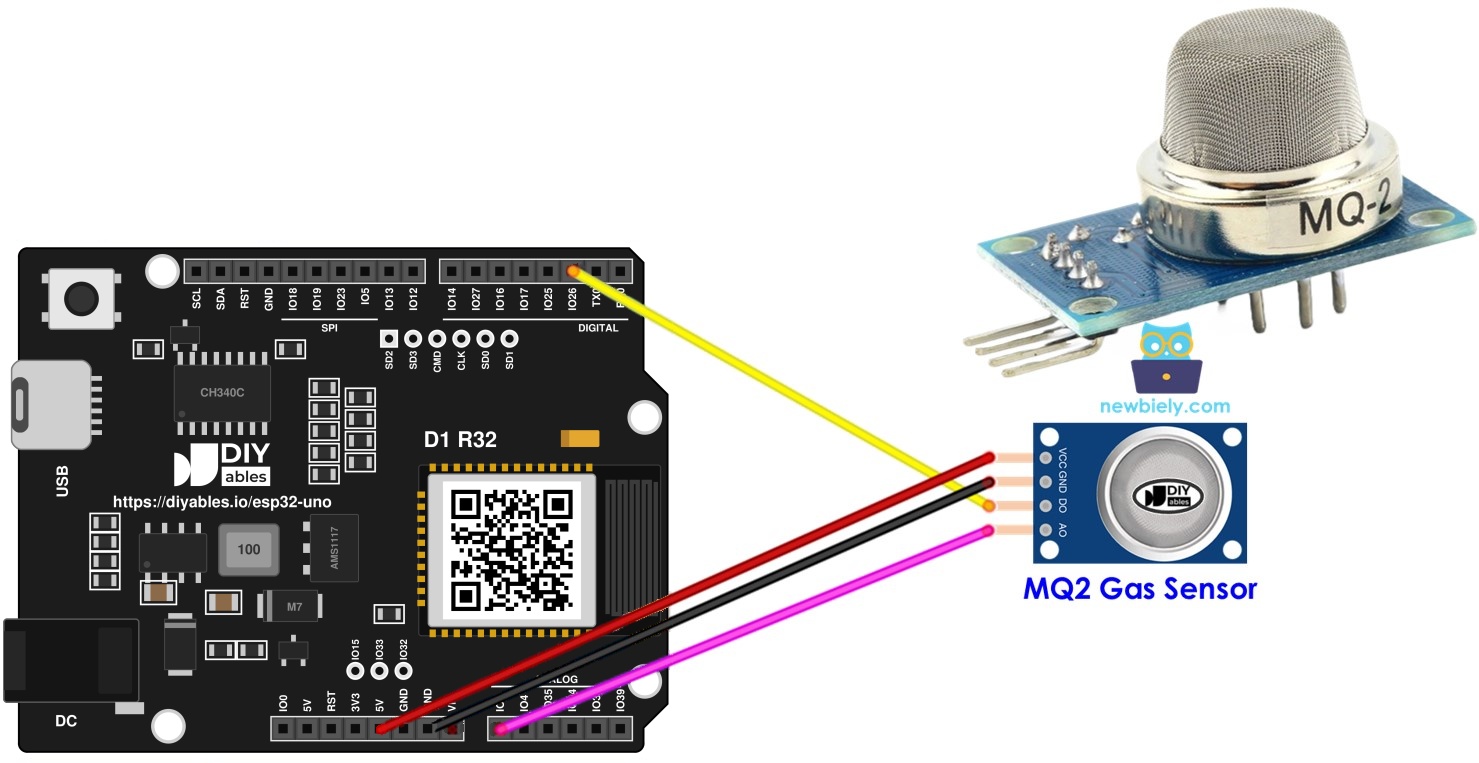
Components You Need
Or you can buy the following kits:
| 1 | × | DIYables Sensor Kit (18 sensors/displays) |
Additionally, some of these links are for products from our own brand, DIYables .
Meet the MQ2 Gas Sensor
After this part, you know what the MQ2 measures and where its limits are.
| Feature | Value |
|---|---|
| Gases it reacts to | LPG, smoke, alcohol, propane, hydrogen, methane, carbon monoxide |
| Supply voltage | 5V (the internal heater needs it) |
| Outputs | 1 digital (DO) and 1 analog (AO) |
| Gas type info | None, one combined reading for all gases |
| Typical use | Leak alarm, bad-air warning, fan or vent trigger |
The MQ2 sees the air as one mix. It reports "how much burnable gas is around", not "which gas it is". For a leak alarm or a smoke warning, that one reading is all you need.
Pinout
Two pins feed the module and two pins send its answer back.
| Pin | Role | Where It Goes |
|---|---|---|
| VCC | Power for the logic and the heater | 5V |
| GND | Ground | GND |
| DO | Digital result, LOW when gas passes the set level, HIGH when the air is clean | A digital pin (through a divider) |
| AO | Analog voltage that grows with the amount of gas | An analog pin (through a divider) |
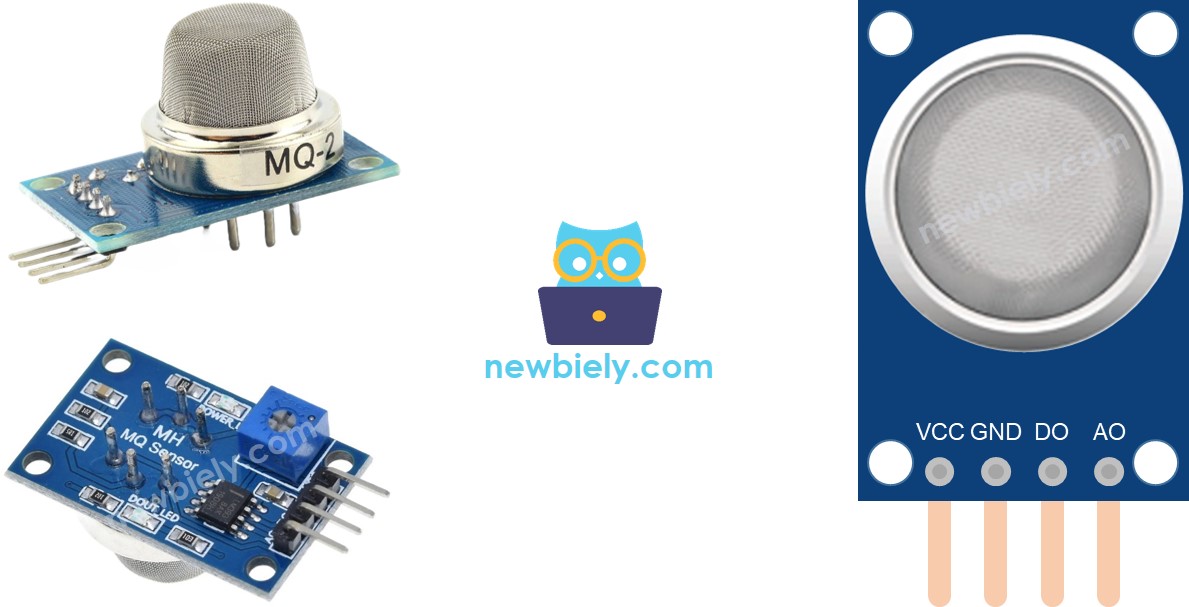
| LED on the Module | Meaning |
|---|---|
| PWR-LED | The module has power |
| DO-LED | Lights when the DO pin says gas is found, dark when the air is clean |
How It Works
Here you see how each output reacts to a change in the air.
| Output | Clean Air | Gas Above the Level | Changed by the Potentiometer? |
|---|---|---|---|
| DO | HIGH, DO-LED off | LOW, DO-LED on | Yes, the knob sets the trigger level |
| AO | Low voltage | Higher voltage, the more gas the higher | No |
Use DO when you only need a yes or no answer. Use AO when you want to watch the gas level rise and fall, or set your own trigger point in code.
WARNING
The MQ2 board is powered from 5V, so DO and AO can swing close to 5V. The ESP32 Uno accepts only 3.3V on its pins (NOT 5V tolerant). Do not plug either output straight into the board. Put a voltage divider on each one, as shown in the wiring part below.
Heating the MQ2 Before Use
At the end of this part, you know how long to wait before you trust the numbers.
| Sensor History | Warm-up Time |
|---|---|
| New, or not used for more than a month | 24 to 48 hours |
| Used in the last few days | 5 to 10 minutes |
A cold heater gives readings that start high and drift. Once the element is hot, the value falls and settles. To heat it, feed VCC with 5V and GND with ground and leave the module on. The ESP32 Uno 5V and GND header pins work fine as that supply.
Good to know: both sketches below pause for 20 seconds in setup(). That is only a short start delay, not a full warm-up.
ESP32 Uno Pinout
Your sketch talks to GPIO numbers, while the board shows Uno labels like D2 and A0. Match the two in the diagram below before you plug in the sensor.

How to Connect
When you finish this part, the heater runs on 5V and both outputs reach the board at a safe level. You can wire DO only, AO only, or both.
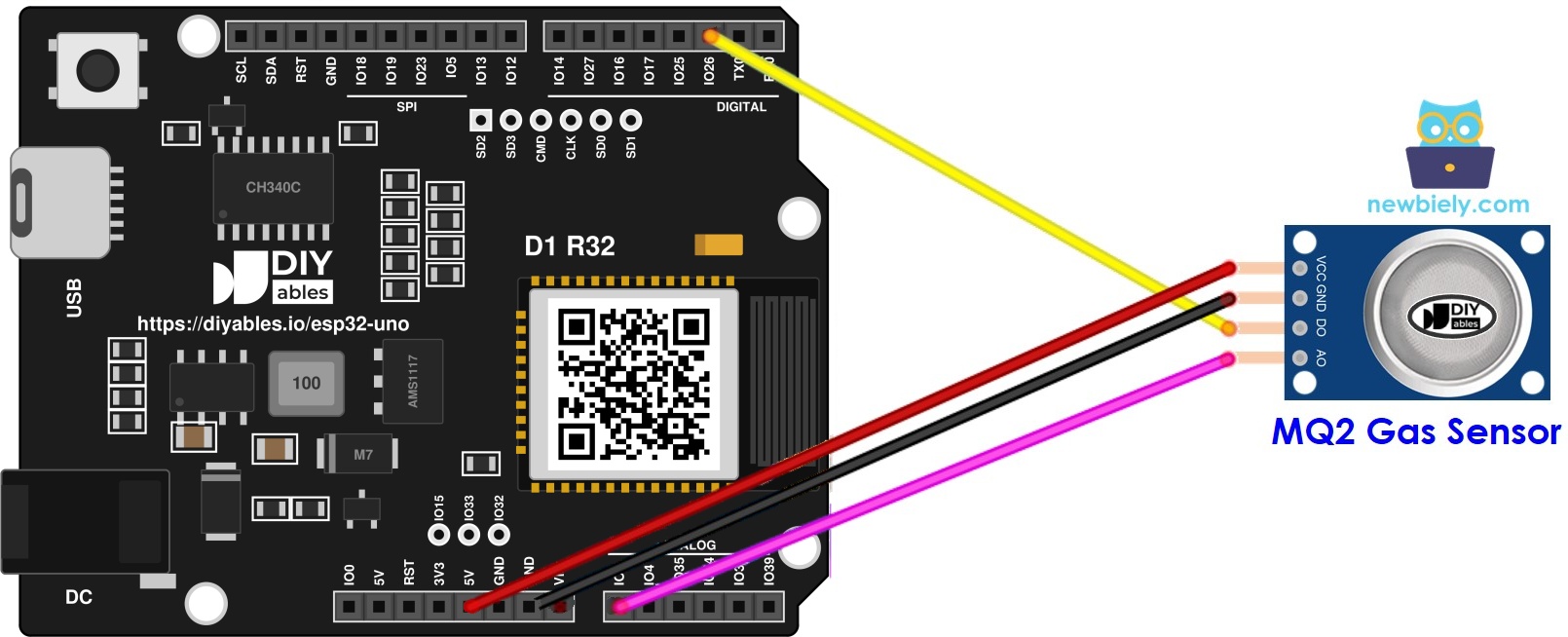
This image is created using Fritzing. Click to enlarge image
※ NOTE THAT:
The wiring diagram may not show the correct wiring for the ESP32 Uno. The sensor outputs can reach 5V, but ESP32 Uno pins are 3.3V only. The picture shows DO and AO wired straight to the board. On the ESP32 Uno, put a 10 kΩ and 20 kΩ voltage divider on each output, as this page shows. We will update the diagram soon. Until then, follow the wiring table and the text on this page, not the picture.
| MQ2 Pin | ESP32 Uno Pin |
|---|---|
| VCC | 5V |
| GND | GND |
| DO | D2 (GPIO26), via a voltage divider |
| AO | A0 (GPIO2), via a voltage divider |
Make one divider for every output you connect:
| Resistor | From | To |
|---|---|---|
| 10 kΩ (upper) | MQ2 DO or AO | D2 or A0 on the board |
| 20 kΩ (lower) | D2 or A0 on the board | GND |
The divider keeps two thirds of the signal, so 5V turns into roughly 3.3V. No 20 kΩ resistor in your kit? Two 10 kΩ resistors in series give the same 20 kΩ. For DO, a logic level converter is a fine choice too.
WARNING
The picture shows DO and AO wired directly to D2 and A0. On the ESP32 Uno, always place the divider in between, or the 5V signal can harm GPIO26 or GPIO2.
A0 is GPIO2, a boot strapping pin. If the sensor holds this pin HIGH while the board starts, the upload or the boot can fail. If that happens, unplug the AO wire, upload, then plug it back in. GPIO2 is also an ADC2 pin, so analogRead() on A0 stops working once WiFi is turned on.
Good to know: the ESP32 Uno ADC reads 0–4095 (12-bit) and tops out at about 3.3V. That is why the divider matters for AO as well as for DO.
ESP32 Uno Code - Detect Gas with the DO Pin
This sketch waits 20 seconds, then checks D2 (GPIO26) in a loop and prints a gas or no-gas message.
Upload and Test
- First time with this board? Set it up with ESP32 Uno - Getting Started before you continue.
- Build the circuit by following the wiring table above, with the divider on DO.
- Plug in the USB Type-C cable between the ESP32 Uno and your computer.
- Select the board in Arduino IDE: pick ESP32 Dev Module and the COM port of the board (CH340).
- Paste the sketch into a new Arduino IDE window.
- Press Upload and wait for "Done uploading".
- Open the Serial Monitor at 9600 baud and wait out the 20-second pause.
- Bring a gas source close, for example the gas of an unlit lighter, and watch the messages change.
- Pro tip: set the trigger level in the room where the sensor will live. Turn the knob until the DO-LED just goes dark, then a quarter turn more, so normal air never sets it off.
ESP32 Uno Code - Measure Gas Level with the AO Pin
This sketch waits 20 seconds, then reads A0 (GPIO2) with analogRead() and prints the raw level. Higher means more gas.
Good to know: setup() calls analogSetAttenuation(ADC_11db). This 11 dB setting lets the ESP32 Uno analog pin read the full span, from 0V up to about 3.3V. With a narrower span, the reading hits 4095 too early and high gas levels all look the same.
Upload and Test
- Move the divider to the AO line if it is not there yet.
- Paste the sketch into Arduino IDE.
- Press Upload. If the upload hangs, pull the AO wire off A0 for a moment.
- Open the Serial Monitor at 9600 baud.
- Hold the sensor near smoke or gas and watch the value climb.
- Pro tip: log the AO value for a full day in normal air. Kitchen cooking and open windows move the baseline, so set your alarm limit well above the highest normal value.
From here, compare DO or AO with your own limit, and fire a buzzer, a relay or a fan when the air gets bad.
Video Tutorial
See the ESP32 Uno build in action in the video below.
Code Explanation
Both sketches are short. This table shows what each part does.
| Code Part | What It Does |
|---|---|
| #define DO_PIN 26 / #define AO_PIN 2 | Names the GPIO for D2 and A0 |
| Serial.begin(9600) | Opens the link to the Serial Monitor |
| analogSetAttenuation(ADC_11db) | Sets the analog range to about 0–3.3V (AO sketch only) |
| delay(20000) | Gives the heater a short 20-second start |
| digitalRead(DO_PIN) | HIGH means clean air, LOW means gas found |
| analogRead(AO_PIN) | Returns 0–4095, more gas gives a bigger number |
The loop has no delay, so new lines appear very fast. Add delay(500); at the end of loop() if you want a slower, easier-to-read log.
ESP32 Uno vs UNO R4 for This Project
This part shows what changes when you move the gas sensor project from the UNO R4 to the ESP32 Uno.
| Item | Arduino UNO R4 | ESP32 Uno |
|---|---|---|
| Logic voltage | 5V | 3.3V |
| DO pin | D2 | D2 (GPIO26) |
| AO pin | A0 | A0 (GPIO2), ADC2 and boot strapping |
| ADC range | 0–1023 (default) | 0–4095 (12-bit) |
| Extra code line | None | analogSetAttenuation(ADC_11db) |
| Signal parts | Direct wires | 10 kΩ / 20 kΩ divider on DO and AO |
| Arduino IDE board | Arduino UNO R4 WiFi or Minima | ESP32 Dev Module |
The header positions stay the same, so the converted wiring picture still fits. The one thing to add is the voltage divider, because the 5V module outputs are too high for 3.3V pins.
Go Wireless: Gas Alarm on Your Phone
After this part, you have an idea for checking the air without a USB cable.
The ESP32 Uno has WiFi and Bluetooth built in. Instead of the Serial Monitor, you can send the MQ2 level to a phone and watch it as a live gauge or a graph from another room. For the WiFi version, move the AO wire to A2–A5 or GPIO32/33 first, since A0 cannot be read while WiFi is on. For a Bluetooth version, an ADC1 pin is also the safer choice.
Language References
Open these pages to learn more about each function in the two sketches.
Troubleshooting
| Problem | Possible Cause | Solution |
|---|---|---|
| Board has no COM port in Arduino IDE | CH340 driver missing or charge-only cable | Install the CH340 driver and switch to a USB data cable |
| Upload stops at "Failed to connect" or "Waiting for download" | Board did not enter download mode | Hold the BOOT button as the upload starts, then let go |
| Board does not boot or upload with the sensor connected | A0 (GPIO2) is a boot strapping pin and the AO line pulls it the wrong way | Unplug the AO wire while uploading, or move AO to A2 (GPIO35) and change the pin in code |
| PWR-LED on the module is dark | VCC or GND loose, or VCC on 3.3V | Put VCC on the 5V pin and GND on GND, then press the jumpers in firmly |
| Numbers start very high and keep falling | The heater is still cold | Let it run 5 to 10 minutes, or 24 to 48 hours for a new sensor |
| "The gas is present" never stops, even in clean air | Trigger level set too sensitive | Turn the potentiometer the other way until the DO-LED goes off |
| DO looks LOW in clean air | The divider drags the HIGH level down on this module | Check the 10 kΩ and 20 kΩ values, or use a logic level converter on DO |
| AO is stuck at 4095 | No divider on AO, or the attenuation line was removed | Add the divider and keep analogSetAttenuation(ADC_11db) in setup() |
| AO reads 0 in a WiFi sketch | A0 is on ADC2, which is blocked while WiFi runs | Move AO to A2–A5 or GPIO32/33 |
| Garbage text on the Serial Monitor | Baud rate does not match | Choose 9600 baud in the Serial Monitor |
FAQ
Does the MQ2 work if I feed it 3.3V from the ESP32 Uno?
Not well. The heater needs 5V to reach its working temperature. On 3.3V it stays cool and the readings are weak and unreliable. Keep VCC on 5V and scale the outputs down with dividers.
Is it safe to connect the MQ2 DO pin directly to an ESP32 Uno pin?
No. On a 5V supply, DO and AO can go up to about 5V, and ESP32 Uno pins accept only 3.3V. A 10 kΩ / 20 kΩ divider or a level converter brings the signal into the safe range.
What does the AO number from the ESP32 Uno actually mean?
It is a raw 0–4095 value, not ppm. A bigger value means more burnable gas. Because of the divider, the board sees about two thirds of the real AO voltage, so 4095 is about 3.3V at the pin.
Why is analogSetAttenuation(ADC_11db) in the MQ2 analog sketch?
It sets the ESP32 Uno ADC to read about 0–3.3V, so the whole divided AO signal maps to 0–4095. With a smaller range, the value saturates early. The UNO R4 sketch does not need this line, because only the ESP32 Uno ADC needs it. Keep the voltage on the pin at 3.3V or less.
Can the MQ2 name the gas or give a ppm value?
It cannot name the gas, because it reacts to all of them together. A ppm value needs calibration with known gas levels and the curves from the MQ2 datasheet. Most home projects just compare the raw value with a limit.
Can I use the gas reading in a WiFi project on the ESP32 Uno?
Yes, but not on A0. A0 (GPIO2) and A1 (GPIO4) are ADC2 pins, and ADC2 cannot be read while WiFi is on. Move the AO wire to A2–A5 (GPIO35, 34, 36, 39) or GPIO32/33, and change AO_PIN in the code to match.
Why does my ESP32 Uno sometimes refuse to boot with the sensor plugged in?
A0 is GPIO2, a boot strapping pin that the chip checks at power-up. A high voltage on it at that moment can stop boot or upload. Unplug the AO wire while uploading, or move AO to an input-only pin such as A2 (GPIO35).
Can I read two MQ sensors at the same time?
Yes. Wire the second module's AO to another analog pin, such as A2 (GPIO35), through its own divider, and add a second analogRead() line. Power both heaters from 5V, but note that each heater draws around 150 mA.
Do I need to install a library for the MQ2?
No. Both sketches use only built-in functions: pinMode(), digitalRead(), analogRead() and Serial. You only need the esp32 by Espressif Systems core in Arduino IDE.
What if my gas alarm needs more pins than the Uno headers give?
The ESP32 Uno has a few extra holes near the power header. GPIO32 and GPIO33 offer I/O, PWM and analog input on ADC1, so they keep working while WiFi is on. GPIO15 offers I/O, PWM and analog input on ADC2. Add pin headers with a soldering iron, then put the GPIO number in the sketch. For an MQ2 AO line in a WiFi project, GPIO32 or GPIO33 is the best pick. Two warnings: GPIO15 and GPIO0 (the IO0 pin at the unused Uno NC position) are boot strapping pins, and a wrong connection can stop the board from booting or uploading, so use GPIO32/33 first. Also, never use the six holes under the digital header (SD0–SD3, CMD, CLK = GPIO6–GPIO11). They are wired to the flash chip, and using them crashes the board.
Can I put an UNO gas sensor shield on the ESP32 Uno?
The headers have the same shape, so many shields fit. Check that the shield sends only 3.3V signals into the board and does not use A4/A5 for I2C, because on the ESP32 Uno I2C is on the SDA and SCL header pins.
How can I make a real gas alarm from this project?
Add a buzzer or a relay on a free digital pin, and switch it on when DO goes LOW or AO passes your limit. A relay can start a fan or a vent. For safety, use this only as an extra warning, not as a certified gas detector.