
ESP32 UNO - Joystick - Servo Motor
Want to aim a camera mount by hand? Pair an ESP32 Uno with a joystick and two servo motors, and the pan-tilt head turns wherever your thumb points. The build runs on the ESP32 Uno form board with plain Arduino code, and the same joystick pan-tilt setup also works for two loose servos on a desk.
By the end, you can:
- Connect a thumb stick and two servos to the ESP32 Uno headers
- Read the X and Y axes as 12-bit numbers with analogRead()
- Turn each axis into a servo angle with map()
- Step a pan-tilt kit with direction commands and re-center it with the stick button
Two Ways to Steer
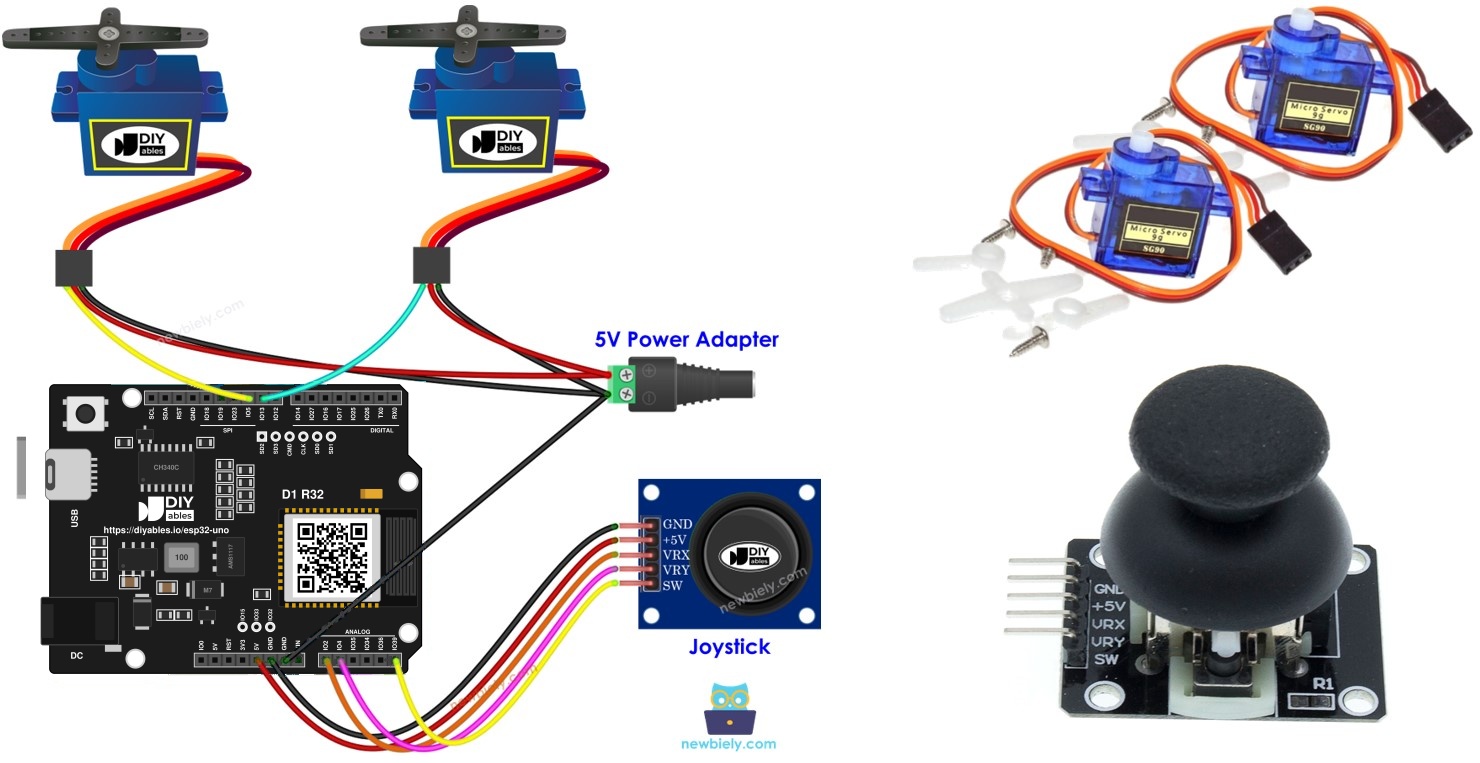
Inside the stick sit two potentiometers at 90 degrees to each other. One tracks left-right (X), the other tracks up-down (Y), and their voltages leave the module on VRX and VRY. VRX drives servo #1 (pan) and VRY drives servo #2 (tilt).
| Mode | Stick Action | Servo Result |
|---|---|---|
| Follow mode | Move the stick anywhere | Each servo angle mirrors the stick position on its axis |
| Follow mode | Release the stick | The stick springs to the middle and both servos return to about 90 degrees |
| Command mode | Hold left / right | Servo #1 steps clockwise / counterclockwise |
| Command mode | Hold up / down | Servo #2 steps clockwise / counterclockwise |
| Command mode | Release the stick | Both servos stay at their last angle |
| Command mode | Press the stick down (SW) | Both servos jump back to 90 degrees |
Components You Need
| 1 | × | ESP32 Uno-form Board | |
| 1 | × | USB Cable Type-A to Type-C (for USB-A PC) | |
| 1 | × | USB Cable Type-C to Type-C (for USB-C PC) | |
| 1 | × | Joystick | |
| 2 | × | Servo Motor | |
| 2 | × | Optionally, Pan-tilt kit with servo motor | |
| 1 | × | Jumper Wires |
Or you can buy the following kits:
| 1 | × | DIYables Sensor Kit (18 sensors/displays) |
Additionally, some of these links are for products from our own brand, DIYables .
Buy Note: For controlling multiple servo motors, use the PCA9685 16 Channel PWM Servo Driver Module to save MCU pins and simplify wiring.
Joystick and Servo at a Glance
After this part, you know which signal each part sends or needs.
| Part | Pins Used | Signal on the ESP32 Uno |
|---|---|---|
| Joystick X-axis | VRX | Analog voltage, read as 0 to 4095 |
| Joystick Y-axis | VRY | Analog voltage, read as 0 to 4095 |
| Joystick button | SW | Goes LOW while the stick is pressed down |
| Servo #1 and #2 | Signal wire | PWM pulse that sets an angle from 0 to 180 degrees |
For the full pinout and the basics of each part, open the ESP32 Uno - Joystick page and the ESP32 Uno - Servo Motor page.
ESP32 Uno Pinout
On the ESP32 Uno form board, every Uno header label hides a GPIO number, and that number goes in your sketch. Find A0, A1, D2, D9 and D10 on the diagram before you start.

How to Connect
When this part is done, the stick and both servos sit on the right headers.
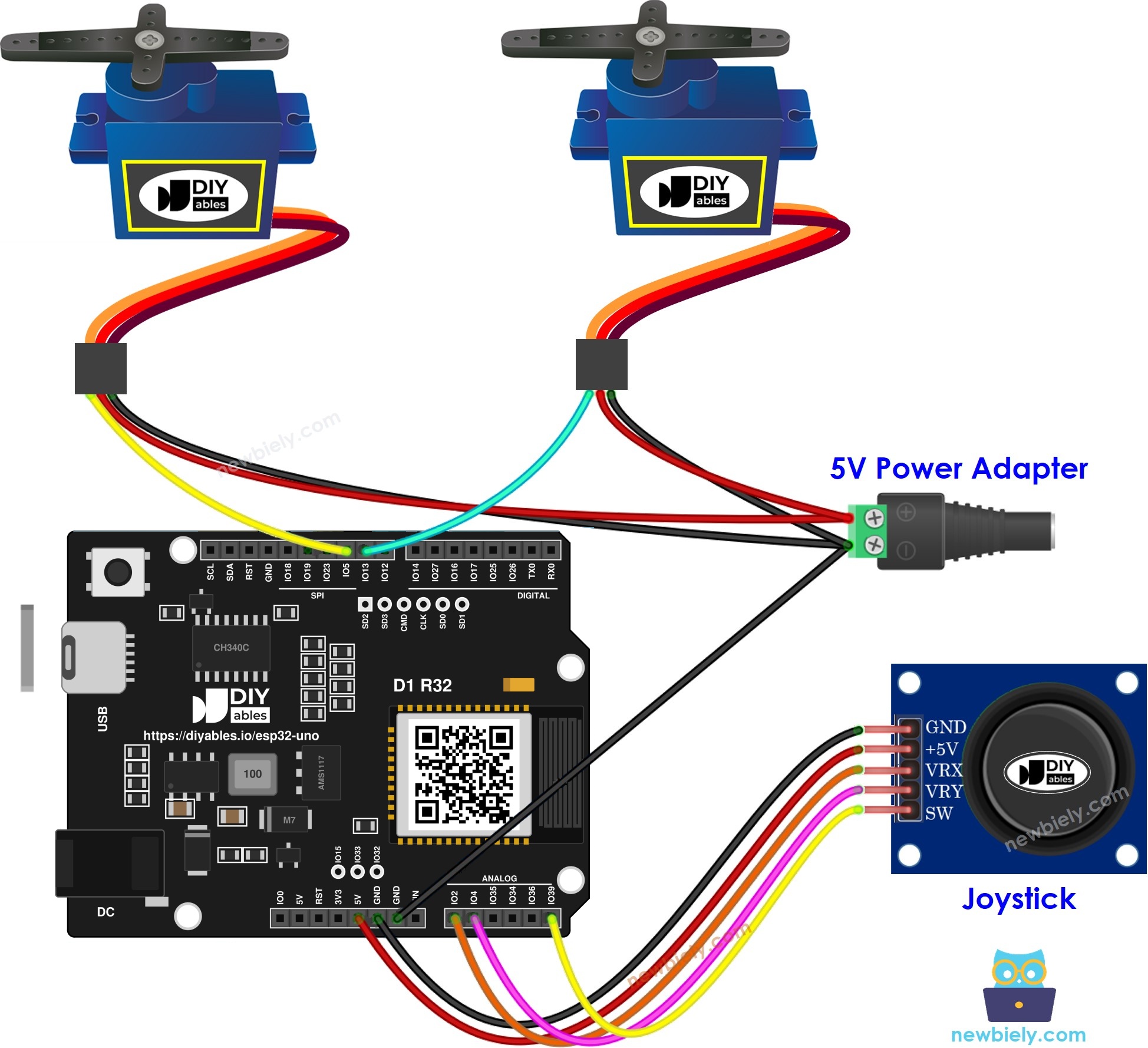
This image is created using Fritzing. Click to enlarge image
※ NOTE THAT:
The wiring diagram may not show the correct pin. On the ESP32 Uno, the joystick SW wire goes to D2 (GPIO26), not A5 as the picture may show. We will update the diagram soon. Until then, follow the wiring table and the code on this page, not the picture.
| Component Pin | ESP32 Uno Pin |
|---|---|
| Joystick +5V (VCC) | 3.3V |
| Joystick GND | GND |
| Joystick VRX | A0 (GPIO2) |
| Joystick VRY | A1 (GPIO4) |
| Joystick SW | D2 (GPIO26) |
| Servo #1 red (VCC) | 5V |
| Servo #1 brown or black (GND) | GND |
| Servo #1 orange or yellow (signal) | D9 (GPIO13) |
| Servo #2 red (VCC) | 5V |
| Servo #2 brown or black (GND) | GND |
| Servo #2 orange or yellow (signal) | D10 (GPIO5) |
Good to know: feed the joystick from 3.3V. The ESP32 Uno pins are not 5V tolerant, and a 5V stick could push VRX and VRY above the safe level. The servos may stay on 5V, because their signal line only receives 3.3V pulses from the board.
WARNING
A0 (GPIO2) and D10 (GPIO5) are boot strapping pins. The chip checks them at power-up to pick its boot mode. A joystick and a servo signal wire are normally harmless here, but if the board refuses to start or upload, unplug the VRX and servo #2 signal wires, upload, then plug them back.
WARNING
A0 (GPIO2) and A1 (GPIO4) belong to ADC2. These sketches do not use WiFi, so analogRead() works fine. If you later add WiFi to this project, the joystick readings on A0 and A1 will stop working.
ESP32 Uno Code
Two sketches follow, one per mode. Both read the stick on A0 and A1 and drive the servos on D9 and D10 through the ESP32Servo library, since the classic Servo library does not run on this board.
ESP32 Uno Code - Servos Follow the Joystick Position
This sketch reads both axes, scales each reading to an angle, and prints the raw numbers next to the angles.
Good to know: setup() calls analogSetAttenuation(ADC_11db). This 11 dB setting lets each ESP32 Uno analog pin measure the whole span from 0V to about 3.3V. Without the wide span, the readings reach 4095 early and the servos slam to 180 degrees long before the stick hits its edge.
Upload and Test
- First time with this board? Set it up with ESP32 Uno - Getting Started before you continue.
- Build the circuit by following the wiring table above.
- Plug in the USB Type-C cable between the ESP32 Uno and your computer.
- Select the board in Arduino IDE: pick ESP32 Dev Module and the COM port of the board (CH340).
- Add the servo library: in the Library Manager, search ESP32Servo and install the package by Kevin Harrington.
- Paste the sketch into a new Arduino IDE window.
- Press Upload (Upload button) and wait for "Done uploading".
- Open the Serial Monitor at 9600 baud.
- Sweep the stick slowly in a circle and watch both servos track it.
- Pro tip: note the X and Y numbers with the stick at rest. If they sit far from 2048, the pan-tilt head will rest a few degrees off center. Narrow the map() input range around your real rest value to fix it.
ESP32 Uno Code - Joystick Directions as Servo Commands
Every 100 ms, this sketch turns a pushed axis into a LEFT, RIGHT, UP or DOWN command and steps that servo by one degree. A press on the stick button re-centers both servos.
Upload and Test
- Open the Library Manager from the Libraries button in the IDE sidebar.
- Type ezButton into the search field; the right entry comes from ArduinoGetStarted.com.
- Press Install.
- Search for ezButton created by ArduinoGetStarted.com and click the Install button.
- Paste the sketch into the Arduino IDE and press Upload.
- Open the Serial Monitor at 9600 baud.
- Hold the stick in one direction and watch that servo creep one degree at a time.
- Press the stick down to snap both servos back to the middle.
- Pro tip: for a slower, finer pan, raise UPDATE_INTERVAL from 100 to 200. Each held second then moves the head 5 degrees instead of 10.
Video Tutorial
See the ESP32 Uno build in action in the video below.
Code Explanation
After this part, you can change the speed, range and thresholds with confidence.
| Code Part | What It Does |
|---|---|
| analogSetAttenuation(ADC_11db) | Opens the ADC range to about 0 to 3.3V so the stick covers 0 to 4095 |
| map(xValue, 0, 4095, 0, 180) | Scales a 12-bit reading into a servo angle (follow mode) |
| LEFT_THRESHOLD 1600 / RIGHT_THRESHOLD 3200 | Dead zone around the 2048 center; only a clear push creates a command |
| UPDATE_INTERVAL 100 | Sets how often a held direction adds or removes one degree |
| button.isPressed() | Fires once per press of SW and puts both angles back to 90 |
The result: follow mode moves the servos as fast as your hand, while command mode moves them in small, steady steps.
Good to know: the last print line of the command sketch shows xAngle twice, so the second number in the Serial Monitor is the pan angle, not the tilt angle. The servos still move correctly. To see the tilt angle, change the second Serial.print(xAngle) to Serial.print(yAngle).
ESP32 Uno vs UNO R4 for This Project
Moving this joystick pan-tilt build from the UNO R4 to the ESP32 Uno needs only a few changes.
| Item | Arduino UNO R4 | ESP32 Uno |
|---|---|---|
| Logic voltage | 5V | 3.3V |
| Joystick power | 5V | 3.3V |
| Pins used | A0, A1, D2, D9, D10 | GPIO2, GPIO4, GPIO26, GPIO13, GPIO5 |
| ADC range | 0 to 1023 | 0 to 4095 |
| Command thresholds | 400 and 800 | 1600 and 3200 |
| Servo library | Servo.h | ESP32Servo.h |
Most wiring positions stay the same, but the SW wire differs from the UNO R4 picture: it goes to D2 (GPIO26) because the A5 pin of the ESP32 Uno is input only and has no internal pull-up. Also move the joystick VCC wire from 5V to 3.3V.
Go Wireless: Steer the Pan-Tilt from Your Phone
Here you get an idea for driving the servos without any wire to your hand.
The ESP32 Uno has WiFi and Bluetooth built in. Swap the physical stick for an on-screen joystick on your phone, and you can aim a pan-tilt camera from across the room. A slider or rotator page also works well for setting one servo to an exact angle.
Good to know: with WiFi on, A0 and A1 cannot be read. If you keep the physical stick in a WiFi version, move VRX and VRY to GPIO32 and GPIO33.
Function References
Each link explains one function used above. The Servo functions behave the same way in the ESP32Servo library.
Troubleshooting
| Problem | Possible Cause | Solution |
|---|---|---|
| Board not listed under Port | CH340 driver missing or charge-only cable | Install the CH340 driver and use a USB cable that carries data |
| Upload stops at "Waiting for download" | Board did not enter flash mode | Hold the BOOT button while the upload starts, then release it |
| Board does not boot or upload with the circuit connected | Boot strapping pins A0 (GPIO2) or D10 (GPIO5) pulled the wrong way | Unplug the VRX and servo #2 signal wires while uploading, or use another pin |
| Servos twitch and the board restarts | Two servos pull too much current from the USB 5V | Power the servos from a separate 5V supply and join its GND to the board GND |
| One servo is dead while the other works | Signal wire on the wrong header or loose GND | Check D9 for servo #1, D10 for servo #2 and a shared GND |
| "ESP32Servo.h - No such file" when compiling | Servo library for this board not installed | Install ESP32Servo by Kevin Harrington in the Library Manager |
| Servo jumps to 180 degrees with a small push | ADC range too small or joystick on 5V | Keep analogSetAttenuation(ADC_11db) in setup() and power the stick from 3.3V |
FAQ
How does a thumb joystick report its position?
It holds two potentiometers, one per axis. Each acts as a voltage divider, so VRX and VRY give a voltage between 0V and the supply. On the ESP32 Uno this becomes a number from 0 to 4095, with the middle near 2048.
Is it safe to run the joystick module on 5V with this board?
No. At 5V the VRX and VRY outputs can reach 5V, and the ESP32 Uno pins only accept 3.3V. Connect the module VCC to 3.3V instead. The stick still covers the full 0 to 4095 range.
Which library moves servos on the ESP32 Uno?
Install the Kevin Harrington ESP32Servo package, then put #include <ESP32Servo.h> at the top. It keeps the same attach() and write() calls as the classic Servo library, so only the include line changes.
What is analogSetAttenuation(ADC_11db) doing in the joystick sketch?
It sets the ESP32 Uno ADC input range to about 0 to 3.3V, so the whole joystick swing maps to 0 to 4095. With a smaller range, the reading saturates early and the servo hits its end too soon. An UNO R4 sketch never has this call; it belongs to the ESP32 Uno core only. The stick voltage must stay at or below 3.3V.
Can I add WiFi control and still read the joystick on A0 and A1?
Not on those pins. A0 (GPIO2) and A1 (GPIO4) are ADC2 pins, and ADC2 cannot be read while WiFi is on. Move VRX and VRY to A2 to A5 (GPIO35, 34, 36, 39) or to GPIO32 and GPIO33, then change the pin numbers in code.
How do I make the command mode react to a lighter push?
Bring the thresholds closer to the center. For example, use 1800 and 2800 instead of 1600 and 3200. Do not go too close to 2048, or the servos will drift while the stick rests.
Can two servos run from the board's 5V pin?
Two small SG90 servos often work on USB power when they move lightly. Under load, or when both start together, they can drop the voltage and reset the board. A separate 5V supply with a shared GND is the safe choice.
What if this pan-tilt project needs more pins than the Uno headers give?
The ESP32 Uno has a few extra holes near the power header. GPIO32 and GPIO33 offer I/O, PWM and analog on ADC1, so they keep working while WiFi is on. GPIO15 offers I/O, PWM and analog on ADC2. Add pin headers with a soldering iron, then use the plain GPIO number in the sketch. For this project, GPIO32 and GPIO33 suit a second joystick or a WiFi version of the stick. Two warnings: GPIO15 and GPIO0 (the IO0 pin at the unused Uno NC position) are boot strapping pins, and a wrong connection can stop the board from booting or uploading, so use GPIO32 and GPIO33 first. Also never use the six holes under the digital header (SD0 to SD3, CMD, CLK = GPIO6 to GPIO11), because they connect to the flash chip and using them crashes the board.
Will a joystick shield made for the Uno fit the ESP32 Uno?
The header layout matches, so it plugs in. Check that the shield powers the stick from 3.3V, or that it has a voltage switch. Then map each shield pin to its GPIO with the pinout diagram.