
ESP32 UNO - Micro SD Card
Need more storage than the chip gives you? Add a Micro SD Card to the ESP32 Uno and keep logs, settings and text files on a card you can pop into any PC. A cheap SPI card module joins the card to the ESP32 Uno form board, and the built-in SD library handles the file system for you.
What you will do:
- Connect a Micro SD Card module to the four SPI lines
- Make a new text file when it is missing
- Append text to a file and print it back byte by byte
- Read a file line by line with readBytesUntil()
- Replace a file with fresh content
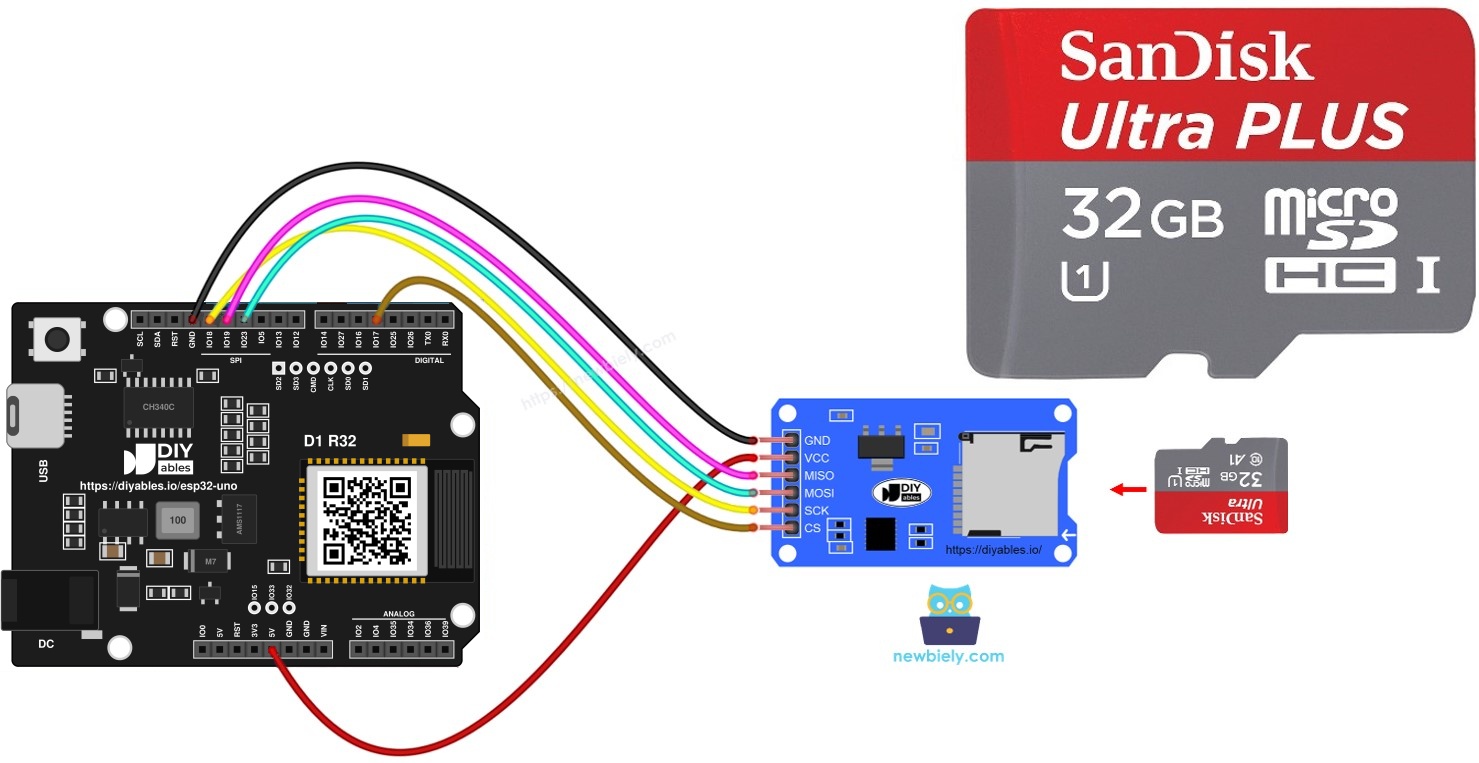
Components You Need
Or you can buy the following kits:
| 1 | × | DIYables Sensor Kit (18 sensors/displays) |
Additionally, some of these links are for products from our own brand, DIYables .
Micro SD Card Module Basics
By the end of this part, you know what each module pin does and how to prep the card.
The module is a small holder board. The card sits in its slot, and the ESP32 Uno sends commands to the card through the module over SPI. Most modules also carry a 3.3V regulator and a logic buffer chip, so the card always runs at a safe voltage.
| Item | Value |
|---|---|
| Interface | SPI (4 signal lines) |
| Module supply | 5V on VCC (on-board regulator gives the card 3.3V) |
| Card file system | FAT16 or FAT32 |
| Typical use | data logs, config files, text and CSV storage |
Pinout
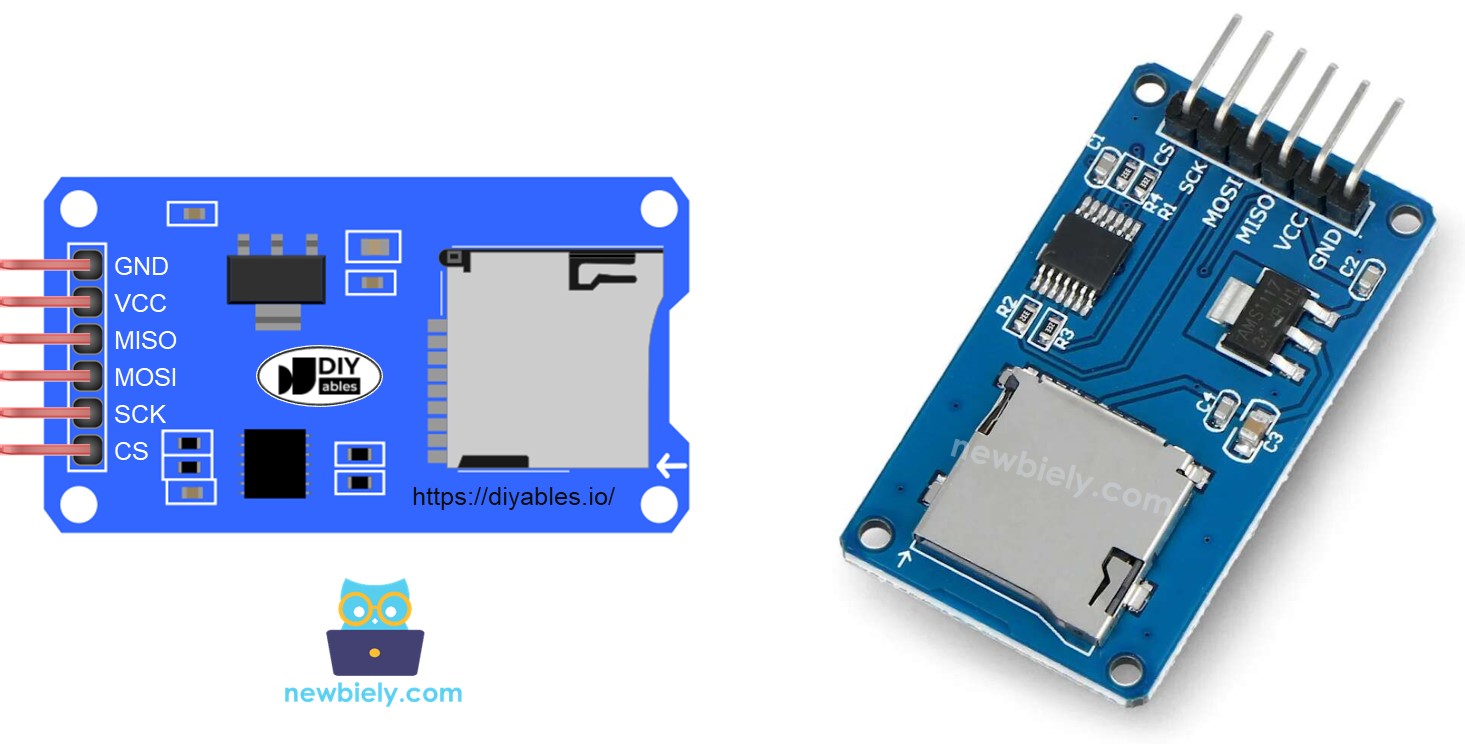
| Module Pin | Role |
|---|---|
| VCC | power input, wire it to 5V |
| GND | ground, shared with the board |
| MISO | data from the card to the ESP32 Uno |
| MOSI | data from the ESP32 Uno to the card |
| SCK | clock signal made by the ESP32 Uno |
| SS (CS) | chip select, any free digital pin set in code |
Good to know: the SPI pins on the ESP32 Uno headers (D11, D12, D13) are the chip's default VSPI pins, so the SD library finds them with no extra setup.
Preparation
Do this once on your computer, before the card goes into the module.
- Slide the Micro SD Card into the USB 3.0 SD Card Reader and plug the reader into your PC.
- Check the file system. It must be FAT16 or FAT32. Cards above 32 GB often ship as exFAT, so reformat those to FAT32.
ESP32 Uno Pinout
Your code talks to GPIO numbers, while the board is printed with Uno labels. Use this diagram to match the D4, D11, D12 and D13 headers to their GPIOs.

How to Connect
After this step, the card module sits on the SPI bus and has its own chip select line.
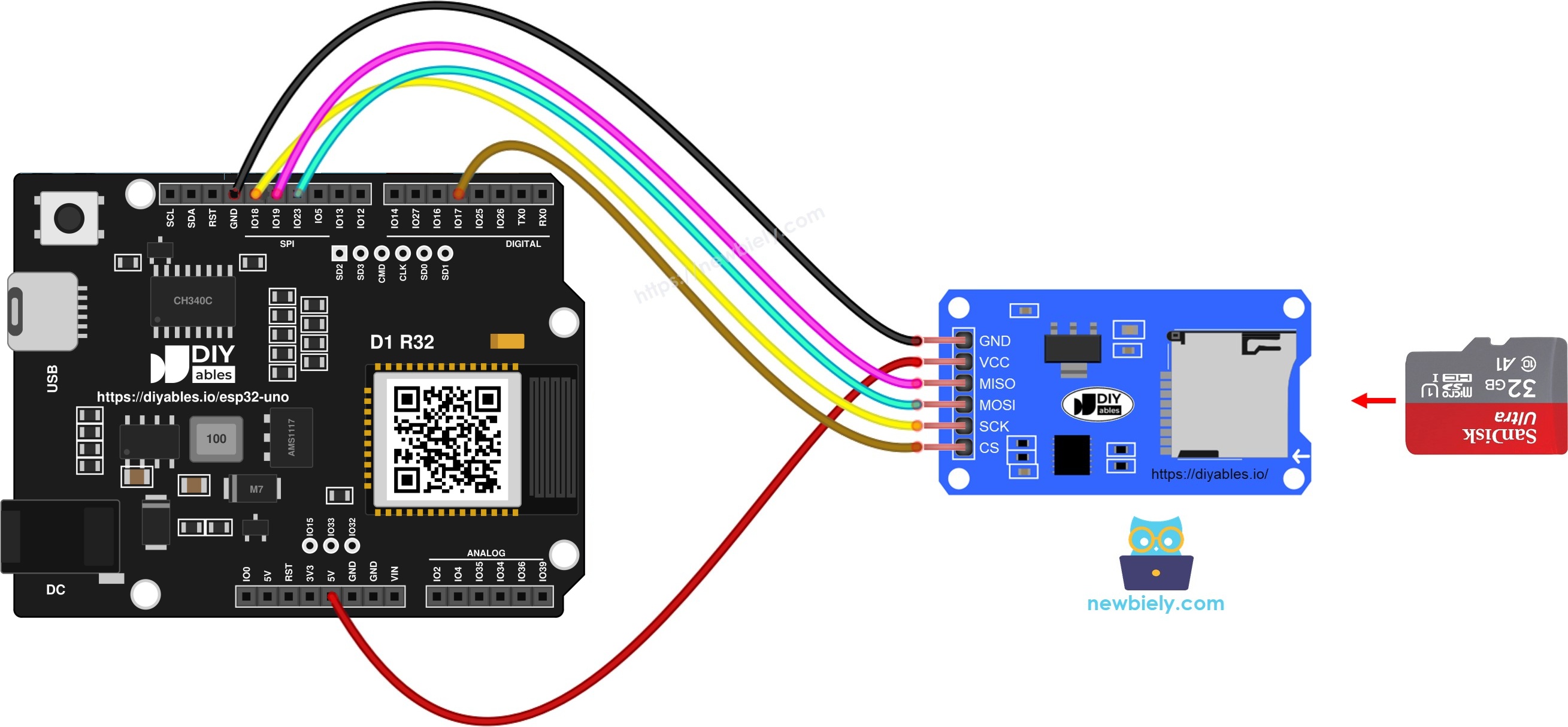
This image is created using Fritzing. Click to enlarge image
| Micro SD Card Module Pin | ESP32 Uno Pin |
|---|---|
| VCC | 5V |
| GND | GND |
| MISO | D12 (GPIO19) |
| MOSI | D11 (GPIO23) |
| SCK | D13 (GPIO18) |
| SS (CS) | D4 (GPIO17) |
Good to know: ESP32 Uno pins run at 3.3V and are not 5V tolerant.
WARNING
Feed 5V only to a module that has a regulator and a buffer chip (the usual blue or red board). Its MISO line then stays at 3.3V. A bare card socket with no parts on it has no buffer, so wire its VCC to the 3.3V pin, never to 5V.
※ NOTE THAT:
A shield with its own card slot, like an Ethernet shield, can replace the separate module. Just insert the card into the shield. Make sure the shield routes SPI to D11 to D13 and uses D4 for CS. A shield that takes SPI only from the ICSP header may not reach the ESP32 Uno SPI pins.
Open a File on the Micro SD Card (Create It If Missing)
Here you get a sketch that checks for arduino.txt and makes an empty copy when it is not on the card.
ESP32 Uno Code
The sketch starts the card on GPIO17, asks SD.exists() about the file, and opens it in write mode for a moment if it is missing.
| Code Part | What It Does |
|---|---|
| SD.begin(PIN_SPI_CS) | mounts the card through CS on GPIO17 |
| SD.exists("/arduino.txt") | returns true when the file is on the card |
| SD.open(..., FILE_WRITE) then close() | makes an empty file |
| while (1) | halts the sketch if the card did not mount |
The result is a single empty file in the root folder of the card.
Good to know: the SD library in the esp32 core needs a full path, so every file name in this guide starts with a slash ("/arduino.txt"). Without it, open and exists calls fail.
Upload and Test
- First time with this board? Set it up with ESP32 Uno - Getting Started before you continue.
- Insert the card into the slot of the module.
- Build the circuit by following the wiring table above.
- Plug in the USB Type-C cable between the ESP32 Uno and your computer.
- Select the board in Arduino IDE: pick ESP32 Dev Module and the COM port of the board (CH340).
- Open the Serial Monitor and choose 9600 baud.
- Paste the sketch into a new Arduino IDE window. No library install is needed, since SD ships with the esp32 core.
- Click Upload and wait for "Done uploading".
- Read the first run output:
- Press EN (reset) to run it again. Now the file is found at once:
※ NOTE THAT:
The first output can scroll past before the Serial Monitor opens. Press the EN button and the sketch prints everything again.
- Confirm on the PC. Move the card to the USB reader, plug it in, and look for arduino.txt in the root folder.
- Pro tip: always unplug the USB cable or hold EN before you pull the card out. Pulling it during a write can damage the file system.
Write Text and Read It Back Byte by Byte
With this sketch, two text lines land in arduino.txt and the full file comes back on the Serial Monitor, one byte at a time.
| Code Part | What It Does |
|---|---|
| SD.open("/arduino.txt", FILE_APPEND) | opens the file and moves to its end |
| myFile.println(...) | saves one line of text plus a newline |
| SD.open(..., FILE_READ) | reopens the file in read-only mode |
| myFile.read() inside while (available()) | pulls each byte until the end of the file |
Good to know: on the ESP32 Uno, FILE_WRITE wipes the file before it writes. To add to the end, use FILE_APPEND, as this sketch does.
Serial Monitor output:
※ NOTE THAT:
Every run appends the same pair of lines. After one reset, the file holds four lines:
To view the text on a PC, put the card in the USB reader and open arduino.txt with any text editor.
Read a File Line by Line
This part gives you a numbered printout, which suits files where each line is one record.
| Code Part | What It Does |
|---|---|
| char line[100] | buffer for one line, up to 100 characters |
| readBytesUntil('\n', line, 100) | copies bytes until a newline and returns the count |
| line_count++ | keeps the line number for the printout |
| Serial.write(line, line_length) | prints exactly the bytes that were read |
Each line of the file shows up with its number in front. Raise both 100 values if your lines are longer.
Output on a fresh card:
※ NOTE THAT:
This sketch appends before it reads. If arduino.txt still holds text from the earlier sketch, you get Line 3, Line 4 and so on.
Replace Old File Content with New Text
Use this pattern when you want only the newest data in a file, for example the last saved setting.
A file opened for appending grows forever. To start clean, the sketch deletes the old file and then makes a new one under the same name.
| Code Part | What It Does |
|---|---|
| SD.remove("/arduino.txt") | deletes the old file, if one exists |
| SD.open(..., FILE_WRITE) | creates an empty file with the same name |
| println() pair | writes the two new lines |
| read loop | prints the new content back |
The file holds exactly two lines after each run. FILE_WRITE on the ESP32 Uno would clear the file anyway, but the remove call makes the intent clear in the code.
Serial Monitor output:
- Press EN on the ESP32 Uno.
- Watch the output. It stays at two lines, since the file is rebuilt on every boot.
Want proof on the PC? Open arduino.txt from the card reader. It has two lines only.
Video Tutorial
See the ESP32 Uno build in action in the video below.
ESP32 Uno vs UNO R4 for This Project
This table lists what changes when you move the SD card sketches from the UNO R4 to the ESP32 Uno.
| Item | Arduino UNO R4 | ESP32 Uno |
|---|---|---|
| Logic voltage | 5V | 3.3V |
| CS pin in code | 4 | 17 (D4) |
| SPI pins | D11, D12, D13 | D11 (GPIO23), D12 (GPIO19), D13 (GPIO18) |
| File path | "arduino.txt" works | needs "/arduino.txt" |
| Append mode | FILE_WRITE appends | FILE_APPEND appends, FILE_WRITE clears |
| Board in Arduino IDE | Arduino UNO R4 WiFi or Minima | ESP32 Dev Module |
The wiring stays the same, header for header. Only the CS number, the leading slash and the open mode change in code. Use a module with a buffer chip so 5V never reaches an ESP32 Uno pin.
Go Wireless: Read Your Log from a Phone
Here is one way to check stored data without pulling the card.
A data logger is more useful when you can peek at it from your desk. The ESP32 Uno has WiFi and Bluetooth, so it can read lines from the card and push them to a web page or a phone app. For example, send each line of arduino.txt to a web monitor, or show the last ten records in a table.
Language References
Use these pages to look up each function in the sketches.
Troubleshooting
| Problem | Possible Cause | Solution |
|---|---|---|
| "SD Card is either missing or has failed!" at boot | Card not seated, a loose SPI wire, or CS set to the wrong number | Push the card in until it clicks, recheck the four SPI wires, and keep PIN_SPI_CS at 17 |
| Mount fails with a large new card | Card uses exFAT or NTFS | Reformat it to FAT32 on your PC |
| exists() always says false | The path has no leading slash | Write "/arduino.txt" in every SD call |
| Earlier text is gone after a reset | The file was opened with FILE_WRITE | Switch to FILE_APPEND for logging |
| Readings work for a while, then stop | Long jumper wires or a weak GND link | Shorten the wires and add a second GND wire |
| Module gets warm or the board resets | A bare socket is fed 5V | Move VCC of a bufferless socket to 3.3V |
| No COM port shows up | CH340 driver missing or a charge-only cable | Install the CH340 driver and use a data USB cable |
| "Failed to connect" or "Waiting for download" | The board did not enter upload mode | Hold the BOOT button while the upload starts |
| Serial Monitor is blank or shows junk | Baud rate mismatch or the monitor opened late | Pick 9600 baud and press EN |
FAQ
Do I need to install a library for the SD card on the ESP32 Uno?
No. The SD library is part of the esp32 by Espressif Systems core. Once the core is installed, just add #include
Can I change the CS pin to another header?
Yes. Any free output pin works for CS. Change the PIN_SPI_CS value to the new GPIO number. Avoid A2 to A5 (input only) and D8 or D10 (boot strapping pins).
How big can the Micro SD Card be?
The library reads FAT16 and FAT32. Cards up to 32 GB usually come as FAT32. A 64 GB or larger card works after you reformat it to FAT32 with a suitable tool.
Why does the ESP32 Uno code use "/arduino.txt" and not "arduino.txt"?
The esp32 core uses a virtual file system that expects paths from the root. A name without the slash points to nothing, so the open call returns an empty file object.
What is the difference between FILE_WRITE and FILE_APPEND here?
On the ESP32 Uno, FILE_WRITE opens a file empty, like a new page. FILE_APPEND keeps the content and moves to the end. The UNO R4 code uses FILE_WRITE for both jobs, so this is the main code change.
Is the 5V VCC wire safe for the 3.3V ESP32 Uno pins?
It is safe with a standard module that has a regulator and a buffer chip, because its MISO output is 3.3V. A bare card socket must be powered from 3.3V, since its pins connect straight to the card.
Can I use an Uno shield with an SD slot on the ESP32 Uno?
Often yes, if the shield takes SPI from D11 to D13 and CS from D4. Shields that use only the ICSP header for SPI do not connect to the ESP32 Uno SPI pins.
Can I log sensor data to the card every few seconds?
Yes. Open the file with FILE_APPEND, print one line with the value and a time stamp, then close it. Closing after each write keeps the data safe if power drops.
Why does the board not start when I connect another module to D8 or D10?
D8 (GPIO12) and D10 (GPIO5) are boot strapping pins. A module that pulls them the wrong way at power-on stops the boot. The SD wiring in this guide does not use them.
What if my data logger needs more pins than the Uno headers give?
The ESP32 Uno has extra holes near the power header. GPIO32 and GPIO33 offer I/O, PWM and analog on ADC1, so they still read analog values while WiFi is on. GPIO15 offers I/O, PWM and analog on ADC2. Add pin headers with a soldering iron, then use the GPIO number in your sketch. For a logger, GPIO32/33 suit an analog sensor, or a second CS line for another SPI device. Two warnings: GPIO15 and GPIO0 (the IO0 pin at the unused Uno NC spot) are boot strapping pins, and a wrong connection can stop the board from booting or uploading, so use GPIO32/33 first. Never use the six holes under the digital header (SD0 to SD3, CMD, CLK = GPIO6 to GPIO11). They are wired to the flash chip, and using them crashes the board.
Can I see the file content on a web page instead of the Serial Monitor?
Yes. The ESP32 Uno has WiFi, so it can read the file and send each line to a browser. The DIYables Web Apps library makes this easy with a ready Web Monitor page.