
ESP32 UNO - Ultrasonic Sensor - LED
Want an LED that reacts when something comes near? With the ESP32 Uno form board, an HC-SR04 ultrasonic sensor can measure distance and light an LED when an object is close. Your hand moves in, the LED glows. Your hand moves out, the LED goes dark.
By the end, you can:
- Connect an HC-SR04 and an LED to the ESP32 Uno headers
- Make the 5V ECHO signal safe for a 3.3V pin
- Measure distance in centimeters with pulseIn()
- Switch an LED on and off at a distance limit you choose
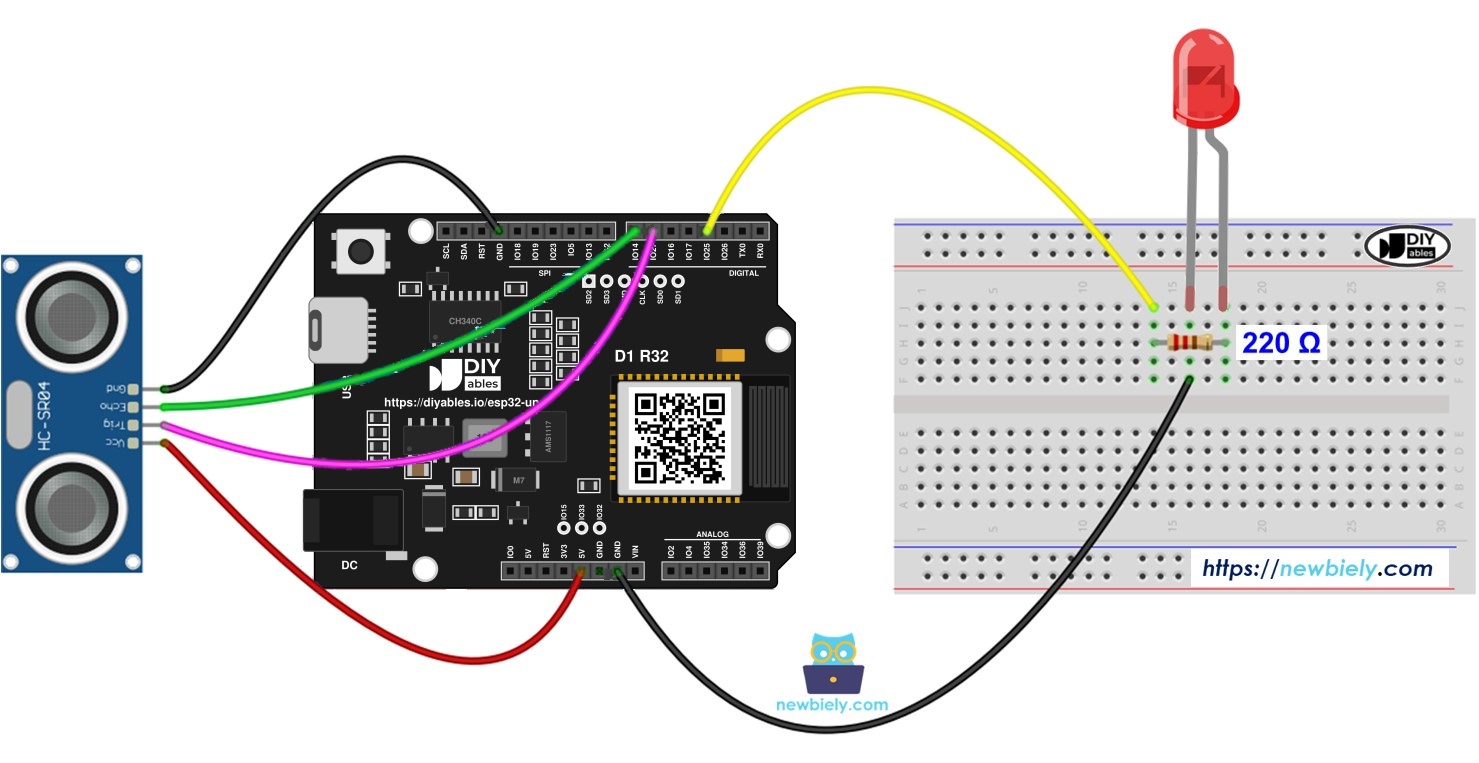
Components You Need
Or you can buy the following kits:
| 1 | × | DIYables Sensor Kit (18 sensors/displays) |
Additionally, some of these links are for products from our own brand, DIYables .
Buy Note: Use the LED Module for easier wiring. It includes an integrated resistor.
How the LED and the Sensor Work
By the end of this part, you know what each piece does in this project.
| Part | Role in This Project |
|---|---|
| Ultrasonic sensor | Measures the distance to the object in front of it |
| LED | Shows the result, on when near and off when far |
| 220 ohm resistor | Limits the LED current |
| ESP32 Uno | Reads the sensor and decides when to switch the LED |
The sensor sends a short burst of sound you cannot hear. The sound bounces off an object and comes back. The sensor keeps its ECHO pin HIGH for the whole trip, and the ESP32 Uno turns that time into centimeters. If the result is below 50 cm, the LED turns on.
Want to learn each part alone first? Use these guides:
ESP32 Uno Pinout
Every Uno header pin on the ESP32 Uno form board is tied to one GPIO number, and your sketch uses that number. Look at the diagram to match the labels before you place any wire.

How to Connect
By the end of this part, the sensor and the LED are wired and ready.
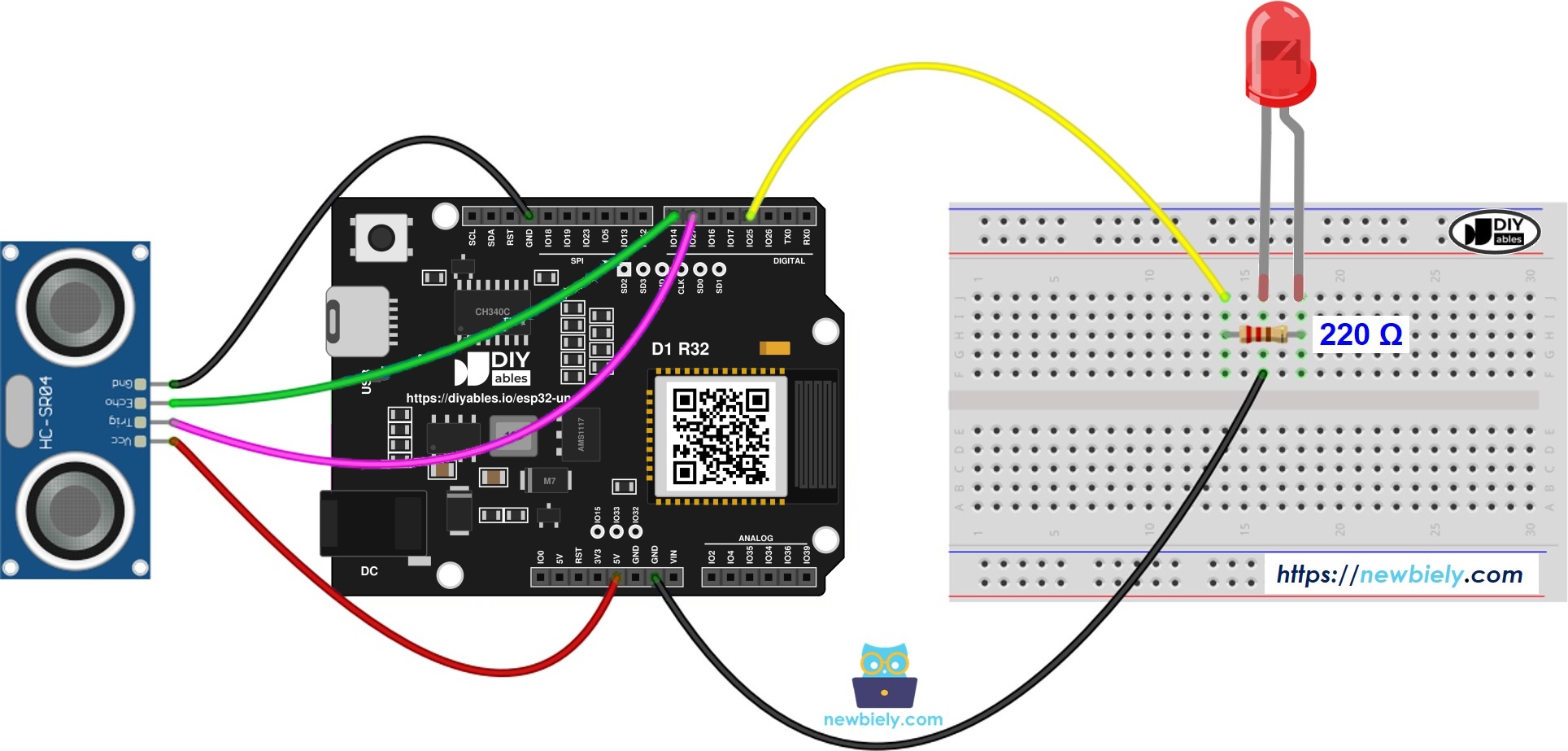
This image is created using Fritzing. Click to enlarge image
※ NOTE THAT:
The wiring diagram may not show the correct wiring for the ESP32 Uno. The HC-SR04 ECHO pin sends a 5V signal, and ESP32 Uno pins are 3.3V only. The picture shows ECHO wired straight to the board. On the ESP32 Uno, put a voltage divider or a level converter on ECHO, as this page shows. We will update the diagram soon. Until then, follow the wiring table and the text on this page, not the picture.
| Component Pin | ESP32 Uno Pin |
|---|---|
| Ultrasonic Sensor VCC | 5V |
| Ultrasonic Sensor TRIG | D6 (GPIO27) |
| Ultrasonic Sensor ECHO (through level converter) | D7 (GPIO14) |
| Ultrasonic Sensor GND | GND |
| LED Anode (+) via 220 ohm resistor | D3 (GPIO25) |
| LED Cathode (-) | GND |
Good to know: ESP32 Uno pins use 3.3V logic. The TRIG pulse from the board is strong enough for the sensor, but the ECHO pulse is not safe for the board.
WARNING
A classic HC-SR04 needs 5V power, and that makes ECHO swing to 5V as well. Pins on this board cannot take 5V. Add a level converter in the ECHO line, or make a divider with two resistors (1 kΩ in series with ECHO, then 2 kΩ down to GND). A 3.3V sensor such as the HC-SR04P also works without any extra part.
ESP32 Uno Code
The sketch fires a 10 microsecond pulse on TRIG, times the ECHO pulse, converts it to centimeters and sets the LED. It also prints the distance twice a second.
| Code Part | What It Does |
|---|---|
| TRIG_PIN, ECHO_PIN, LED_PIN | Hold the GPIO numbers 27, 14 and 25 |
| DISTANCE_THRESHOLD | Distance limit in cm, set to 50 |
| digitalWrite(TRIG_PIN, HIGH) for 10 us | Starts one measurement |
| pulseIn(ECHO_PIN, HIGH) | Measures the echo time in microseconds |
| 0.017 * duration_us | Turns the time into centimeters |
| if / else on distance_cm | Switches the LED on or off |
The LED follows your hand, and the Serial Monitor shows every reading.
Upload and Test
- First time with this board? Set it up with ESP32 Uno - Getting Started before you continue.
- Build the circuit by following the wiring table above.
- Plug in the USB Type-C cable between the ESP32 Uno and your computer.
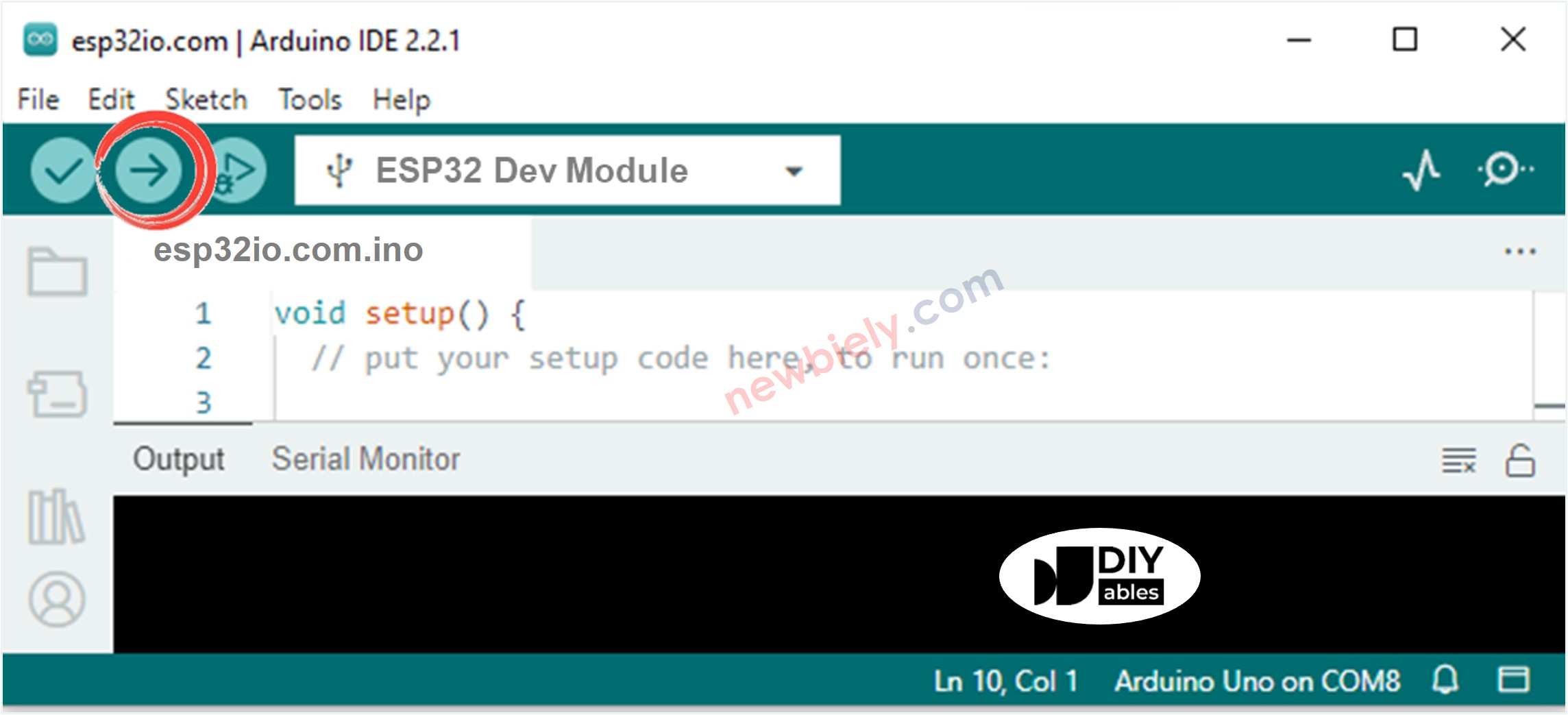
- Select the board in Arduino IDE: pick ESP32 Dev Module and the COM port of the board (CH340).
- Copy the code above into a new sketch.
- Click Upload to send the code to the board.
- Start the Serial Monitor and choose 9600 baud.
- Wave your hand toward the sensor and back. Watch the LED switch.
- Pro tip: put a book 30 cm in front of the sensor and stick a tape mark there. It makes a fast, repeatable test for your threshold.
Video Tutorial
See the ESP32 Uno build in action in the video below.
Code Explanation
Every line in the sketch has a comment. The math sits in distance_cm = 0.017 * duration_us. Sound covers about 0.034 cm each microsecond. The echo goes out and back, so the code halves that figure. To change the switching distance, edit DISTANCE_THRESHOLD.
※ NOTE THAT:
This sketch is for learning. Ultrasonic readings are noisy, and one bad reading can make the LED flicker. For stable values, filter the noise as shown here.
ESP32 Uno vs UNO R4 for This Project
By the end of this part, you know what changes when you move this project from the UNO R4 to the ESP32 Uno.
| Item | Arduino UNO R4 | ESP32 Uno |
|---|---|---|
| Logic voltage | 5V | 3.3V |
| TRIG pin | D6 (pin 6) | D6 (GPIO27) |
| ECHO pin | D7 (pin 7) | D7 (GPIO14) |
| LED pin | D3 (pin 3) | D3 (GPIO25) |
| ECHO level | Direct connection | Level converter or divider needed |
| Arduino IDE board | Arduino UNO R4 WiFi | ESP32 Dev Module |
The header positions stay the same, so the wiring diagram looks alike. Only the ECHO wire needs an extra part. In the code, only the three pin numbers change.
Go Wireless: See the Distance on Your Phone
By the end of this part, you have an idea to watch the distance without a cable.
The ESP32 Uno has WiFi and Bluetooth, so the distance does not have to stay in the Serial Monitor. Send each reading to a live gauge or chart on your phone or in a browser, and watch the LED react at the same time.
Try These Next
- Add a second LED that turns on at a longer distance, for a near and far warning
- Make the LED blink faster as the object gets closer
- Add a buzzer, so it beeps when something is too close
Troubleshooting
| Problem | Possible Cause | Solution |
|---|---|---|
| No COM port in Arduino IDE | CH340 driver missing or charge-only USB cable | Install the CH340 driver and use a data USB cable |
| Upload fails with Failed to connect or Waiting for download | Board did not enter download mode | Hold the BOOT button when the upload starts |
| Reading stays at 0 cm | Echo never arrives, or the ECHO jumper is loose | Re-seat the ECHO jumper on D7 through the converter, and confirm VCC has 5V |
| Distance values jump around | Noise or a soft object in front of the sensor | Aim at a flat hard surface and filter the readings |
| LED never lights | LED turned the wrong way or wrong pin in code | Long leg (anode) goes to the resistor and D3, and the code uses 25 |
| LED stays lit | Limit set too high, or readings stuck near 0 | Reduce DISTANCE_THRESHOLD and check the sensor wires |
| GPIO14 stops working | The 5V ECHO signal went straight into a 3.3V pin | Add a level converter or divider, and use another pin if GPIO14 is damaged |
| Sensor does not respond | Sensor VCC on 3.3V | Power a classic HC-SR04 from 5V |
| Garbled text in Serial Monitor | Baud rate mismatch | Pick 9600 in the baud drop-down |
FAQ
How does an ultrasonic sensor know the distance?
It sends out a sound pulse and waits for the echo. The longer the echo takes, the farther the object is. The code turns that time into centimeters.
Do I need a resistor with the LED?
Yes. A 220 ohm resistor in series limits the current. Without it, the LED or the GPIO pin can be damaged.
Is it safe to connect the HC-SR04 ECHO pin directly to the ESP32 Uno?
No. The sensor outputs 5V on ECHO, and the board pins are 3.3V only. Use a level converter or a 1 kΩ and 2 kΩ divider.
Will the sensor run on the 3.3V pin?
The standard HC-SR04 wants 5V and often misreads at 3.3V. The HC-SR04P accepts 3.3V to 5V, and at 3.3V its ECHO output is safe for the board.
How do I change the distance that lights the LED?
Edit DISTANCE_THRESHOLD. Set it to 20 and the LED lights only when an object is closer than 20 cm.
Why does the code use 27, 14 and 25 and not 6, 7 and 3?
Uno header labels are for wiring. Code uses GPIO numbers. The mapping is D6 to GPIO27, D7 to GPIO14, D3 to GPIO25.
Can I use an input-only pin like A2 (GPIO35) for TRIG or the LED?
No. A2 to A5 are input only, so they cannot send the TRIG pulse or drive the LED. They can be used for ECHO only.
Does the UNO R4 code work on the ESP32 Uno?
Almost. pulseIn(), digitalWrite() and delayMicroseconds() behave the same. Change the three pin numbers, and add a level converter for ECHO.
Can I show the distance on a web page with the ESP32 Uno?
Yes. The ESP32 Uno has WiFi and Bluetooth. Use the web monitor or plotter tutorials linked in the Go Wireless section.
What if my project needs more pins than the Uno headers give me?
The ESP32 Uno has a few extra holes near the power header: GPIO32 and GPIO33 (I/O, PWM, analog on ADC1, so they also work while WiFi is on) and GPIO15 (I/O, PWM, analog on ADC2). Solder pin headers to use them and write the GPIO number in code. For a second sensor or LED, GPIO32 and GPIO33 are the best choice. Two warnings: GPIO15 and GPIO0 (the IO0 pin at the unused Uno NC position) are boot strapping pins, so a wrong connection can stop the board from booting or uploading code, and you should use GPIO32 and GPIO33 first. Never use the six holes under the digital header (SD0 to SD3, CMD, CLK = GPIO6 to GPIO11), because they are wired to the flash chip and using them crashes the board.