
ESP32 UNO - Rain Sensor
Want to know when it starts to rain? An ESP32 Uno rain sensor can tell you in one second. Connect a rainfall sensor module to the ESP32 Uno form board, and your code can see rain or snow on the pad, and also how wet the pad is.
By the end, you can:
- Wire a rain sensor to the ESP32 Uno
- Switch the sensor on only during a reading, to protect the pad
- Detect rain with digitalRead() on the DO pin
- Measure the wetness level with analogRead() on the AO pin
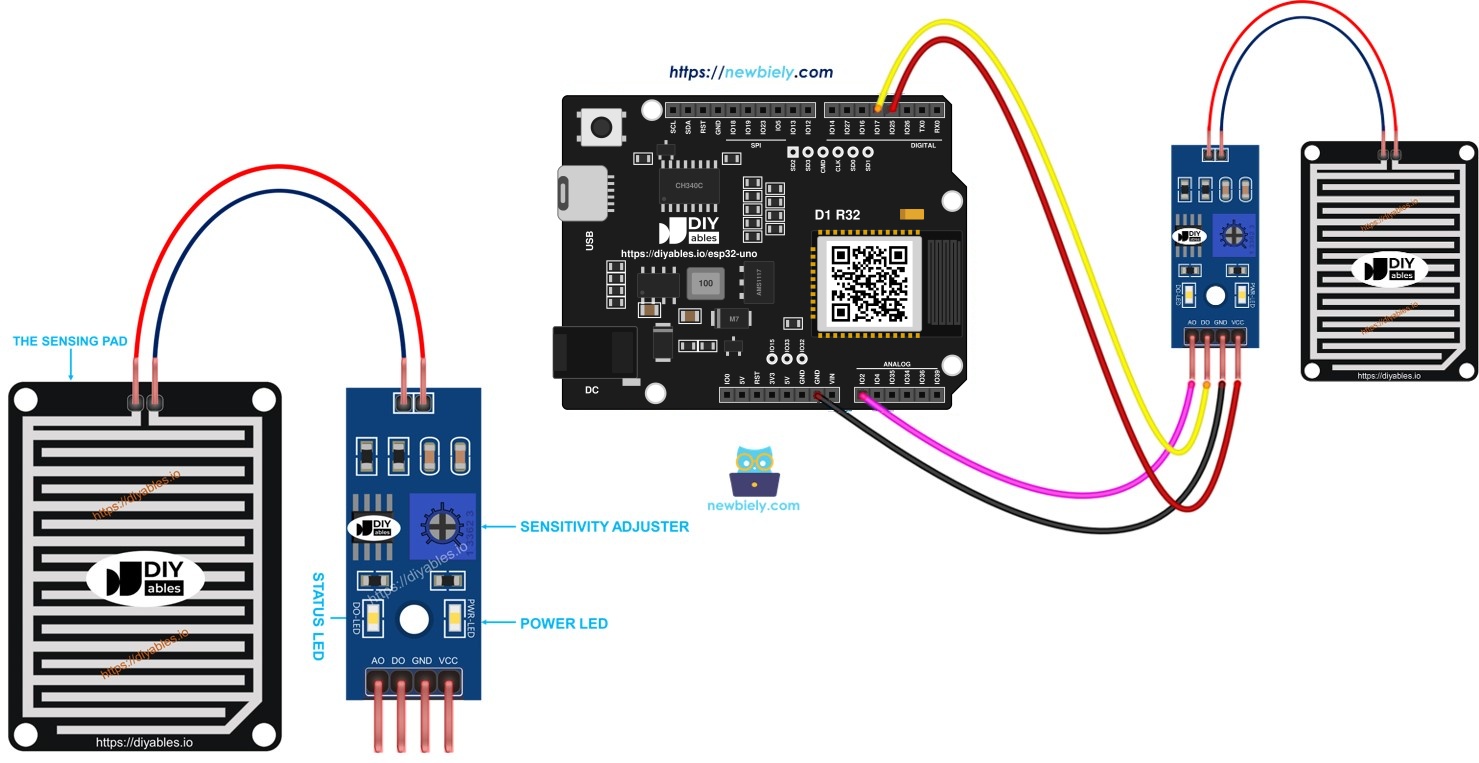
Later, you can extend the code to run a motor or sound an alarm when water falls on the pad.
Components You Need
| 1 | × | ESP32 Uno-form Board | |
| 1 | × | USB Cable Type-A to Type-C (for USB-A PC) | |
| 1 | × | USB Cable Type-C to Type-C (for USB-C PC) | |
| 1 | × | Rain Sensor | |
| 1 | × | Jumper Wires |
Or you can buy the following kits:
| 1 | × | DIYables Sensor Kit (18 sensors/displays) |
Additionally, some of these links are for products from our own brand, DIYables .
Overview of Rain Sensor
By the end of this part, you know what each piece of the module does.
The module detects rain and wet snow. It has a digital output (LOW or HIGH) and an analog output. It is made of two parts: the sensing pad and the electronic module.
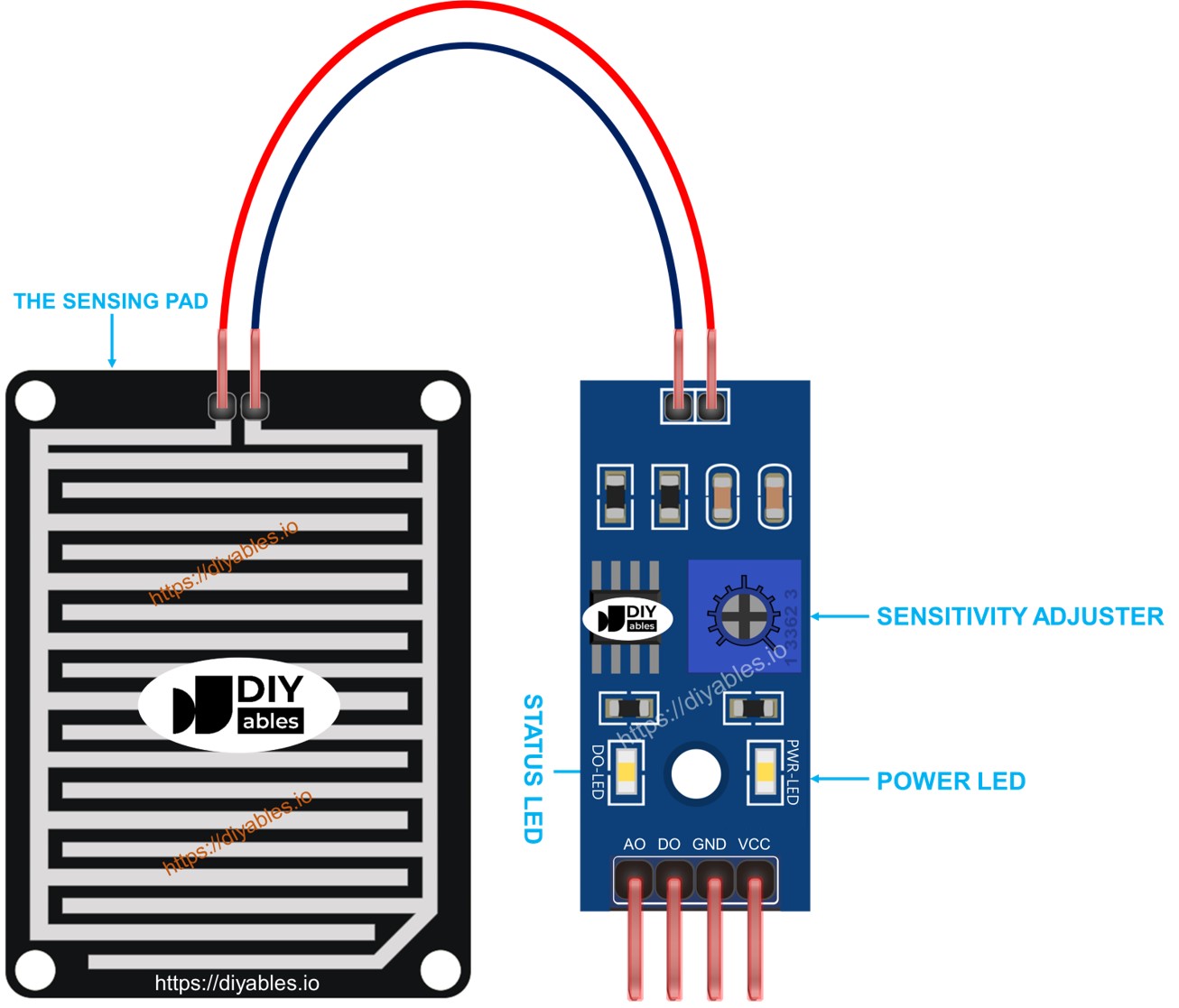
The sensing pad
The pad goes outside, for example on a roof, where water can fall on it. Its surface has thin copper lines in two groups: power lines and sense lines. The groups do not touch while the pad is dry. A drop of water or melted snow joins them. Both groups work the same way, so any line can play either role.
The electronic module
The module converts the pad signal into a digital or analog value for the ESP32 Uno. It has four pins.
| Pin | Role |
|---|---|
| VCC | Supply, 3.3V to 5V |
| GND | Ground (0V) |
| DO | Digital output. HIGH means dry, LOW means rain. The on-board potentiometer sets the threshold |
| AO | Analog output. Lower value means more water, higher value means less water |
Two LEDs are on the module. PWR-LED shows power. DO-LED lights up when the DO pin shows rain.
How It Works
Use the DO pin for a quick yes or no, or the AO pin for a level.
| Output | Dry Pad | Wet Pad | Potentiometer Effect |
|---|---|---|---|
| DO | HIGH, DO-LED off | LOW, DO-LED on | Sets the switching threshold |
| AO | High value | Low value | No effect |
ESP32 Uno Pinout
Each Uno header label on the ESP32 Uno form board matches one GPIO number. Look at the diagram first, then use the table in the next section to place your wires.

How to Connect
By the end of this part, the rain sensor is wired to the ESP32 Uno.
Do not tie VCC to a 3.3V pin all the time. Constant current slowly eats the copper lines (electrochemical corrosion). Instead, feed VCC from a pin of the board, and switch it on only for the moment of each reading. Here, D3 (GPIO25) does this job. You can wire only one output, or both.
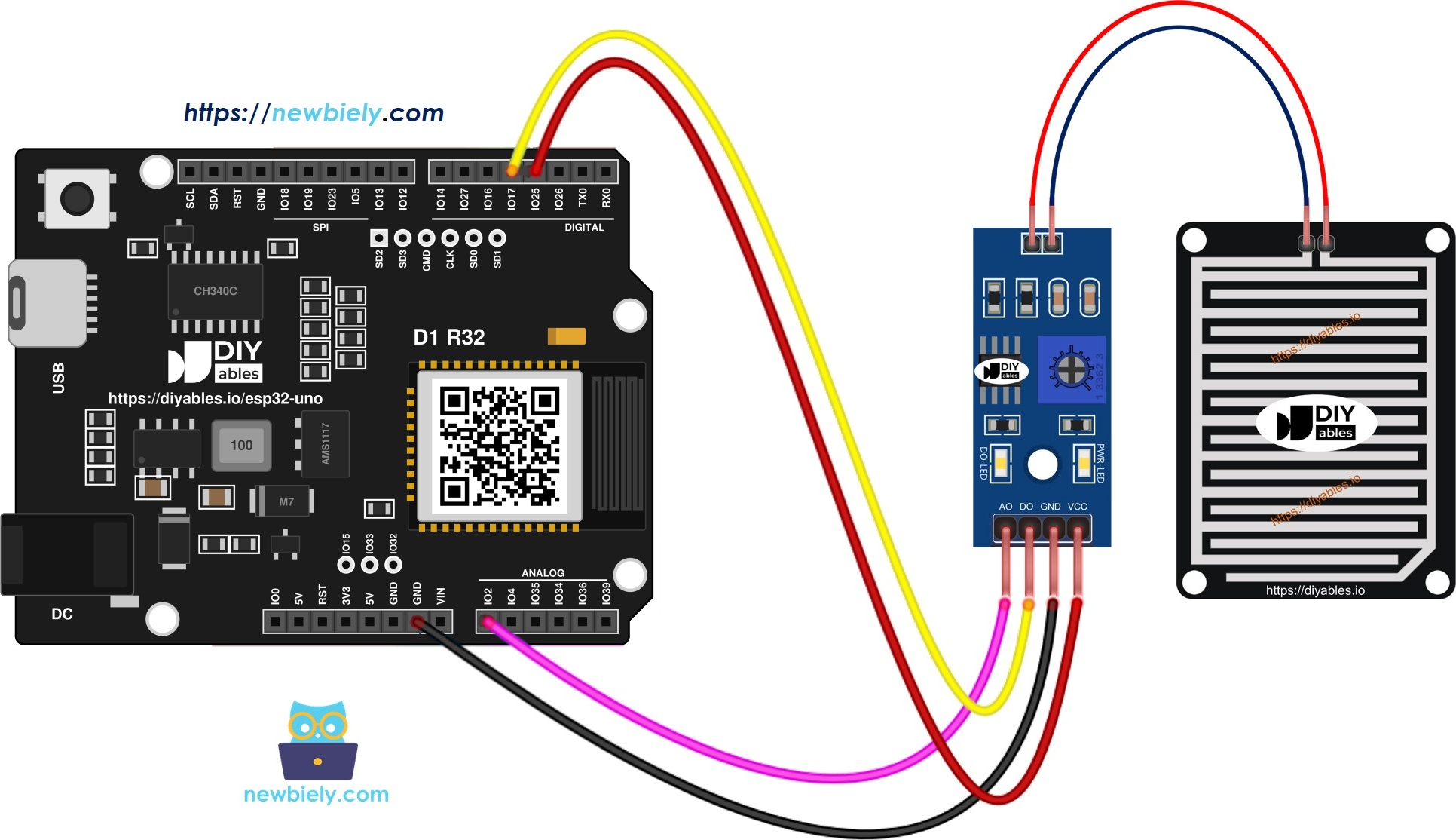
This image is created using Fritzing. Click to enlarge image
| Module Pin | Board Pin |
|---|---|
| VCC | D3 (GPIO25) |
| GND | GND |
| DO | D4 (GPIO17) |
| AO | A0 (GPIO2) |
WARNING
A0 (GPIO2) is a boot strapping pin. A module that pulls it the wrong way can stop the board from booting or uploading. If an upload fails, unplug the AO wire, upload, and plug it in again.
Good to know: The sensor is powered from a 3.3V GPIO pin, so DO and AO never go above 3.3V. ESP32 Uno pins are not 5V tolerant, so never power this module from 5V.
ESP32 Uno Code - Digital Rain Detection (DO pin)
This sketch powers the sensor, reads D4 (GPIO17), and prints the rain state once per second.
Detailed Instructions
- First time with this board? Set it up with ESP32 Uno - Getting Started before you continue.
- Build the circuit by following the wiring table above.
- Plug in the USB Type-C cable between the ESP32 Uno and your computer.
- Select the board in Arduino IDE: pick ESP32 Dev Module and the COM port of the board (CH340).
- Copy the code above into Arduino IDE.
- Click Upload and wait until it finishes.
- Open the Serial Monitor at 9600 baud.
- Wet the pad with a few drops of water.
- Read the output:
- Pro tip: Hold a damp cloth near the pad, not on it. Turn the potentiometer until DO-LED switches exactly when the pad gets slightly wet.
| Code Part | What It Does |
|---|---|
| digitalWrite(POWER_PIN, HIGH) | Turns the sensor on through D3 (GPIO25) |
| delay(10) | Lets the sensor settle for 10 ms |
| digitalRead(DO_PIN) | Reads the DO level on D4 (GPIO17) |
| digitalWrite(POWER_PIN, LOW) | Turns the sensor off again |
| delay(1000) | Waits one second between readings |
ESP32 Uno Code - Analog Wetness Level (AO pin)
This sketch powers the sensor, reads A0 (GPIO2) as a number from 0 to 4095, and prints it every second.
Good to know: The line analogSetAttenuation(ADC_11db) lets the analog pin read the full range, from 0V up to about 3.3V. Without a wide range, readings hit 4095 too early and wet and dry look the same.
Detailed Instructions
- Copy the code into Arduino IDE.
- Click Upload.
- Open the Serial Monitor at 9600 baud.
- Add water slowly on the pad, then let it dry.
- Watch the numbers fall when the pad gets wet and rise when it dries:
- Pro tip: Note one dry value and one wet value. Then pick your own limit in code, for example rain when the value is below 2000.
Video Tutorial
See the ESP32 Uno build in action in the video below.
ESP32 Uno vs UNO R4 for This Project
By the end of this part, you know what changes when you move this rain sensor project from the UNO R4 to the ESP32 Uno.
| Item | Arduino UNO R4 | ESP32 Uno |
|---|---|---|
| Logic voltage | 5V | 3.3V |
| Power pin | D3 | D3 (GPIO25) |
| DO pin | D4 | D4 (GPIO17) |
| AO pin | A0 | A0 (GPIO2) |
| ADC range | 0 to 1023 | 0 to 4095 |
| Extra code line | none | analogSetAttenuation(ADC_11db) |
| Arduino IDE board | Arduino UNO R4 WiFi | ESP32 Dev Module |
The same header positions work as-is. Just keep the module on 3.3V, because the ESP32 Uno pins do not accept 5V.
Go Wireless: Rain Alert on Your Phone
By the end of this part, you have an idea to see the rain level without a cable.
The ESP32 Uno has WiFi and Bluetooth. You can send the AO value to a web page or a phone app, and watch the rain level live from the sofa. A graph also shows how fast the pad gets wet.
Try These Next
- Turn on a buzzer when the DO pin shows rain.
- Close a window with a servo when the AO value falls below your limit.
- Print "light rain" and "heavy rain" using two AO limits.
Function References
Troubleshooting
| Problem | Possible Cause | Solution |
|---|---|---|
| No COM port in Arduino IDE | CH340 driver missing or charge-only cable | Install the CH340 driver and use a data USB cable |
| Upload fails with "Failed to connect" | Board not in download mode | Hold the BOOT button while the upload starts |
| Board will not boot or upload with the sensor connected | A0 (GPIO2) is a boot strapping pin pulled the wrong way | Unplug the AO wire while uploading, then reconnect it |
| Nothing prints in Serial Monitor | Wrong baud rate | Set 9600 baud |
| Always "NOT detected" even when wet | VCC or DO on the wrong pin, or threshold too low | Check D3 and D4, then turn the potentiometer until DO-LED lights with water |
| Always "detected" when dry | Pad still wet or threshold too high | Dry the pad and turn the potentiometer back |
| AO stuck at 4095 | AO wire loose or the attenuation line was removed | Check A0 (GPIO2) and keep analogSetAttenuation(ADC_11db) |
| AO value random or near 0 | Sensor has no power or GND is missing | Check VCC on D3 (GPIO25) and the GND wire |
| Pad gets weak after weeks | Corrosion on copper lines | Keep power switching in code, clean or replace the pad |
FAQ
How does a rain sensor detect rain?
Water on the pad joins the copper lines, so current can flow between them. The module turns this into a digital HIGH/LOW and an analog value. More water gives a lower analog value.
Can the rain sensor detect snow?
Yes, once the snow melts on the pad. Dry cold snow may not bridge the lines, so it can stay unseen until it starts to melt.
Is 3.3V or 5V right for this module?
Use 3.3V, or a GPIO pin like D3 (GPIO25). At 5V the DO and AO outputs can reach 5V, which can damage ESP32 Uno pins.
Why not keep VCC on a power rail?
Constant current corrodes the copper lines. If the code powers the sensor for only 10 ms per reading, the pad lasts much longer. The module draws just a few mA, so a GPIO can supply it.
How big are the AO numbers on the ESP32 Uno?
analogRead() returns 0 to 4095, because the ADC has 12 bits. A dry pad gives a high value and a wet pad gives a low one. Measure your own values, as they depend on the module.
Why does the code call analogSetAttenuation(ADC_11db)?
It sets the ESP32 Uno ADC input range to about 0 to 3.3V, so the full sensor signal maps to 0 to 4095. With a smaller range, readings saturate early. The UNO R4 does not need this line, because it is ESP32-only. Keep the sensor output at 3.3V or less.
Does the potentiometer change the AO value?
No. It only sets the threshold of the DO pin. The AO pin always shows the raw wetness level.
Why is A0 (GPIO2) a risk on the ESP32 Uno?
GPIO2 is a boot strapping pin. If the sensor pulls it to the wrong level at power-on, the board may not boot or accept an upload. Unplug the AO wire for upload if this happens.
Can I use the AO pin while WiFi is on?
Not on A0 (GPIO2). A0 and A1 are ADC2 pins, and ADC2 cannot be read while WiFi is on. For a WiFi project, move the AO wire to GPIO35, 34, 36 or 39, or to GPIO32 or 33, and change the pin in code.
What if my project needs more pins than the Uno headers give?
The ESP32 Uno has a few extra holes near the power header: GPIO32 and GPIO33 (I/O, PWM, analog on ADC1, so they also work while WiFi is on) and GPIO15 (I/O, PWM, analog on ADC2). Solder pin headers to use them and write the GPIO number in code. For a second rain sensor in a WiFi project, GPIO32 or GPIO33 fits the AO pin. Two warnings: GPIO15 and GPIO0 (the IO0 pin at the unused Uno NC position) are boot strapping pins, and a wrong connection can stop the board from booting or uploading code, so use GPIO32 and GPIO33 first. Never use the six holes under the digital header (SD0 to SD3, CMD, CLK = GPIO6 to GPIO11), because they are wired to the flash chip and using them crashes the board.
Can I show the rain level on a web page?
Yes. The ESP32 Uno has WiFi, so you can send the AO value to a web page or phone. See the Go Wireless section above.