
ESP32 UNO - Actuator
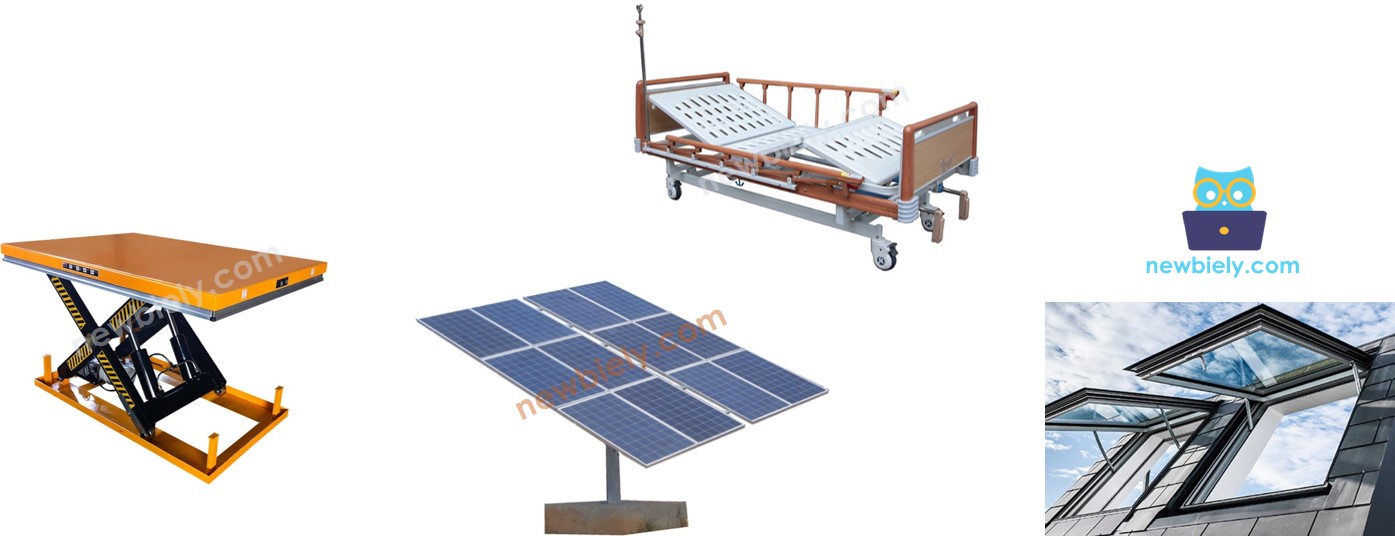
Need a rod that pushes and pulls on command? Drive a 12V linear actuator with the ESP32 Uno and an L298N motor driver, using only three signal wires. The ESP32 Uno form board decides the direction, and a PWM signal sets how fast the rod travels. It is a solid base for DIY automation, such as a lid opener or a lifting table.
By the end, you can:
- Explain how a linear actuator turns motor spin into straight motion
- Wire an L298N driver between the board and a 12V actuator
- Push and pull the rod with two direction pins
- Halt the rod at any point of its stroke
- Set the rod speed with a PWM duty value
This page is for actuators with two wires and no position sensor. For a model with a feedback wire, go to ESP32 Uno - Actuator with Feedback.
Components You Need
Or you can buy the following kits:
| 1 | × | DIYables Sensor Kit (18 sensors/displays) |
Additionally, some of these links are for products from our own brand, DIYables .
Linear Actuator Basics
After this part, you know what moves inside the actuator and how to steer it.
A small DC motor and a lead screw sit inside the tube. The motor turns the screw, and the screw drives the rod forward or backward in a straight line.
Actuator Wires
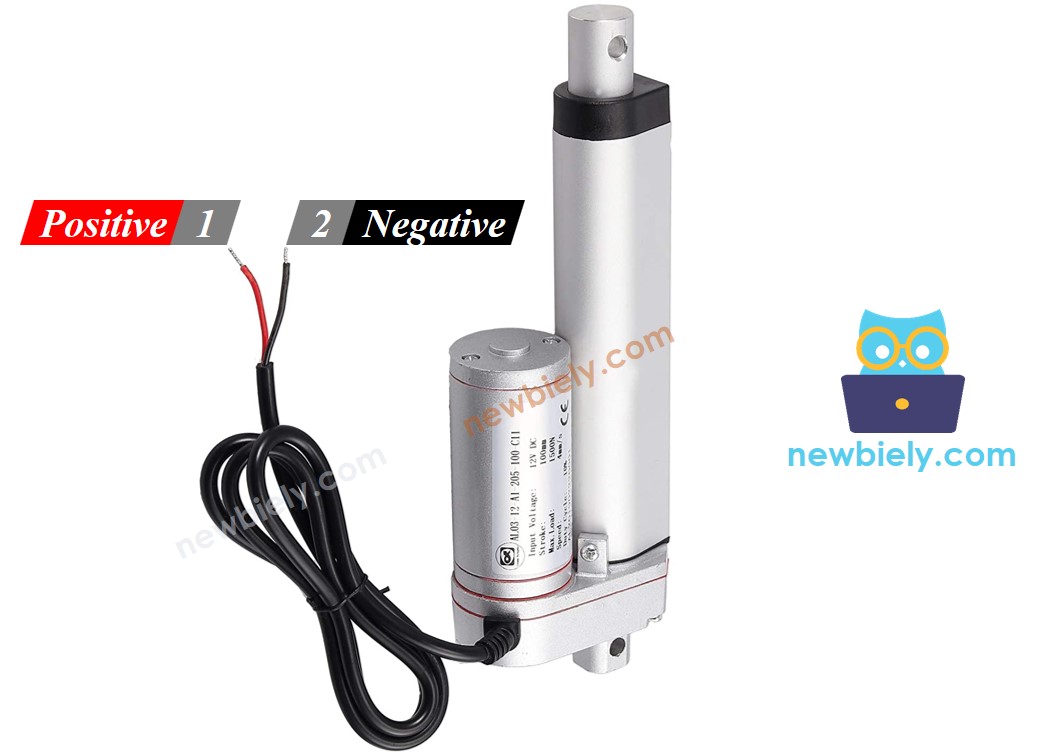
There are just two leads on the actuator.
| Wire | Usual Color | Role |
|---|---|---|
| Positive | Red | Gets the supply for an outward move |
| Negative | Black | Gets the supply for an inward move |
Direction, Holding and Speed
Read the rated voltage on the label first. The example here uses a 12V model.
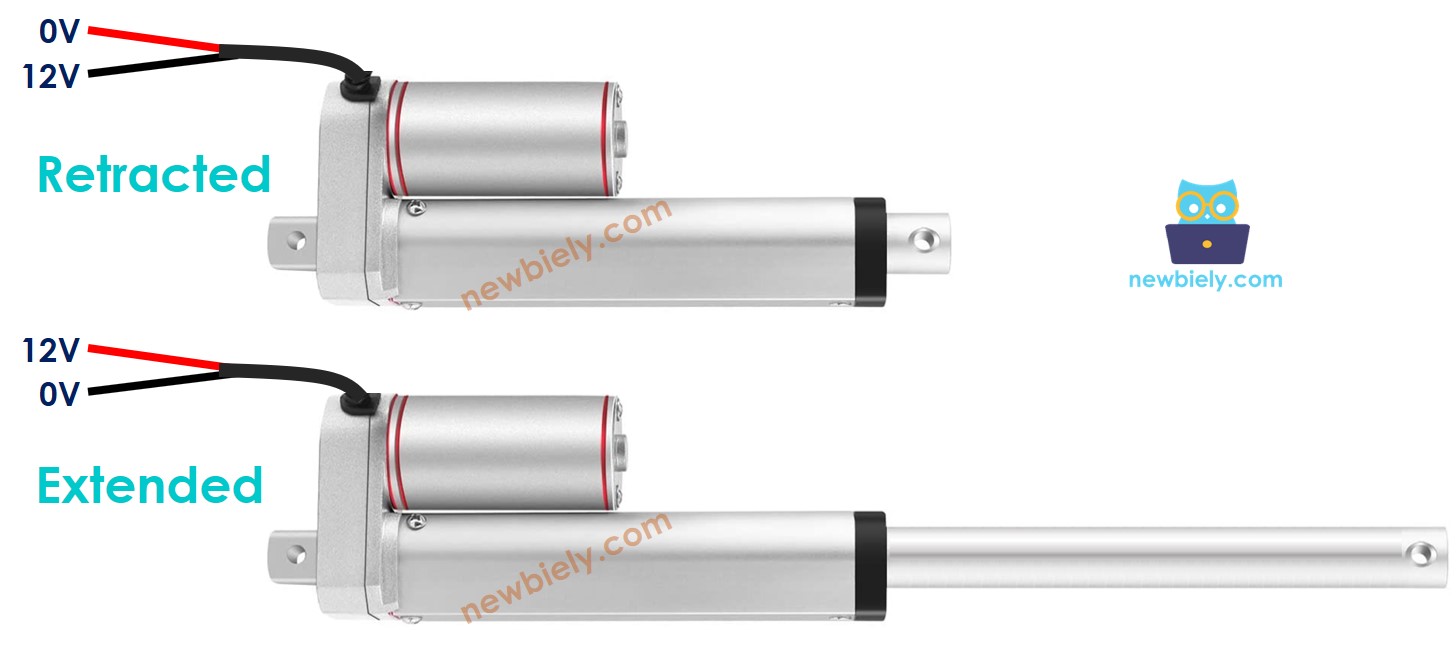
| Positive Wire | Negative Wire | Rod Movement |
|---|---|---|
| 12V | GND | Moves out at top speed until the outer end stop |
| GND | 12V | Moves in at top speed until the inner end stop |
| GND | GND | Stays still |
※ NOTE THAT:
Gearless DC, servo and stepper motors slip under a load once the power is cut. A linear actuator does not. Its screw locks the rod, so a weight stays where it is with zero power.
A lower supply, say 9V on a 12V unit, still moves the rod, only slower. Building an adjustable voltage source is awkward, though. The usual trick is a fixed 12V supply switched on and off very quickly by PWM. The bigger the duty cycle, the quicker the rod travels.
Driving a Linear Actuator from the ESP32 Uno
Typical jobs for the actuator are:
- Push out at full speed
- Pull in at full speed
- Optional: move at a reduced speed
Good to know: an ESP32 Uno GPIO outputs 3.3V and only a few milliamps. That cannot turn the motor, so a driver goes in the middle.
| Driver Job | Result |
|---|---|
| Amplify the weak GPIO signal | The motor gets the full 12V and enough current |
| Flip the supply polarity on command | The rod changes direction |
※ NOTE THAT:
These steps fit any linear actuator; 12V is just the sample here. A 5V actuator also needs a driver, since one ESP32 Uno pin cannot deliver the current a motor draws. Never wire a motor lead to a GPIO.
Here the L298N does the job. Chips like the L293D, or other driver boards, also work.
L298N Motor Driver Basics
After this part, you can name every pin on the L298N board.
The L298N is a dual H-bridge board. Besides actuators, it can spin DC motors and step stepper motors.
L298N Driver Pinout
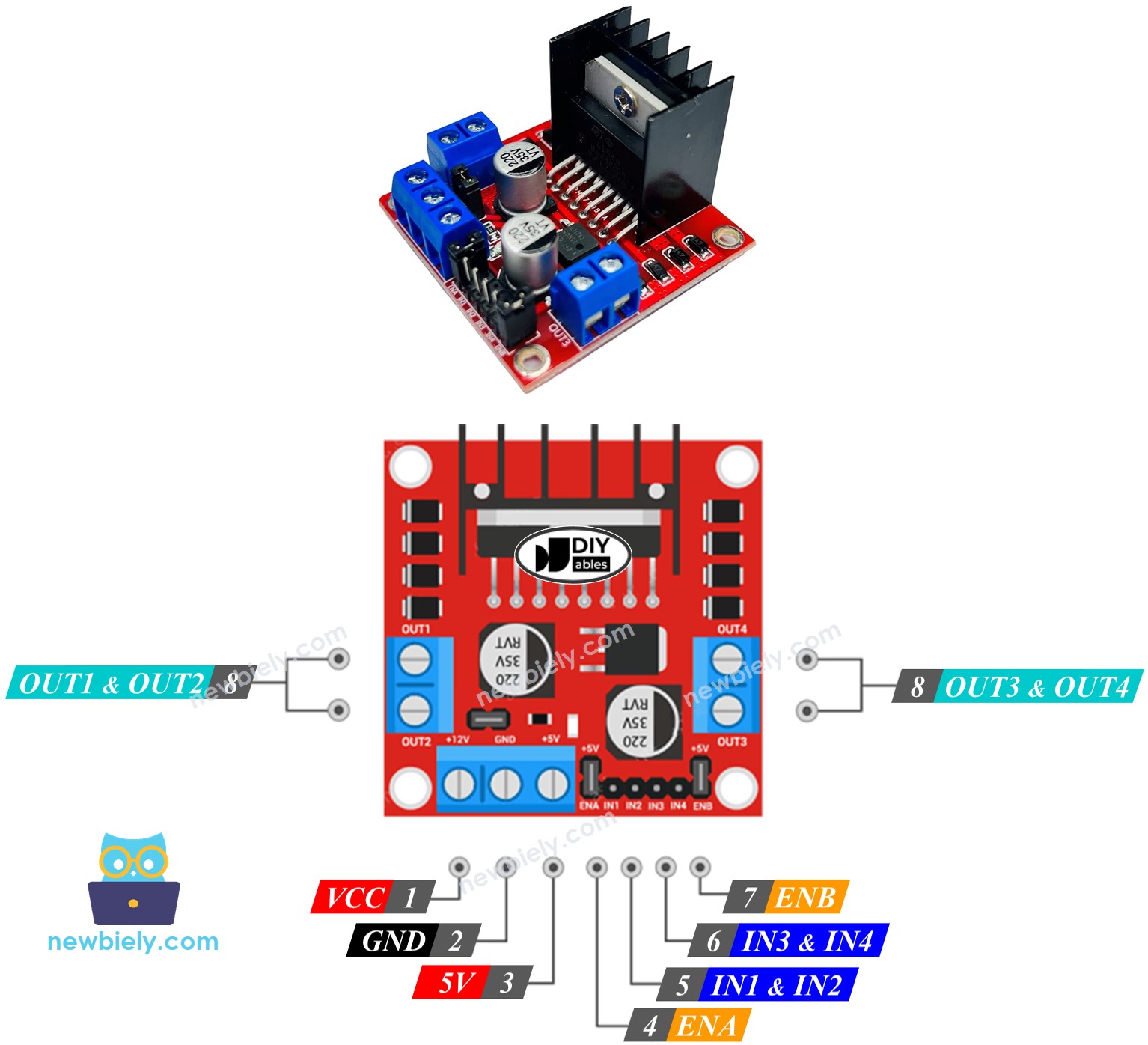
The board has 13 pins and two separate channels, A and B. Each channel runs its own actuator, so two actuators can move at once and on their own.
Shared Pins
| Pin | Role |
|---|---|
| VCC | Motor supply, 5V to 35V |
| GND | Common ground (0V) |
| 5V | Logic supply for the module; feed it from the ESP32 Uno 5V pin |
Channel A Pins
| Pin | Role |
|---|---|
| ENA | Speed of actuator A; remove the jumper and send PWM here |
| IN1 and IN2 | Direction; one HIGH plus one LOW moves the rod, equal levels stop it |
| OUT1 and OUT2 | Outputs to actuator A |
Channel B Pins
| Pin | Role |
|---|---|
| ENB | Speed of actuator B; remove the jumper and send PWM here |
| IN3 and IN4 | Direction; one HIGH plus one LOW moves the rod, equal levels stop it |
| OUT3 and OUT4 | Outputs to actuator B |
Supply Inputs and Jumpers
The module takes two supplies. VCC/GND powers the motor (5V to 35V). The 5V/GND pair powers the module chip (5V to 7V). Pull off all three jumpers to keep the setup simple.
Each actuator uses three ESP32 Uno pins, so one board and one L298N can move two actuators together.
※ NOTE THAT:
Only channel A is used below. A second actuator on channel B follows the same steps with ENB, IN3 and IN4.
ESP32 Uno Pinout
Your code uses the GPIO number that sits behind each Uno header label. Find D6, D7 and D13 in this diagram before you plug in any jumper wire.

Moving the Linear Actuator
By the end of this part, the hardware is connected and you know the code lines for each move.
How to Connect
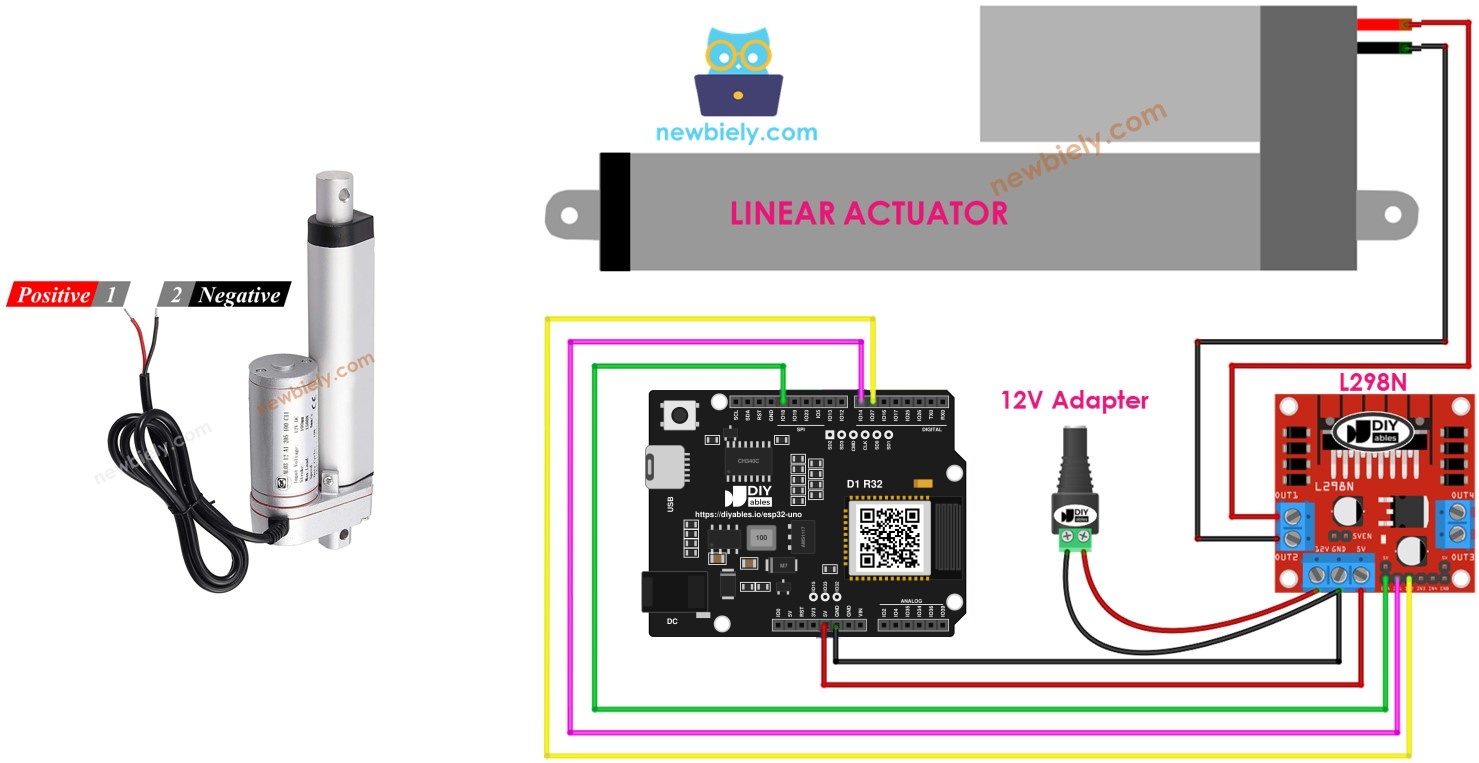
Pull all three jumpers off the L298N first. Then wire the parts as in the picture.
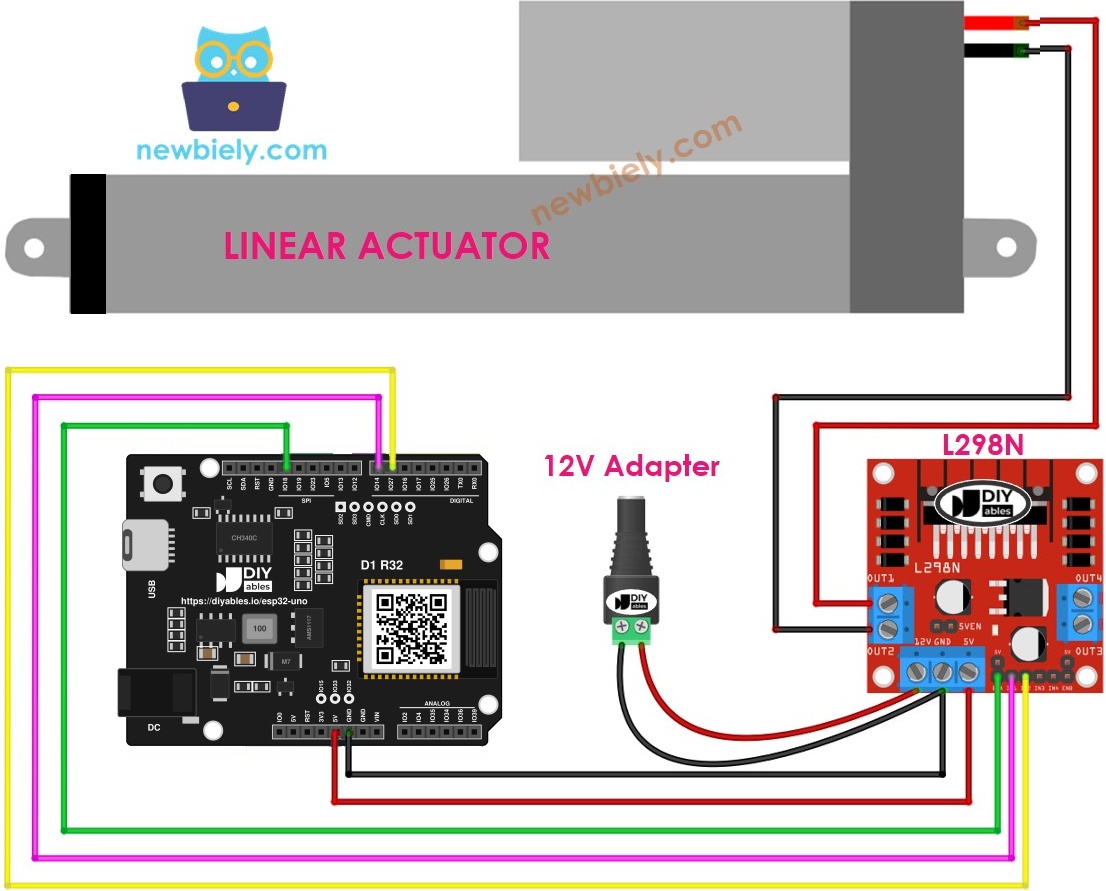
This image is created using Fritzing. Click to enlarge image
| L298N Pin | ESP32 Uno Pin |
|---|---|
| ENA | D13 (GPIO18) |
| IN1 | D7 (GPIO14) |
| IN2 | D6 (GPIO27) |
| 5V | 5V |
| GND | GND |
| Other Wire | Goes To |
|---|---|
| Actuator positive and negative | OUT1 and OUT2 |
| 12V adapter + | L298N VCC |
| 12V adapter - | L298N GND |
Good to know: the three control lines only leave the ESP32 Uno, and the L298N accepts 3.3V as HIGH. No level shifter is needed, and no 5V signal ever enters a board pin.
Push Out and Pull In
The two levels on IN1 and IN2 pick the direction.
| IN1 Level | IN2 Level | Rod of Actuator A |
|---|---|---|
| HIGH | LOW | Travels out |
| LOW | HIGH | Travels in |
| LOW | LOW | Halted |
| HIGH | HIGH | Halted |
Push the rod out
Pull the rod in
※ NOTE THAT:
Rod going backward? The leads on OUT1 and OUT2 are reversed. Swap those two leads, or swap the HIGH and LOW values in the sketch.
Halting the Rod Mid-Stroke
The actuator cuts out by itself at each end. To stop it somewhere in between, use one of these options.
| Method | Code |
|---|---|
| Zero speed | analogWrite(ENA_PIN, 0); |
| Both direction pins LOW | digitalWrite(IN1_PIN, LOW); digitalWrite(IN2_PIN, LOW); |
| Both direction pins HIGH | digitalWrite(IN1_PIN, HIGH); digitalWrite(IN2_PIN, HIGH); |
Option 1 — zero speed
Option 2 — both pins LOW
Option 3 — both pins HIGH
Speed Control with PWM on ENA
A PWM signal on ENA, in place of a steady HIGH, sets the rod speed.
- Keep the ENA wire on D13 (GPIO18).
- Send the duty value with analogWrite(). The L298N scales the pulses up to 12V.
| speed Value | Rod Behavior |
|---|---|
| 0 | Halted |
| 100 | Slow travel |
| 180 | Medium travel |
| 255 | Top speed |
Good to know: analogWrite() works on the ESP32 Uno with the familiar 0–255 range, so speed code from other Arduino boards runs as-is. Very low values may not overcome the screw friction, so the rod may not move at all.
ESP32 Uno Example Code
The sketch runs a full-speed cycle: out, wait, in, wait, and again.
Upload and Test
- First time with this board? Set it up with ESP32 Uno - Getting Started before you continue.
- Pull off the three L298N jumpers.
- Build the circuit by following the wiring table above.
- Plug in the USB Type-C cable between the ESP32 Uno and your computer.
- Select the board in Arduino IDE: pick ESP32 Dev Module and the COM port of the board (CH340).
- Paste the sketch into a new Arduino IDE window.
- Click Upload and wait for "Done uploading".
- Connect the 12V adapter to the DC jack. Check this sequence:
- The rod travels out and halts at its outer end stop
- It holds there for the rest of the 20 seconds
- It travels back in and halts at its inner end stop
- It holds again, and the loop restarts
Video Tutorial
See the ESP32 Uno build in action in the video below.
How the Code Works
| Code Part | What It Does |
|---|---|
| #define ENA_PIN 18 | D13 (GPIO18) goes to the L298N ENA input |
| #define IN1_PIN 14 / IN2_PIN 27 | D7 (GPIO14) and D6 (GPIO27) set the direction |
| digitalWrite(ENA_PIN, HIGH) in setup() | Locks the speed at 100% for the whole run |
| IN1 HIGH and IN2 LOW, then delay(20000) | Rod moves out for up to 20 seconds |
| IN1 LOW and IN2 HIGH, then delay(20000) | Rod moves in for up to 20 seconds |
The end stops cut the motor before the 20 seconds pass, so the rod simply rests at each end until the next command.
ESP32 Uno vs UNO R4 for This Project
Moving this build from the UNO R4 to the ESP32 Uno changes only the pin numbers and the board setup.
| Item | Arduino UNO R4 | ESP32 Uno |
|---|---|---|
| Logic voltage | 5V | 3.3V |
| ENA pin in code | 13 (D13) | 18 (D13) |
| IN1 pin in code | 7 (D7) | 14 (D7) |
| IN2 pin in code | 6 (D6) | 27 (D6) |
| PWM range with analogWrite() | 0 to 255 | 0 to 255 |
| WiFi and Bluetooth | WiFi on the R4 WiFi only | WiFi plus Bluetooth Classic and BLE |
| Arduino IDE board | Arduino UNO R4 WiFi or Minima | ESP32 Dev Module |
The wiring stays on the same header positions, so the circuit works as-is. The L298N reads 3.3V as HIGH, and no signal travels back into the board, so no level shifter is needed.
Wrap-Up
You built a full actuator setup: L298N wiring, out and in moves with two direction pins, three ways to halt the rod, and PWM speed control on ENA. The same method works for any actuator without feedback. Use it for a motorized hatch, a TV lift or a chicken coop door.
Go Wireless: Move the Rod from Your Phone
After this part, you know how to take the actuator off the USB cable and control it from a phone.
The ESP32 Uno has WiFi and Bluetooth built in. Put a slider on your phone screen and map its value to the ENA duty cycle, or use two buttons of a joystick for out and in. Then you can open a lid or raise a shelf from across the room.
Try These Next
- Use a speed of 120 for the outward move and 255 for the inward move.
- Add two buttons: one pushes the rod out while held, the other pulls it in.
- Stop the rod halfway by cutting the motor after half the stroke time.
- Wire a second actuator on channel B and move both rods at the same time.
Troubleshooting
| Problem | Possible Cause | Solution |
|---|---|---|
| No COM port appears in Arduino IDE | CH340 driver not installed or a charge-only cable | Install the CH340 driver and use a USB cable that carries data |
| Upload stops at "Failed to connect" or "Waiting for download" | The chip did not enter download mode | Hold the BOOT button when the upload starts and let go once writing begins |
| Rod never moves | 12V adapter off, or the ENA jumper setup is wrong | Plug in the adapter, check VCC and GND on the L298N, and confirm ENA goes to D13 |
| Rod moves out but never comes back | IN2 wire loose or on the wrong header | Check that IN2 sits on D6 and the code uses 27 |
| Board reboots each time the rod starts | Grounds not shared, or the motor pulls power from USB | Join the adapter GND, the L298N GND and the board GND, and power the motor only from the adapter |
| Rod crawls or stalls under load | Adapter too weak or PWM value too low | Use an adapter rated for the actuator current and raise the speed value |
| L298N gets very hot | The driver drops about 2V and the load is heavy | Add airflow or a heatsink, or switch to a MOSFET driver for big actuators |
| Rod turns back before it reaches the end | The stroke takes longer than 20 seconds | Increase both delay() values |
FAQ
Why do I need the L298N instead of wiring the actuator to a GPIO?
A GPIO gives 3.3V at a few milliamps, but an actuator motor pulls hundreds of milliamps or more. The motor also kicks back voltage spikes. A driver supplies the current and keeps those spikes away from the board.
Is 3.3V from the ESP32 Uno enough for the L298N inputs?
Yes. The L298N counts about 2.3V and above as HIGH, so the ENA, IN1 and IN2 lines work directly. All three lines are outputs, so no 5V reaches the board.
How much current does a 12V linear actuator draw?
Small hobby models draw around 1A under load and up to 2–3A when stalled at an end stop. Check the datasheet and pick a 12V adapter rated above the stall current.
Which other ESP32 Uno header pins can drive the L298N?
Yes. Most ESP32 Uno digital pins support PWM. Change the three GPIO numbers in the code. Avoid D8 (GPIO12) and D10 (GPIO5), because they are boot strapping pins, and avoid A2–A5 (GPIO35, 34, 36, 39), because they are input only and cannot drive the L298N.
Do I need a library to run a linear actuator on the ESP32 Uno?
No. The sketch only uses pinMode(), digitalWrite(), analogWrite() and delay(), which come with the esp32 by Espressif Systems core.
Can the ESP32 Uno know where the rod is?
Not with a two-wire actuator. You can only estimate the position from the time it has moved. For a real position reading, use an actuator with a feedback wire and read it on an analog pin.
Will an L298N shield in Uno shape fit the ESP32 Uno?
The headers match the Uno layout, so many shields plug in. Check that the shield does not send 5V signals back into a board pin, and that it does not need AREF, because that spot is the Reset pin on this board.
What stops the rod at each end if the code keeps the motor on?
Each actuator has built-in limit switches. When the rod reaches an end, a switch cuts the motor current, even while the ESP32 Uno still sends the direction signal. That is why the sketch can use a long delay safely.
What if my build needs extra pins beyond the Uno headers?
The ESP32 Uno has a few extra holes near the power header: GPIO32 and GPIO33 (I/O, PWM, analog on ADC1, so they also work while WiFi is on) and GPIO15 (I/O, PWM, analog on ADC2). Solder pin headers there and write the GPIO number in code. For a second actuator's ENB, IN3 and IN4, GPIO32 and GPIO33 are the first picks. Keep two warnings in mind. First, GPIO15 and GPIO0 (the IO0 pin at the unused Uno NC spot) are boot strapping pins, and a wrong connection can stop the board from booting or uploading code, so use GPIO32/33 first. Second, never touch the six holes under the digital header (SD0–SD3, CMD, CLK = GPIO6–GPIO11); they are wired to the flash chip, and using them crashes the board.
Can I control the actuator over WiFi and still use the same pins?
Yes. D13, D7 and D6 are plain digital and PWM outputs, so WiFi does not affect them. Only analog reads on the ADC2 pins stop working while WiFi is on.