
ESP32 UNO - Ultrasonic Sensor - Piezo Buzzer
Want a buzzer that reacts when someone walks up to your desk? Connect an ultrasonic sensor and a piezo buzzer to the ESP32 Uno form board, and the buzzer will beep or play a tune whenever an object gets closer than 50 cm. It works like the parking sensor in a car.
By the end, you can:
- Connect an HC-SR04 distance sensor and a piezo buzzer to the ESP32 Uno
- Measure distance in centimeters with pulseIn()
- Switch the buzzer on when an object is near, and off when it moves away
- Play a short melody with tone() when your hand comes close
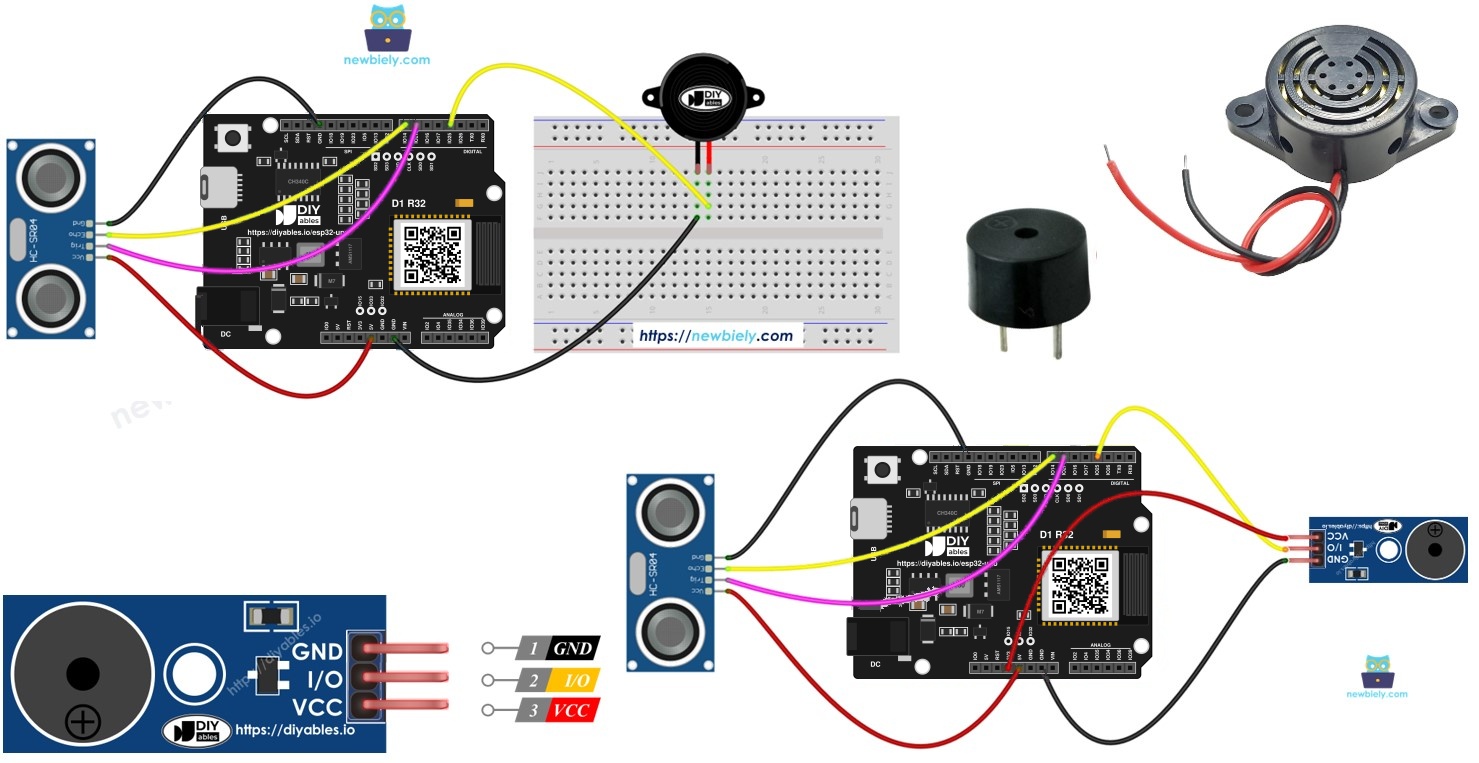
Components You Need
Or you can buy the following kits:
| 1 | × | DIYables Sensor Kit (18 sensors/displays) |
Additionally, some of these links are for products from our own brand, DIYables .
How the Two Parts Work Together
By the end of this part, you know what each part does in the project.
| Part | Role in the Project |
|---|---|
| Ultrasonic sensor (HC-SR04) | Sends a sound pulse and reports how long the echo takes to return |
| Piezo buzzer | Makes a sound when the ESP32 Uno sets its pin HIGH, or plays notes with tone() |
| ESP32 Uno | Turns the echo time into centimeters and decides when to sound the buzzer |
New to these parts? Read their own guides first.
The buzzers in this guide run on 3-5V and connect straight to a pin. A 12V buzzer needs a relay instead. See the ESP32 Uno - Buzzer tutorial.
Good to know: The HC-SR04 runs on 5V, so its ECHO pin sends a 5V pulse. ESP32 Uno pins use 3.3V logic and are not 5V tolerant, so ECHO needs a level converter or a voltage divider.
ESP32 Uno Pinout
Every Uno header pin on the ESP32 Uno form board has its own GPIO number, and your sketch uses that number. Look at the picture to match the labels before you place any wire.

How to Connect
By the end of this part, the sensor and the buzzer are wired and ready. You can use a bare buzzer or a buzzer module. The sensor wiring is the same for both.
Bare piezo buzzer
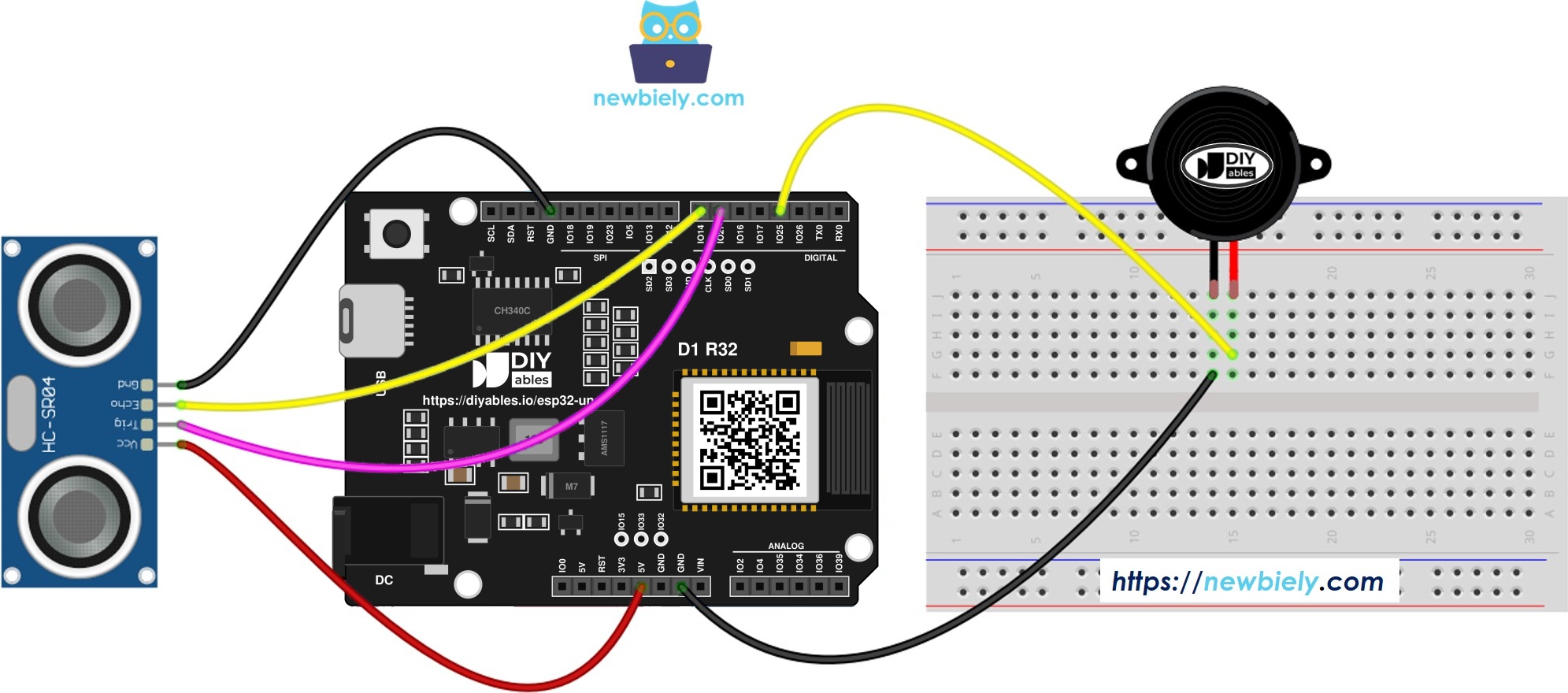
This image is created using Fritzing. Click to enlarge image
※ NOTE THAT:
The wiring diagram may not show the correct wiring for the ESP32 Uno. The HC-SR04 ECHO pin sends a 5V signal, and ESP32 Uno pins are 3.3V only. The picture shows ECHO wired straight to the board. On the ESP32 Uno, put a voltage divider or a level converter on ECHO, as this page shows. We will update the diagram soon. Until then, follow the wiring table and the text on this page, not the picture.
Piezo buzzer module
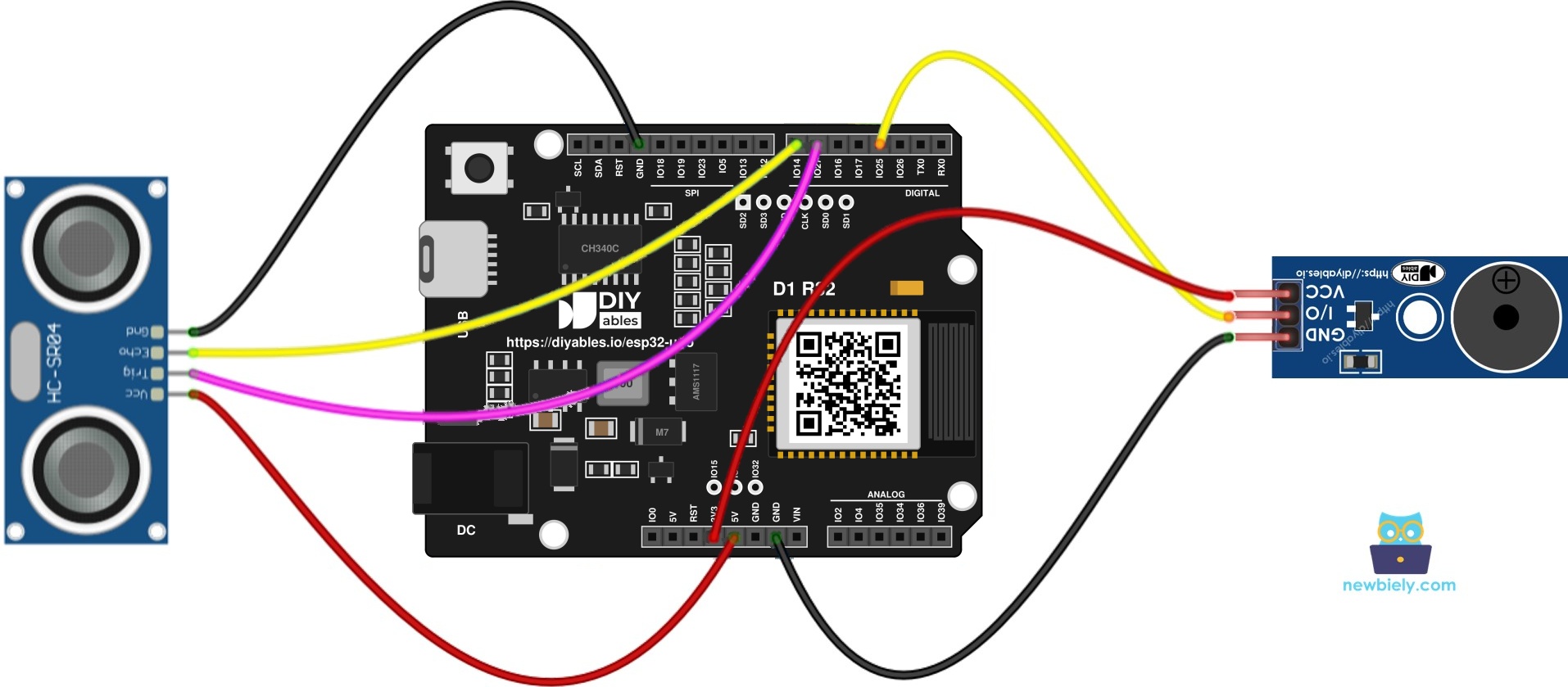
This image is created using Fritzing. Click to enlarge image
| Component Pin | ESP32 Uno Pin |
|---|---|
| Sensor VCC pin | 5V |
| Sensor GND pin | GND |
| Sensor TRIG pin | D6 (GPIO27) |
| Sensor ECHO pin | D7 (GPIO14), via the level converter |
| Buzzer plus or module I/O | D3 (GPIO25) |
| Buzzer minus or module GND | GND |
| Module VCC (module only) | 3.3V or 5V |
WARNING
The HC-SR04 ECHO pin outputs 5V, but ESP32 Uno pins accept 3.3V at most. Route ECHO to D7 (GPIO14) via a 5V to 3.3V level converter. Without a converter, make a divider: 1kΩ between ECHO and D7, plus 2kΩ between D7 and GND.
Good to know: The 3.3V trigger pulse from D6 (GPIO27) is high enough for the HC-SR04, so the TRIG wire needs no converter.
ESP32 Uno Code - Simple Sound
The sketch pings the sensor twice a second, turns the echo time into centimeters, and sets the buzzer pin HIGH when the object is under 50 cm.
| Code Part | What It Does |
|---|---|
| DISTANCE_THRESHOLD | Sets the alarm distance, 50 cm by default |
| digitalWrite(TRIG_PIN, HIGH) for 10 microseconds | Starts one measurement |
| pulseIn(ECHO_PIN, HIGH) | Measures the echo time in microseconds |
| 0.017 * duration_us | Converts the echo time into centimeters |
| digitalWrite(BUZZER_PIN, ...) | Turns the buzzer on or off by distance |
The Serial Monitor shows every reading, so you can see what the sensor measures.
Upload and Test
- First time with this board? Set it up with ESP32 Uno - Getting Started before you continue.
- Build the circuit by following the wiring table above.
- Plug in the USB Type-C cable between the ESP32 Uno and your computer.
- Select the board in Arduino IDE: pick ESP32 Dev Module and the COM port of the board (CH340).
- Paste the code above into a new sketch.
- Click Upload and wait for the "Done uploading" message.
- Open the Serial Monitor and set 9600 baud.
- Wave your hand about 20 cm in front of the sensor.
- Listen for the buzzer. The sound starts inside 50 cm and ends when your hand leaves.
- Pro tip: Lay a book flat on the table and slide it toward the sensor. A hard flat surface gives steadier readings than a hand.
Video Tutorial
See the ESP32 Uno build in action in the video below.
Code Explanation
Each line in the sketch has a comment. Read them from top to bottom and you follow the whole flow: trigger, echo, distance, buzzer.
ESP32 Uno vs UNO R4 for This Project
Moving this build from the UNO R4 to the ESP32 Uno changes the pin numbers and one signal level.
| Item | Arduino UNO R4 | ESP32 Uno |
|---|---|---|
| Logic voltage | 5V | 3.3V |
| TRIG pin | 6 (D6) | D6 (GPIO27) |
| ECHO pin | 7 (D7) | D7 (GPIO14), with a level converter |
| Buzzer pin | 3 (D3) | D3 (GPIO25) |
| Arduino IDE board | Arduino UNO R4 WiFi | ESP32 Dev Module |
| USB chip | none needed | CH340 driver |
The wires stay on the same Uno header positions. Only the numbers in the code change. Add the level converter on ECHO, because the UNO R4 did not need one.
Melody Version
Want a tune instead of a beep? This sketch measures distance the same way, and plays a short song with tone() when an object is closer than 50 cm. Use a passive buzzer or a passive buzzer module for a real melody.
Add the note list
The melody needs a second file with the note frequencies.
- Copy the melody code above into the Arduino IDE.
- Add a new tab. Press Ctrl+Shift+N, or use the small menu button under the Serial Monitor icon and pick New Tab.
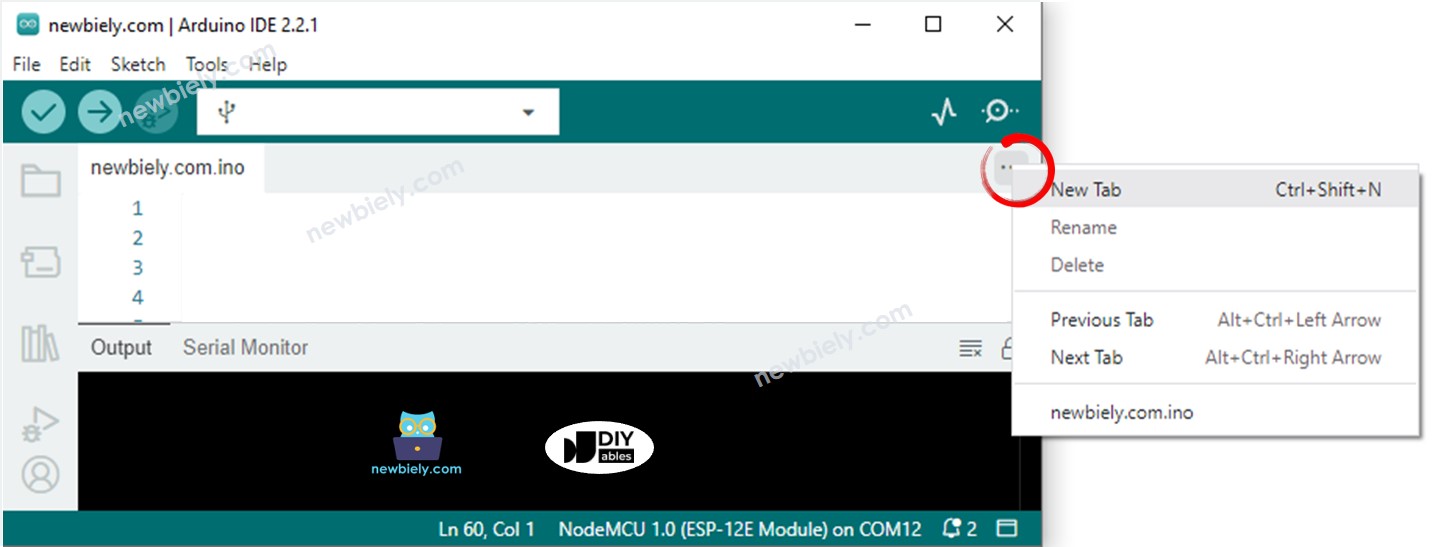
- Type the name pitches.h in the box, then press OK.
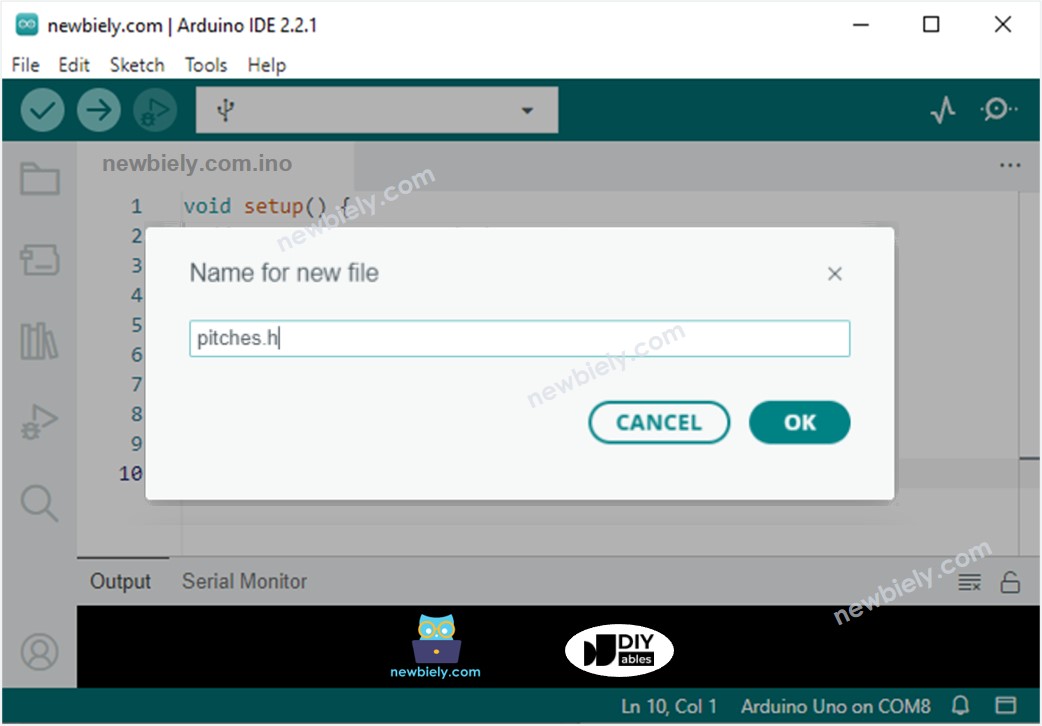
- Paste this note list into the pitches.h tab.
- Click Upload to send the sketch to the ESP32 Uno.
- Move your hand close to the sensor.
- Listen to the tune from the buzzer.
- Pro tip: Hold still while the song plays. The sketch measures again only after the last note.
| Code Part | What It Does |
|---|---|
| melody[] | Lists the note frequencies |
| noteDurations[] | Gives each note a length (4 = quarter, 8 = eighth) |
| tone(BUZZER_PIN, note, length) | Plays one note on D3 (GPIO25) |
| delay(length x 1.30) | Adds a short gap between notes |
| noTone(BUZZER_PIN) | Stops the sound before the next note |
※ NOTE THAT:
- This code is for learning. Ultrasonic readings jump when there is noise, so filter them in a real project. Learn how to filter noise for the ultrasonic sensor.
Go Wireless: Distance Alarm on Your Phone
By the end of this part, you know how to see the distance on a phone.
The ESP32 Uno has WiFi and Bluetooth. You can send the measured distance to your phone and watch it on a live gauge or chart, even when you are not near the Serial Monitor. Pair it with the buzzer and you get an alarm you can also read from across the room.
Try These Next
- Change DISTANCE_THRESHOLD to 20 or 100 and test the new alarm distance.
- Make the beep faster as the object gets closer, by shortening the delay with the distance.
- Add an LED on another free pin that lights together with the buzzer.
Troubleshooting
| Problem | Possible Cause | Solution |
|---|---|---|
| No COM port in Arduino IDE | CH340 driver missing or charge-only cable | Install the CH340 driver and use a data USB cable |
| Upload fails with "Failed to connect" or "Waiting for download" | Board is not in download mode | Hold the BOOT button while the upload starts |
| Distance always reads 0 | No echo returns, so pulseIn() gives 0 | Check the ECHO wire and the level converter, and power the sensor from 5V |
| Distance values swing wildly | Echo noise, or a soft object that absorbs sound | Point at a hard flat target and average several readings |
| No sound at all | Buzzer reversed or on the wrong pin | Put plus on D3 (GPIO25), minus on GND, and power the module |
| Buzzer stays on all the time | Object always within 50 cm, or the buzzer is wired to the wrong pin | Move objects away or raise the distance limit, then check the wiring |
| Tune plays as one steady tone | An active buzzer is fitted | Swap in a passive buzzer or module |
| NOTE_E5 not declared | The pitches.h tab is absent or has another name | Create a tab called pitches.h and paste the notes in it |
| Garbled text in the Serial Monitor | Baud rate does not match | Choose 9600 in the baud drop-down |
FAQ
How does an HC-SR04 measure distance?
It sends a burst of ultrasound and waits for the echo. The echo time, multiplied by the speed of sound and halved, gives the distance. Typical range is about 2 cm to 400 cm.
Will the HC-SR04 run from 3.3V?
Most boards want 5V to behave. At 3.3V they often return no echo or wrong values. Use the 5V pin and protect ECHO with a level converter or divider.
Why does the ECHO pin need a level converter on the ESP32 Uno?
Inputs on this board work at 3.3V and cannot take 5V. A 5V echo pulse may slowly damage the pin. The UNO R4 is a 5V board, so it did not need one.
What is the difference between an active and a passive buzzer?
An active buzzer has its own oscillator and plays one fixed tone. A passive buzzer plays whatever frequency tone() gives it, so only a passive one can play a melody.
Can I reuse my UNO R4 code on the ESP32 Uno?
Nearly all of it. The calls to pulseIn() and tone() behave the same on both boards. What changes is the pin numbers, and you write GPIO numbers: D6 is 27, D7 is 14 and D3 is 25. Pick ESP32 Dev Module in Arduino IDE.
Do UNO shields work with the ESP32 Uno form board?
The board has the Uno shape, so many shields fit. But the ESP32 Uno runs at 3.3V logic and the pins are different, so check that the shield accepts 3.3V signals first.
Does this project need a boot strapping pin?
No. D6 (GPIO27), D7 (GPIO14) and D3 (GPIO25) are normal I/O pins, so the board boots and uploads without trouble while the parts stay connected.
Can I show the distance on a web page with the ESP32 Uno?
Yes. The ESP32 Uno has WiFi and Bluetooth, so you can send the value to a web page or a phone app. See the Go Wireless section above.
How do I change the alarm distance?
Edit DISTANCE_THRESHOLD at the top of the sketch. The value is in centimeters, so 100 means the buzzer sounds when an object is closer than one meter.
What if I need more pins than the Uno headers offer for this build?
The ESP32 Uno has a few extra holes near the power header: GPIO32 and GPIO33 (I/O, PWM, analog on ADC1, so they also work while WiFi is on) and GPIO15 (I/O, PWM, analog on ADC2). Solder headers onto them, then use the plain GPIO number in your sketch. For a second sensor or a warning LED in this project, GPIO32 or GPIO33 are good picks. Two warnings. First, GPIO15 and GPIO0 (the IO0 pin at the unused Uno NC position) are boot strapping pins, and a wrong connection can stop the board from booting or uploading code, so use GPIO32 and GPIO33 first. Second, never use the six holes under the digital header (SD0-SD3, CMD, CLK = GPIO6-GPIO11). They are wired to the flash chip, and using them crashes the board.