
ESP32 UNO - Water Sensor
Want to know when water shows up with the ESP32 Uno? Wire a water level sensor to the ESP32 Uno form board and the Serial Monitor shows a live number for how wet the sensor is. Use it as a water detector for leaks, rain or a tank that is about to overflow.
By the end, you can:
- Wire a water sensor to the ESP32 Uno
- Read the sensor with analogRead() in Arduino IDE
- Detect a leak, rain or an overflow with one threshold value
- Measure the water level in 4 steps
- Calibrate the sensor for your own water
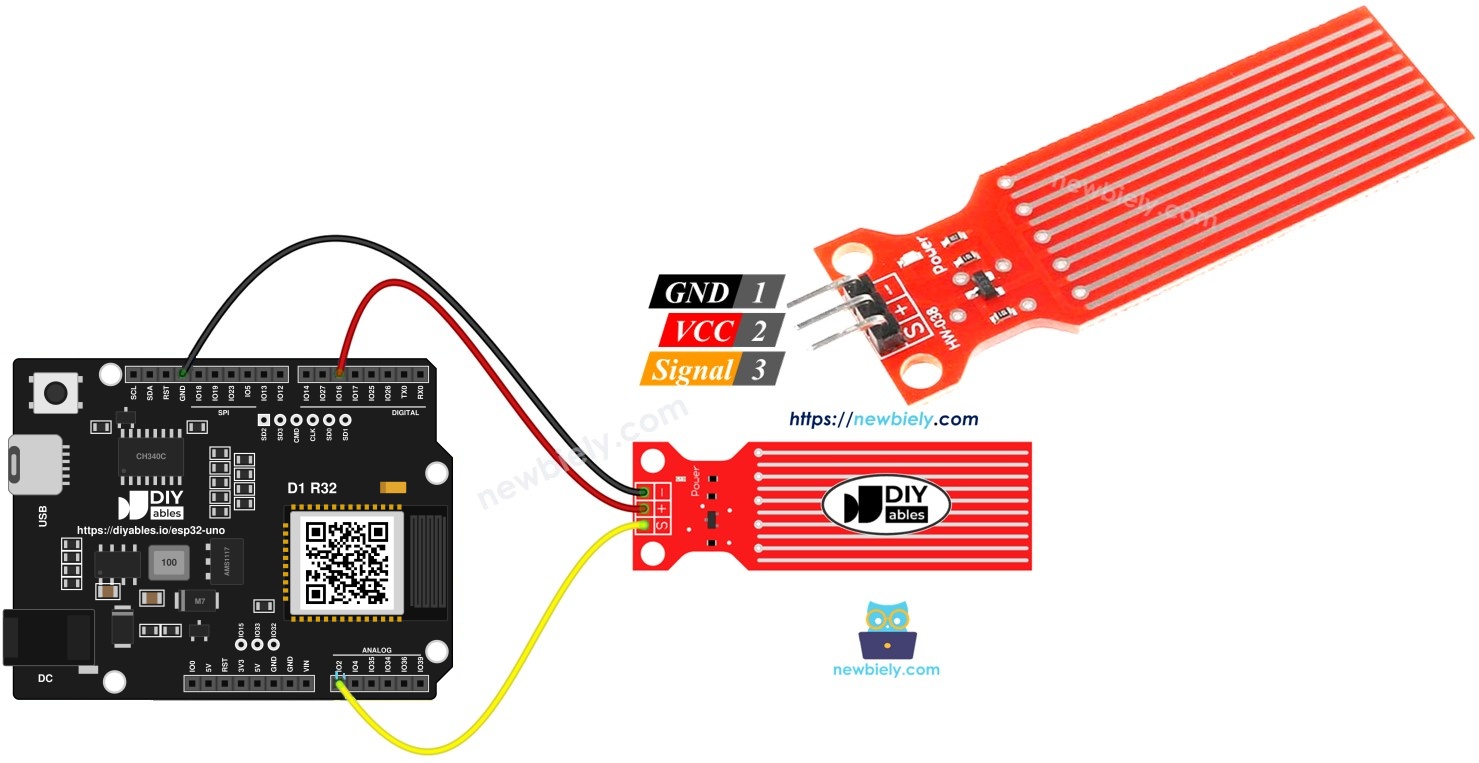
Hardware Preparation
| 1 | × | ESP32 Uno-form Board | |
| 1 | × | USB Cable Type-A to Type-C (for USB-A PC) | |
| 1 | × | USB Cable Type-C to Type-C (for USB-C PC) | |
| 1 | × | Water level sensor | |
| 1 | × | Jumper Wires |
Or you can buy the following kits:
| 1 | × | DIYables Sensor Kit (18 sensors/displays) |
Additionally, some of these links are for products from our own brand, DIYables .
Overview of Water Level Sensor
By the end of this part, you know what the three pins do and why the voltage rises in water.
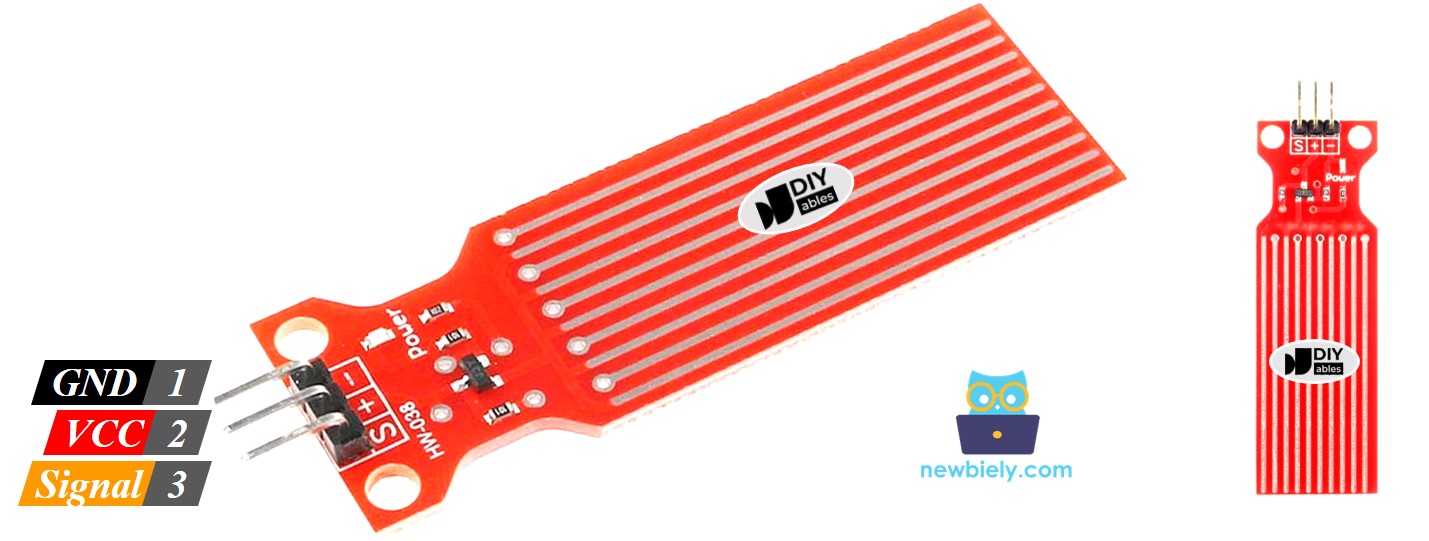
Water Level Sensor Pinout
The module has three pins.
| Pin | Role |
|---|---|
| S (Signal) | Analog output. Goes to an analog input of the ESP32 Uno |
| + (VCC) | Power input, 3.3V to 5V. Use 3.3V on the ESP32 Uno |
| * (GND) | Ground |
※ NOTE THAT:
The signal level follows the supply level. If you change the VCC voltage, the readings change as well.
Good to know: the ESP32 Uno analog pins accept 3.3V at most, so never feed this module with 5V.
How Water Level Sensor Works
More water on the board means a higher voltage on the signal pin. Here is why.
The board shows ten copper traces. Half of them (five) carry power and the other five sense the water. They run side by side, and every sense trace sits between two power traces. In dry air they never touch. Water bridges the gap between them.
Together the traces behave like a variable resistor, similar to a potentiometer.
- More of the board under water means the current flows more easily, so the resistance falls.
- Less of the board under water means the current flows with more difficulty, so the resistance rises.
- The module converts this resistance into an output voltage.
Measure that voltage and you know how high the water climbs on the sensor.
ESP32 Uno Pinout
Every Uno header pin of the ESP32 Uno form board is tied to one GPIO number, and your sketch uses that number. Compare the diagram with the wiring table before you plug in any wire.

Wiring Diagram
By the end of this part, the sensor is connected and switched by a pin of the board.
Power the sensor from a digital pin, not from the 5V pin. A sensor that stays powered in a wet place corrodes quickly. The sketch sets the pin HIGH just before a reading and LOW right after it. A pin of the ESP32 Uno gives 3.3V, which is the right level here.
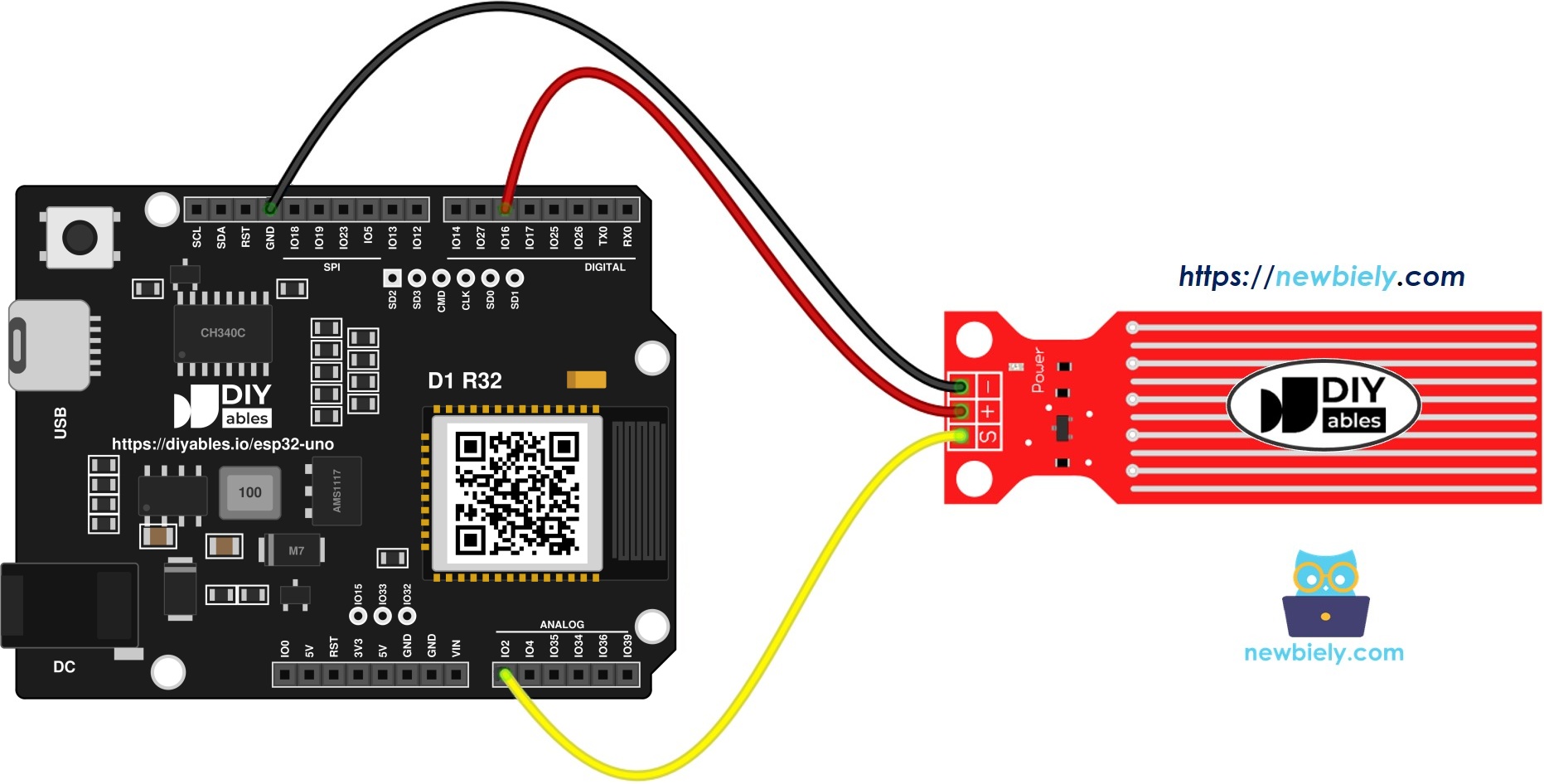
This image is created using Fritzing. Click to enlarge image
| Water Sensor Pin | ESP32 Uno Pin |
|---|---|
| + (VCC) | D5 (GPIO16) |
| * (GND) | GND |
| S (Signal) | A0 (GPIO2) |
WARNING
ESP32 Uno pins are NOT 5V tolerant. Do not connect the sensor VCC to the 5V pin, because the signal can then rise above 3.3V and damage the analog input.
WARNING
A0 (GPIO2) is a boot strapping pin. The sensor signal is normally low or floating at start, so the board boots fine. If upload fails with the sensor connected, unplug the S wire while you upload.
Good to know: A0 (GPIO2) is an ADC2 pin. It reads fine in this tutorial because WiFi is off. For a WiFi project, move the signal wire to A2 (GPIO35) and change the pin in code.
Code
This sketch powers the sensor for 10 ms, reads the signal, cuts the power and prints the raw value once per second.
| Code Part | What It Does |
|---|---|
| POWER_PIN 16 | D5 (GPIO16), supplies the sensor only when needed |
| SIGNAL_PIN 2 | A0 (GPIO2), the analog input |
| analogSetAttenuation(ADC_11db) | Opens the ADC range to about 3.3V |
| analogRead() | Returns 0 to 4095 |
| delay(10) | Lets the reading settle before sampling |
Good to know: the 11 dB attenuation lets the ESP32 Uno analog pin read the full range, from 0V up to about 3.3V. Without a wide range, the readings hit 4095 too early and the water values look wrong.
Detailed Instructions
- First time with this board? Set it up with ESP32 Uno - Getting Started before you continue.
- Build the circuit by following the wiring table above.
- Plug in the USB Type-C cable between the ESP32 Uno and your computer.
- Select the board in Arduino IDE: pick ESP32 Dev Module and the COM port of the board (CH340).
- Copy the code above into a new sketch.
- Click Upload to send it to the board.
- Open the Serial Monitor at 9600 baud.
- Lower the sensor slowly into a glass of water and watch the numbers rise. Out of the water the value stays near 0.
- Pro tip: wipe the sensor dry after each test. Dry traces last longer and give the same reading the next day.
※ NOTE THAT:
Never dip the whole module. Only the printed part with the copper traces may touch the water. Keep the pin header and the wires dry.
Video Tutorial
See the ESP32 Uno build in action in the video below.
The video demo uses this code. It adds a 20x4 I2C LCD, three LEDs and a buzzer. Install the LiquidCrystal_I2C library first.
Wiring for the demo extras:
| Part Pin | ESP32 Uno Pin |
|---|---|
| LCD SDA | SDA (GPIO21) |
| LCD SCL | SCL (GPIO22) |
| Green LED | D6 (GPIO27) |
| Yellow LED | D7 (GPIO14) |
| Red LED | D8 (GPIO12) |
| Buzzer | D9 (GPIO13) |
WARNING
D8 (GPIO12) is a boot strapping pin and must be LOW at start. A red LED with a resistor to GND is fine. If the board will not boot, unplug the red LED wire and upload again.
How To Detect Water Leakage
By the end of this part, the board prints a message when the sensor value goes above a limit. The limit comes from the calibration part below.
The sketch compares each reading with THRESHOLD. The value 1200 is a starting point for the 12-bit range, so change it after you calibrate.
How To Measure The Water Level
By the end of this part, the board shows the water height as a level from 0 to 4.
The full height of the sensor is cut into 4 steps. The map() function turns the reading into a level number.
※ NOTE THAT:
- SENSOR_MIN and SENSOR_MAX come from the calibration test.
- This mapping is not exact, but it is good enough for many projects. For better accuracy, measure the reading at each level as described in the calibration part.
Water Level Sensor Calibration
By the end of this part, you have your own numbers for the threshold and the level steps.
The reading depends on the water and on the supply voltage. Pure water barely conducts, while water with minerals conducts well, and the better it conducts the higher the reading. So calibrate the sensor with the same water you plan to monitor.
Step 1 — Run the test
- Upload the first sketch of this tutorial.
- Put the sensor in the water up to the height you care about.
- Write down the value from the Serial Monitor.
- Use this value as the limit for your action.
The test may need a few tries.
Step 2 — Collect these values
| Value | How To Get It |
|---|---|
| Minimum | Sensor out of the water |
| Maximum | Sensor in the water up to the top mark |
| Leak threshold | Reading when a thin film of water touches the traces |
| Level thresholds | Reading at the height of each level |
ESP32 Uno vs UNO R4 for This Project
Moving this project from the UNO R4 to the ESP32 Uno needs a few code changes and one power change.
| Item | Arduino UNO R4 | ESP32 Uno |
|---|---|---|
| Logic voltage | 5V | 3.3V |
| Sensor power | 5V or a digital pin | D5 (GPIO16), 3.3V |
| Signal pin | A0 | A0 (GPIO2) |
| ADC range | 0 to 1023 | 0 to 4095 |
| Extra code line | none | analogSetAttenuation(ADC_11db) |
| Example threshold | 300 | 1200 |
| Arduino IDE board | Arduino UNO R4 WiFi | ESP32 Dev Module |
The wires stay on the same Uno header positions. Only the numbers in code change: the pins become GPIO numbers and the thresholds grow because the ADC has more steps.
Go Wireless: Water Alarm on Your Phone
By the end of this part, you know how to see the water value without a cable.
The ESP32 Uno has WiFi and Bluetooth. Send the sensor value to a web page or to an app, and you can watch a basement or a plant tray from the sofa. A rising line on a chart shows a slow leak early. Keep the signal on A0 only with WiFi off. When you add WiFi, use A2 (GPIO35) for the signal.
Try These Next
- Turn on an LED or a buzzer when the value goes above the threshold.
- Show the level on an LCD, as in the video demo.
- Log the readings with a time stamp and look at the trend.
- Send an alarm message when water is found.
Function References
Troubleshooting
| Problem | Possible Cause | Solution |
|---|---|---|
| No COM port in Arduino IDE | CH340 driver missing or a charge-only cable | Install the CH340 driver and use a USB Type-C data cable |
| Upload stops at "Failed to connect" or "Waiting for download" | Chip is not in download mode | Hold the BOOT button while the upload starts |
| Board will not boot or upload with the sensor connected | A0 (GPIO2) or D8 (GPIO12) is a boot strapping pin pulled the wrong way | Unplug the module wire while uploading, or use another pin |
| Value is always 0 | Signal wire loose, or D5 (GPIO16) not driving VCC | Check S on A0 (GPIO2), VCC on D5 (GPIO16) and the POWER_PIN number in code |
| Value is always 4095 | Sensor VCC on 5V, or the ADC range is not set | Power it from 3.3V or D5 (GPIO16) and keep analogSetAttenuation(ADC_11db) |
| Readings jump around | Loose jumper wires or wet header pins | Dry the module, press the wires in firmly and average a few readings |
| Sensor works for a week then drifts | Copper traces are corroded | Power it only during a reading and replace the sensor |
| Threshold never triggers | Threshold taken from a 0 to 1023 example | Calibrate again on the 0 to 4095 scale |
| Code compiles but nothing is printed | Wrong baud rate in Serial Monitor | Select 9600 baud |
| analogRead stuck after you add WiFi | A0 (GPIO2) is an ADC2 pin | Move the signal to A2 (GPIO35) and update the pin in code |
FAQ
What does a water level sensor measure?
It measures how much of its copper traces are covered by water. More coverage lowers the resistance and raises the signal voltage. It shows relative level, not exact depth.
Is it safe to connect the sensor to the 5V pin of the ESP32 Uno?
Do not do it. The signal can then go above 3.3V, and the ESP32 Uno analog pins are not 5V tolerant. Use D5 (GPIO16) or the 3.3V pin.
Why does the wiring use D5 to supply the sensor?
Constant current through wet traces makes them corrode. Switching the power on only during a reading makes the sensor last much longer.
Why does the code call analogSetAttenuation(ADC_11db)?
It sets the ESP32 Uno ADC input range to about 0-3.3V, so the full sensor signal maps to 0-4095. With a smaller range, the readings saturate early. The UNO R4 does not need this line. Keep the sensor output at 3.3V or less.
Why do I read values up to 4095 and not 1023?
The ESP32 Uno ADC has 12 bits, so it gives 4096 steps. Old UNO R4 thresholds must be multiplied by about 4.
Can the sensor tell me the exact water depth in cm?
No. The reading changes with water type and temperature. You can split the height into steps and calibrate each step with a ruler.
Why is the pin number 2 when the wire goes to A0?
ESP32 Uno code uses GPIO numbers. The A0 header is wired to GPIO2, so the sketch writes 2.
Can I use this sensor with WiFi on the ESP32 Uno?
Yes, but not on A0 or A1. They are ADC2 pins, and analogRead() fails while WiFi is on. Use A2 (GPIO35) and change SIGNAL_PIN in code.
Does pure water trigger the sensor?
Barely. Tap water and rain have minerals and are detected well. Distilled water gives a very low reading.
Is this sensor waterproof?
No. Only the traces may touch water. The header pins and the wires must stay dry.
What if my project needs more pins than the Uno headers give?
The ESP32 Uno has a few extra holes near the power header: GPIO32 and GPIO33 (I/O, PWM, analog on ADC1, so they also work while WiFi is on) and GPIO15 (I/O, PWM, analog on ADC2). Solder pin headers to them and use the GPIO number in code. For a second water sensor in a WiFi project, GPIO32 or GPIO33 is the best choice. Two warnings: GPIO15 and GPIO0 (the IO0 pin at the unused Uno NC position) are boot strapping pins, and a wrong connection can stop the board from booting or uploading code, so use GPIO32/33 first. Never use the six holes under the digital header (SD0 to SD3, CMD, CLK = GPIO6 to GPIO11); they are wired to the flash chip and using them crashes the board.