
ESP32 UNO - Ultrasonic Sensor
Want to measure distance with the ESP32 Uno? Connect an HC-SR04 ultrasonic sensor to the ESP32 Uno form board and turn echo time into centimeters with a short Arduino sketch. The distance sensor uses sound, so it works on almost any object and shows live values in the Serial Monitor.
By the end, you can:
- Wire an HC-SR04 to the ESP32 Uno with a safe 3.3V echo line
- Fire a trigger pulse, then time the echo using pulseIn()
- Change the echo time into centimeters with one formula
- Filter noisy distance data with a sort-and-average method
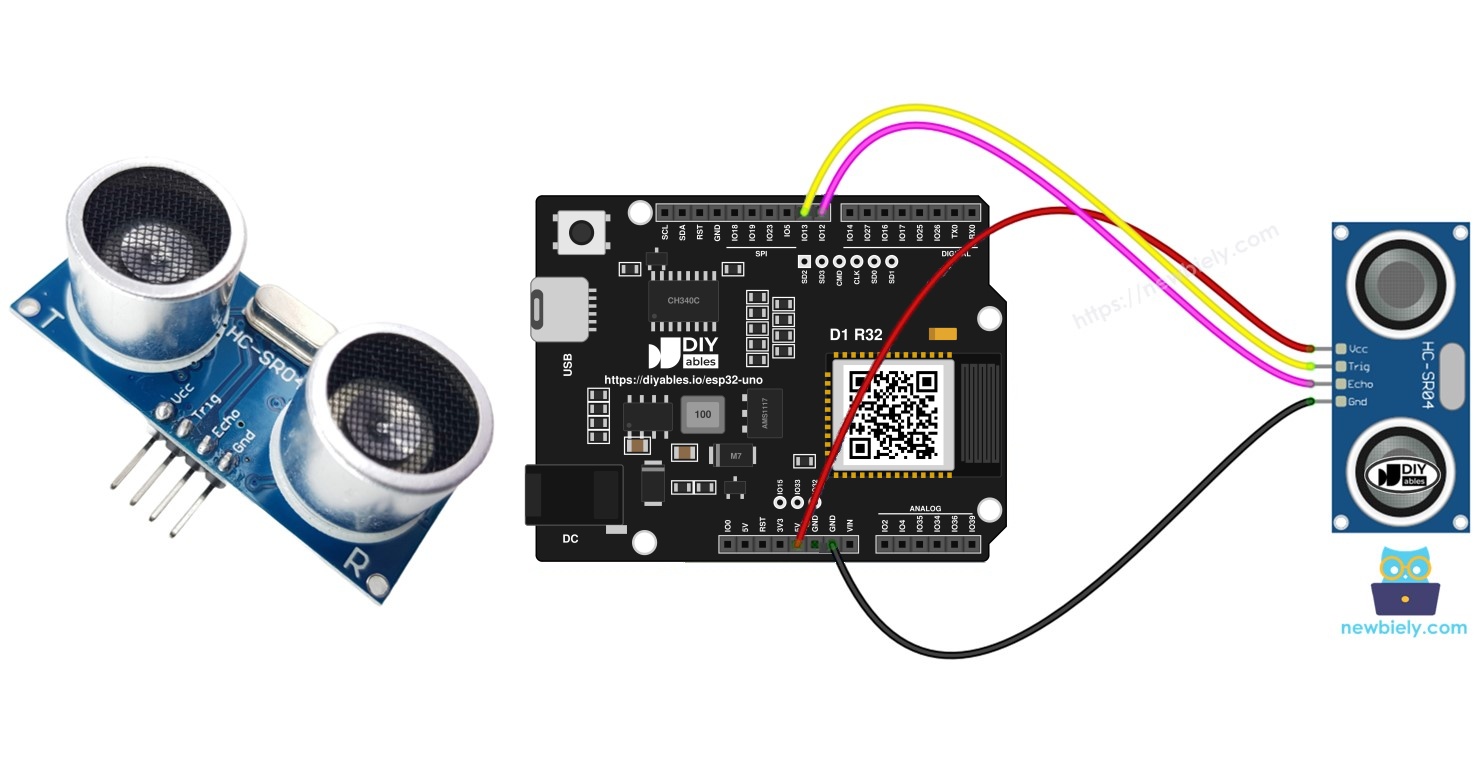
Components You Need
| 1 | × | ESP32 Uno-form Board | |
| 1 | × | USB Cable Type-A to Type-C (for USB-A PC) | |
| 1 | × | USB Cable Type-C to Type-C (for USB-C PC) | |
| 1 | × | Ultrasonic Sensor | |
| 1 | × | Jumper Wires | |
| 1 | × | 5V to 3.3V Level Converter |
Or you can buy the following kits:
| 1 | × | DIYables Sensor Kit (18 sensors/displays) |
Additionally, some of these links are for products from our own brand, DIYables .
How the HC-SR04 Works
By the end of this part, you know what the sensor does and what each pin is for.
The HC-SR04 sends a short burst of sound that people cannot hear. The burst hits an object and bounces back. The sensor keeps its ECHO pin HIGH for as long as the round trip takes, and the board measures that time.
| Item | Value |
|---|---|
| Supply voltage | 5V |
| Measuring range | about 2 cm to 400 cm |
| Beam angle | about 15 degrees |
| Trigger pulse | 10 µs HIGH |
| Formula | distance in cm = 0.017 x echo time in µs |
Good to know: sound travels about 0.034 cm per µs. The echo covers the way out and the way back, so the formula uses half of it (0.017).
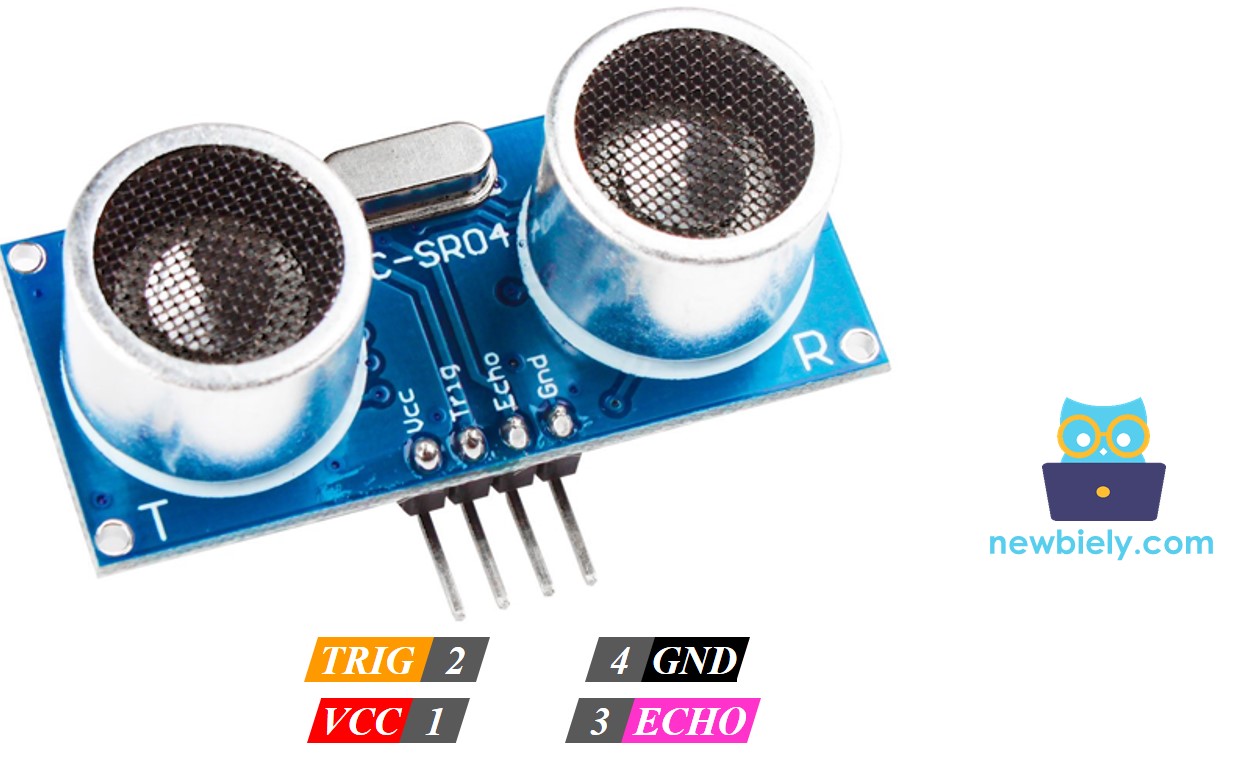
Sensor Pins
| Sensor Pin | Role |
|---|---|
| VCC | Power input, connect to 5V |
| GND | Ground, connect to 0V |
| TRIG | Input, the ESP32 Uno sends a 10 µs pulse here to start a measurement |
| ECHO | Output, a pulse whose length equals the echo time (5V level) |
ESP32 Uno Pinout
Every Uno header pin on the ESP32 Uno form board is tied to one GPIO number, and your sketch uses that number. Match the labels with the picture below before you plug in a wire.

How to Connect
By the end of this part, the sensor is wired with four wires and the ECHO line is safe for 3.3V.
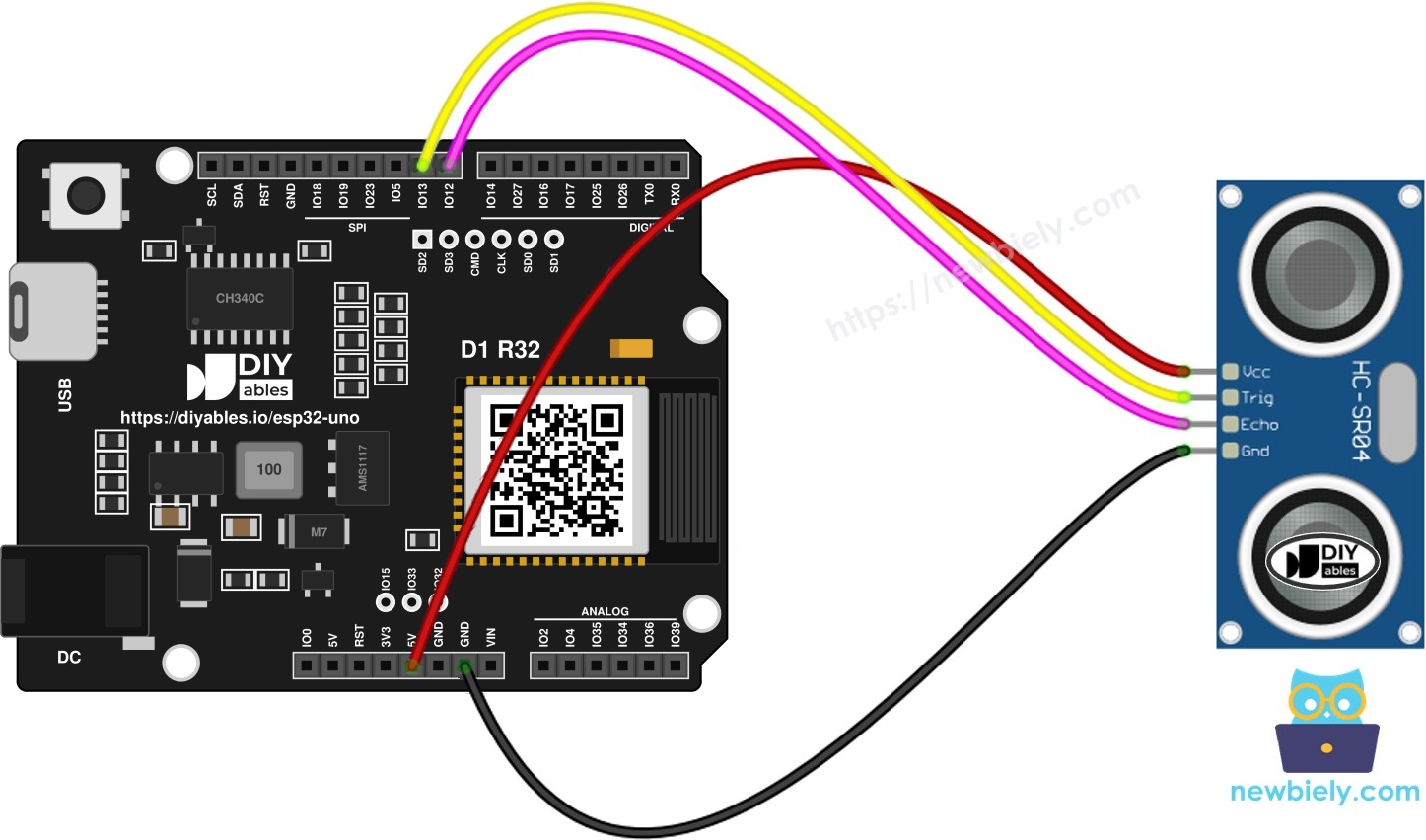
This image is created using Fritzing. Click to enlarge image
※ NOTE THAT:
The wiring diagram may not show the correct wiring for the ESP32 Uno. The HC-SR04 ECHO pin sends a 5V signal, and ESP32 Uno pins are 3.3V only. The picture shows ECHO wired straight to the board. On the ESP32 Uno, put a voltage divider or a level converter on ECHO, as this page shows. We will update the diagram soon. Until then, follow the wiring table and the text on this page, not the picture.
| HC-SR04 Pin | Connects To |
|---|---|
| VCC | 5V |
| GND | GND |
| TRIG | D9 (GPIO13) |
| ECHO | D8 (GPIO12), placed behind a level converter or divider |
Good to know: the board logic is 3.3V and its pins are NOT 5V tolerant. TRIG is safe because the signal goes from the board to the sensor. ECHO is the only risky wire.
WARNING
The HC-SR04 runs on 5V, so its ECHO pin sends a 5V pulse. A direct connection can damage GPIO12 over time. Use a 5V to 3.3V level converter on the ECHO wire. A voltage divider also works: 1kΩ from ECHO to D8 and 2kΩ from D8 to GND.
WARNING
D8 (GPIO12) is a boot strapping pin and must be LOW when the board starts. The sensor keeps ECHO LOW while idle, so this normally works. If the board does not boot or upload, unplug the ECHO wire, upload the code, and plug the wire back in.
ESP32 Uno Code
The sketch pulses TRIG for 10 µs, times the ECHO pulse with pulseIn(), and prints the distance twice per second. The code uses GPIO numbers (13 and 12), not the header names D9 and D8.
| Code Part | What It Does |
|---|---|
| #define TRIG_PIN 13 | Names the GPIO that sends the trigger pulse (D9) |
| #define ECHO_PIN 12 | Names the GPIO that reads the echo (D8) |
| digitalWrite(TRIG_PIN, HIGH) + delayMicroseconds(10) | Makes the 10 µs trigger pulse |
| pulseIn(ECHO_PIN, HIGH) | Returns the echo time in µs |
| 0.017 * duration_us | Converts the echo time to centimeters |
| delay(500) | Waits half a second between readings |
The Serial Monitor now shows one new distance every half second.
Upload and Test
Do these steps in order:
- First time with this board? Set it up with ESP32 Uno - Getting Started before you continue.
- Build the circuit by following the wiring table above.
- Plug in the USB Type-C cable between the ESP32 Uno and your computer.
- Select the board in Arduino IDE: pick ESP32 Dev Module and the COM port of the board (CH340).
- Copy the code above into a new Arduino IDE sketch.
- Click the Upload button to send the code to the board.
- Open the Serial Monitor and set it to 9600 baud.
- Move a flat object toward the sensor and away from it.
- Read the distance on the Serial Monitor.
- Pro tip: Aim the sensor at a wall first and measure it with a ruler. If both numbers match, the wiring and code are good.
Video Tutorial
See the ESP32 Uno build in action in the video below.
The video project adds three LEDs (a traffic light) and a buzzer. As an object comes nearer, the beeps get quicker and the light turns from green to red. Here is the full code used in the video:
The extra parts use these pins:
| Part | ESP32 Uno Pin |
|---|---|
| Green LED | D5 (GPIO16) |
| Yellow LED | D6 (GPIO27) |
| Red LED | D7 (GPIO14) |
| Buzzer | D10 (GPIO5) |
WARNING
D10 (GPIO5) is a boot strapping pin. A buzzer on it is usually fine, but if the board does not boot or upload, unplug the buzzer wire and try again.
Smoothing Noisy Distance Readings
Raw HC-SR04 readings contain noise. A soft surface or a stray echo can give one value that is far too small or too large, and a project that reacts to a single bad value can act wrongly. The fix is to take many readings and drop the extremes.
Step 1 — Collect samples
Read the sensor 20 times and keep every value in an array.
Step 2 — Sort them
Sort the array from the smallest to the largest value.
Step 3 — Drop the extremes
Skip the 5 smallest and the 5 largest values. They are the most likely noise.
Step 4 — Average the middle
Average the 10 middle values (index 5 to 14). This is your distance.
With a 30 ms wait per sample, a single filtered result needs roughly 0.6 s. The pause stops one sound burst from mixing with the next echo.
ESP32 Uno vs UNO R4 for This Project
By the end of this part, you know what changes when this project moves from the UNO R4 to the ESP32 Uno.
| Item | Arduino UNO R4 | ESP32 Uno |
|---|---|---|
| Logic voltage | 5V | 3.3V |
| TRIG pin in code | 9 | 13 (D9 / GPIO13) |
| ECHO pin in code | 8 | 12 (D8 / GPIO12) |
| ECHO wiring | Direct to the pin | Level converter or divider |
| Arduino IDE board | Arduino UNO R4 WiFi | ESP32 Dev Module |
| USB chip | Native USB | CH340 |
The Uno header positions stay the same, so the wires do not move. Only the code numbers change, and the ECHO line needs a level converter because the sensor sends 5V.
Ultrasonic Sensor Applications
An ultrasonic sensor helps whenever a project must know "how far" without touching anything. Try these ideas:
- Stop a robot car before it hits a wall
- Check if a bin or box is full
- Measure the water level in a tank
- Detect when someone steps close to a device
Go Wireless: Distance on Your Phone
By the end of this part, you know how to see the distance without a USB cable.
The ESP32 Uno has WiFi and Bluetooth. You can send the filtered distance to a web page or a phone app and watch it live, for example to check a tank level from another room. These tutorials show how:
Try These Next
- Light an LED when the distance is below 20 cm
- Print the distance in inches (divide cm by 2.54)
- Use two sensors to measure the left and right gap of a robot
- Ignore readings of 0 in your own code
Function References
Troubleshooting
| Problem | Possible Cause | Solution |
|---|---|---|
| No COM port in Arduino IDE | CH340 driver missing or charge-only cable | Install the CH340 driver and use a USB cable that carries data |
| Upload fails with Failed to connect or Waiting for download | Board is not in upload mode | Hold the BOOT button while the upload starts |
| Board does not boot or upload with the sensor connected | ECHO on boot strapping pin D8 (GPIO12) is pulled the wrong way | Unplug the ECHO wire while uploading, then plug it back in |
| Distance is always 0 | No echo, loose wire or broken divider | Check the ECHO path to D8 and keep an object 2 cm to 400 cm away |
| Sensor does not respond at all | VCC or GND wire is loose | Check that VCC goes to 5V and GND goes to GND |
| Readings look wrong or unstable | Weak USB power or sensor on 3.3V | Power VCC from the 5V pin and use a good USB cable |
| Numbers jump up and down | Side echoes or cloth-like targets | Load the filter sketch and point at a hard flat surface |
| Nothing prints in the Serial Monitor | Wrong baud rate | Set the Serial Monitor to 9600 baud |
| Distance never changes | Pin numbers 9 and 8 used in code | Use GPIO numbers 13 for TRIG and 12 for ECHO |
| Pin gets hot or board resets | 5V ECHO signal goes into a 3.3V pin | Add a level converter or a 1kΩ and 2kΩ divider |
FAQ
How does the HC-SR04 measure distance?
It sends a burst of ultrasonic sound and waits for the echo. The ECHO pin stays HIGH for the round-trip time. The sketch multiplies that time by 0.017 to get centimeters.
Do I need a level converter for the ESP32 Uno?
Yes, for the ECHO line. The sensor sends a 5V pulse, and ESP32 Uno pins are not 5V tolerant. TRIG, VCC and GND need no converter. A 1kΩ and 2kΩ voltage divider is a cheap option.
Will the HC-SR04 work on 3.3V power?
The standard HC-SR04 needs 5V and often gives wrong values at 3.3V. Some versions, such as the HC-SR04+ or RCWL-9610, run at 3.3V. For those, the ECHO output is 3.3V too, so no converter is needed. Check the datasheet.
How far can the HC-SR04 measure?
About 2 cm to 400 cm, with a beam angle near 15 degrees. Soft or angled objects reflect less sound, so long-range readings are less steady.
Why do I sometimes see 0 cm?
pulseIn() returns 0 when no echo comes back before its timeout. That happens when nothing is in range, the object absorbs sound, or a wire is loose.
Why does the code use 13 and 12 instead of D9 and D8?
The labels printed on the header are not what the compiler wants. D9 is GPIO13 and D8 is GPIO12, so put the GPIO number in your sketch.
Is GPIO12 safe for the ECHO wire?
GPIO12 is a boot strapping pin and must be LOW at startup. The HC-SR04 keeps ECHO LOW while idle, so it normally works. If the board will not boot or upload, unplug the wire first.
Can I use my Uno shields or the UNO R4 sketch?
The Uno header shape fits many shields, but check their voltage because the pins are 3.3V. For the sketch, change the pin numbers to GPIO numbers. The rest of this code stays the same.
Why is the USB driver different from the UNO R4?
The ESP32 Uno uses a CH340 USB chip. On some computers you must install the CH340 driver before a COM port appears.
Can I see the distance on a web page with the ESP32 Uno?
Yes. The board has WiFi and Bluetooth, so you can send the value to a web page or phone app. See the Go Wireless part above for links.
What if I run out of pins on the Uno headers for this project?
The ESP32 Uno has a few extra holes near the power header. GPIO32 and GPIO33 support I/O, PWM and analog on ADC1, so they also work while WiFi is on. GPIO15 supports I/O, PWM and analog on ADC2. Solder headers into the holes you need and use the GPIO number in your sketch. For a second ultrasonic sensor, use GPIO32 for TRIG and GPIO33 for ECHO. Two warnings apply. First, GPIO15 and GPIO0 (the IO0 pin at the unused Uno NC position) are boot strapping pins, so a wrong connection can stop the board from booting or uploading. Use GPIO32 and GPIO33 first. Second, never use the six holes under the digital header (SD0 to SD3, CMD and CLK, which are GPIO6 to GPIO11). They connect to the flash chip, and using them crashes the board.