
ESP32 UNO - GUVA-S12SD UV Sensor
Is it time for more sunscreen? Is that cheap UV flashlight really giving out UV? A GUVA-S12SD module can answer both, and the ESP32 Uno form board reads it with three jumper wires and no extra parts. The sensor gives a small voltage. The board turns that voltage into millivolts, and a simple rule turns millivolts into a UV index you already know from the weather report.
What this page covers:
- What is inside the purple module and what its SIG, GND and VCC pins do
- Which header holes to use on the ESP32 Uno, and one thing to know about A0
- A first sketch that prints the ADC count and the SIG voltage side by side
- A second sketch that averages the input and prints a UV index from Low to Extreme
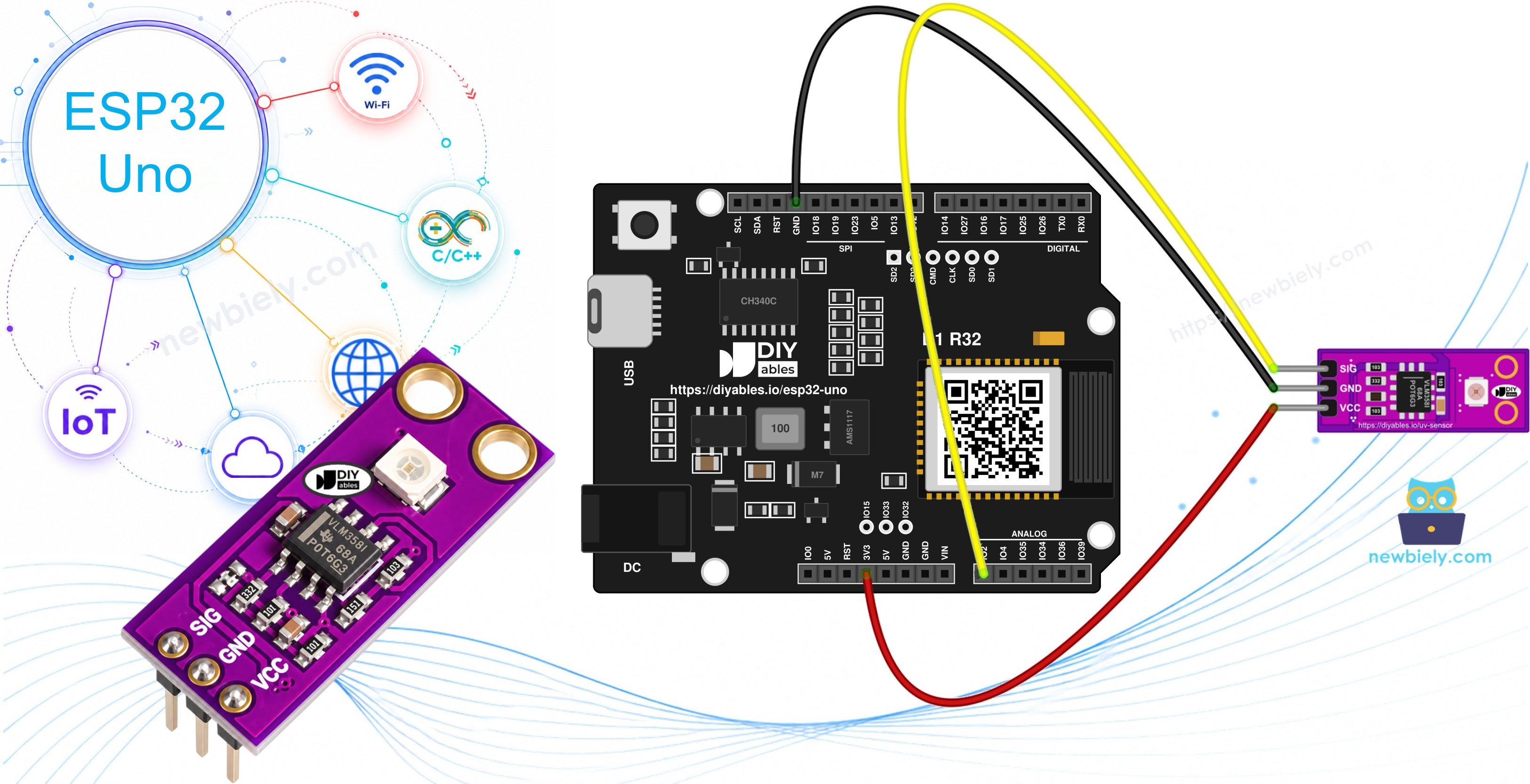
Components You Need
| 1 | × | ESP32 Uno-form Board | |
| 1 | × | USB Cable Type-A to Type-C (for USB-A PC) | |
| 1 | × | USB Cable Type-C to Type-C (for USB-C PC) | |
| 1 | × | GUVA-S12SD UV Sensor Module | |
| 1 | × | Jumper Wires |
Or you can buy the following kits:
| 1 | × | DIYables Sensor Kit (18 sensors/displays) |
Additionally, some of these links are for products from our own brand, DIYables .
The GUVA-S12SD UV Sensor Module
This part explains what the module measures, so the numbers on the Serial Monitor make sense later.
The board is small and purple, about 11mm x 27mm, with two holes for screws. Look for the tiny white square: that is the GUVA-S12SD photodiode. When UV light hits it, a very small current flows. That current is too weak for any ADC, so the VLM358 op-amp next to it changes it into a voltage on SIG. More UV means a higher voltage. The DIYables module comes with the header already soldered, two modules per pack.
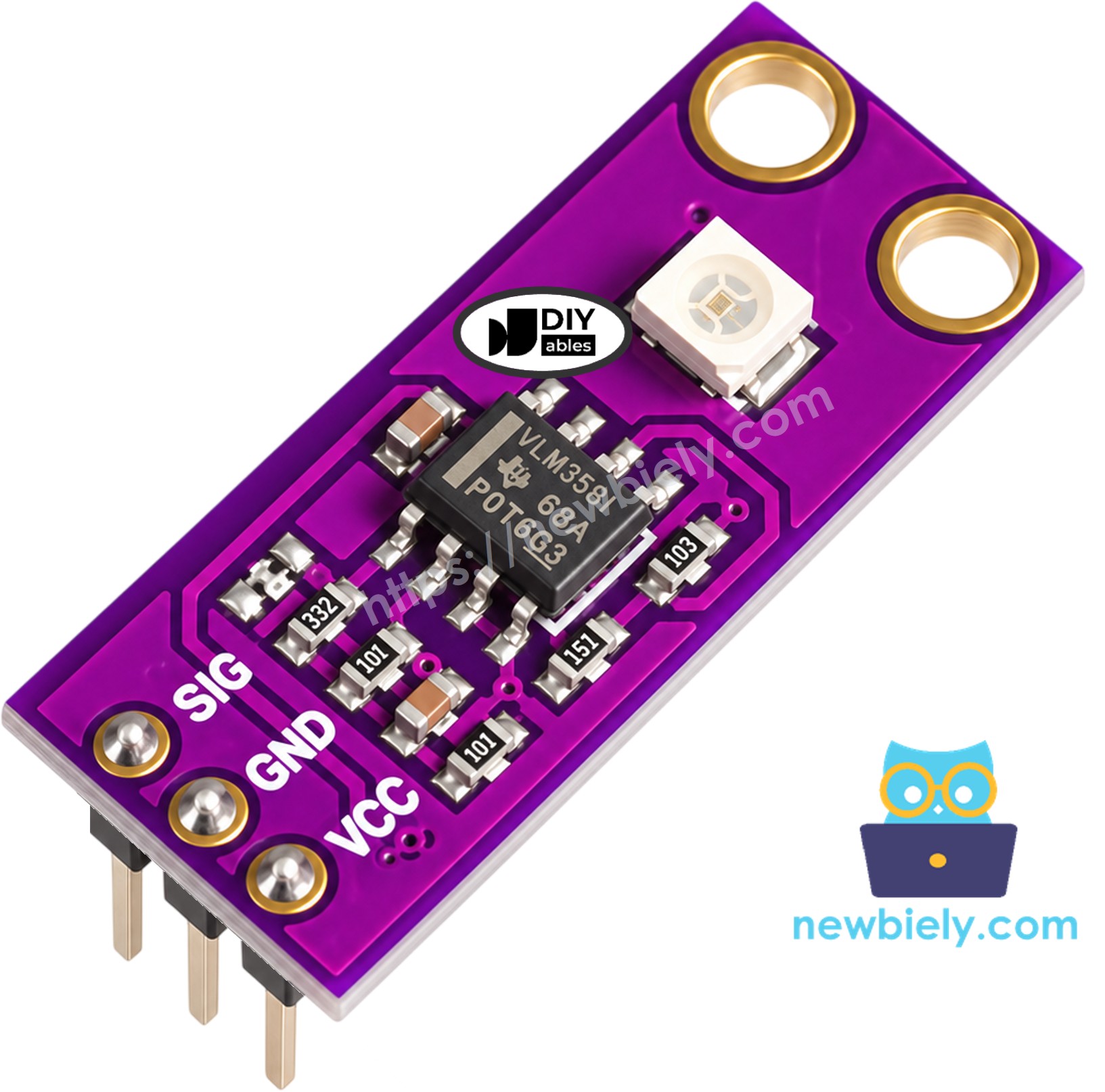
| Pin | What It Does | ESP32 Uno Connection |
|---|---|---|
| SIG | Analog output, about 0V with no UV and around 1V in strong sun | A0 (GPIO2) |
| GND | Ground | GND |
| VCC | Power, 2.5V to 5V DC | 3.3V |
Some facts to keep in mind:
- It reacts to UV-A and UV-B, from 240nm to 370nm.
- It looks out over a wide 130 degree cone, so it does not need to point straight at the sun.
- Normal lamps and window light give almost no UV. At your desk the output stays near 0V. That is correct, not a fault.
From voltage to UV index
Most makers use one easy rule: UV index ≈ SIG voltage / 0.1. So 0.3V is about UV index 3, and 0.7V is about 7. The result is good enough for a hobby project, but it is not a lab meter. Here is the World Health Organization scale the second sketch uses:
| UV Index | Level | What It Means Outside |
|---|---|---|
| 0 to 2 | Low | Safe for most people |
| 3 to 5 | Moderate | Use shade at noon |
| 6 to 7 | High | Sunscreen, hat and shade |
| 8 to 10 | Very High | Stay out of the midday sun |
| 11 and above | Extreme | Avoid the sun if you can |
ESP32 Uno Pinout
The sketches use the number 2 for the sensor pin. The diagram shows why: the hole printed A0 on the Uno-style header is GPIO2 on the ESP32 chip.

How to Connect
Only three wires are needed. Plug them from the module header into the board header.
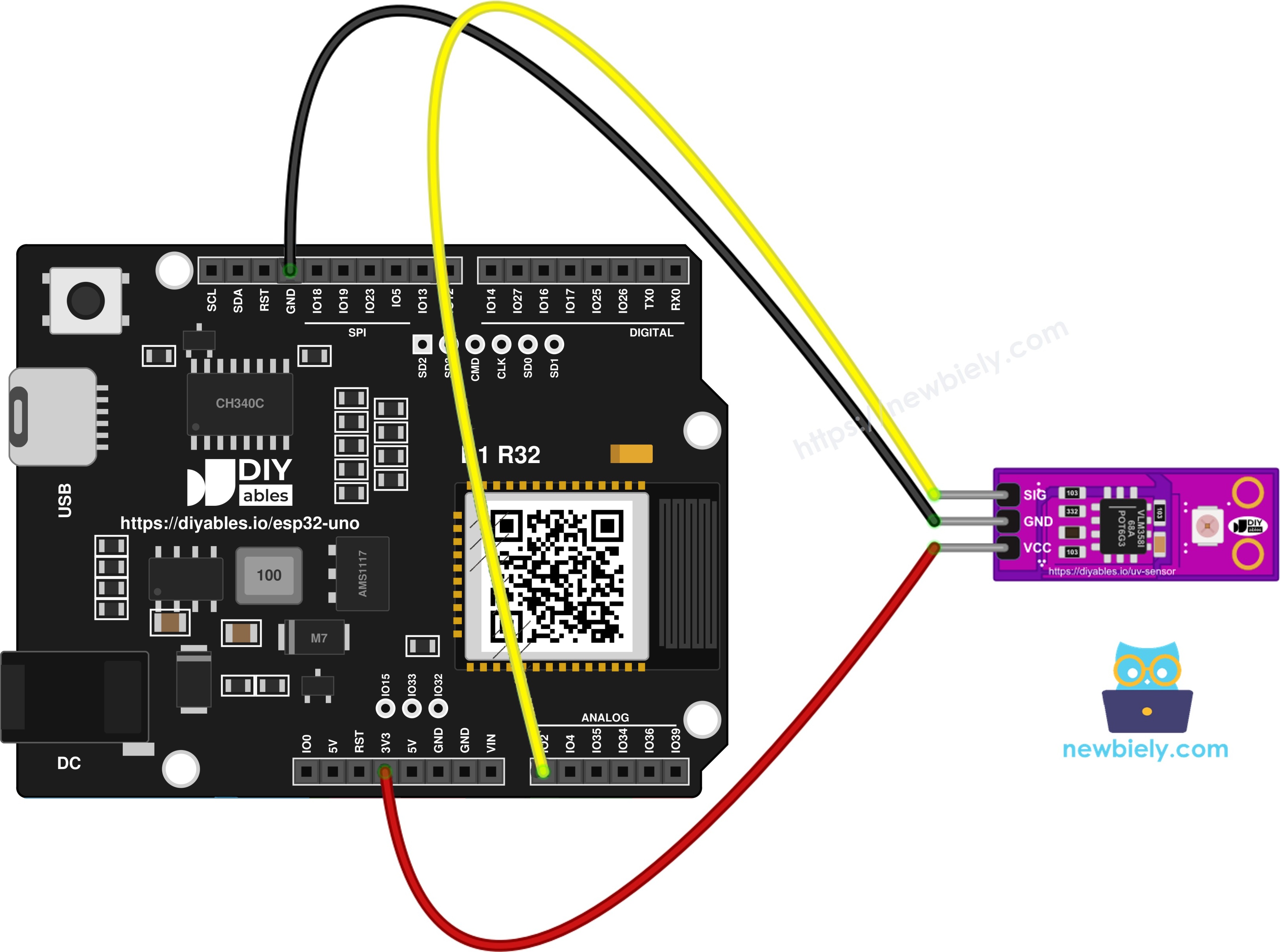
This image is created using Fritzing. Click to enlarge image
| GUVA-S12SD Pin | ESP32 Uno Pin |
|---|---|
| SIG | A0 (GPIO2) |
| GND | GND |
| VCC | 3.3V |
WARNING
Keep VCC on the 3.3V pin. The ESP32 Uno pins take 3.3V at most, and the module works fine at 3.3V.
Good to know: GPIO2 is an ADC2 pin, and ESP32 cannot read ADC2 while WiFi is on; that is no problem here, because these sketches do not use WiFi. GPIO2 is also a boot strapping pin. If an upload ever fails with the sensor plugged in, pull out the SIG wire, upload, then put it back.
ESP32 Uno Code - Read the ADC Count and SIG Voltage
This first sketch prints two numbers every 0.8 seconds. One is the plain 12-bit count from analogRead(). The other is the pin voltage from analogReadMilliVolts(), which uses the calibration data stored in each ESP32 chip at the factory. That makes the voltage more accurate than a simple "count x 3.3 / 4095" sum.
Upload and Test
- New to this board? Install the ESP32 core with ESP32 Uno - Getting Started first.
- Make the three connections from the table above.
- Plug the board in with the USB Type-C cable.
- Pick the board in Arduino IDE: ESP32 Dev Module and the CH340 COM port.
- Paste the sketch into a new window and click Upload.
- Open the Serial Monitor at 9600 baud.
- Watch it indoors first, then carry the laptop to a sunny window with the window open, or go outside. A long USB cable or a power bank helps. The log looks like this:
- Pro tip: no sun today? A 365nm or 395nm UV flashlight held 5 cm above the white square also lifts the reading.
Why does the voltage show 0.07V when the count is 0? The classic ESP32 ADC cannot tell apart voltages under roughly 0.1V. A count of 0 just means "at the bottom", and the small millivolt value is the calibration offset, not real UV. The second sketch handles this case.
ESP32 Uno Code - UV Index with Level Names
Now the sketch takes 20 quick readings and averages them, so one noisy sample does not jump the result. It divides the voltage by 0.1 to get the UV index, then looks up the WHO level in a small table.
Upload and Test
- Keep the wiring from the first sketch.
- Upload this sketch in place of the old one.
- Open the Serial Monitor at 9600 baud again.
- Start in the room, then move into the sun. Here is a run from a clear afternoon:
- Pro tip: compare the number with the UV index in a weather app at the same time. If yours is always a bit higher or lower, change 0.1 in the code to fit your module.
The 1.8 line was taken in the shade of a tree, and the 4.1 line came when a cloud passed. Glass blocks most UV-B, so behind a closed window the index drops a lot.
Video Tutorial
See the ESP32 Uno build in action in the video below.
Code Explanation
| Code Part | What It Does |
|---|---|
| #define UV_PIN 2 | Uses GPIO2, which is the A0 hole on the header |
| analogSetAttenuation(ADC_11db) | Opens the input range to about 3.1V, more than the module ever gives |
| analogRead(UV_PIN) | Gives a count from 0 to 4095 with no correction |
| analogReadMilliVolts(UV_PIN) | Gives the pin voltage in mV, corrected by the chip's own calibration |
| for (int i = 0; i < SAMPLES; i++) | Adds 20 readings so the average is calm |
| if (total_raw == 0) | Treats a reading at the very bottom of the range as 0V |
| sig_volt / 0.1 | The rule of thumb, 0.1V per UV index point |
| LEVEL_TOP[] and LEVEL_NAME[] | Upper limit and name of each WHO level |
| while (level < 4 && ...) | Moves up the table until the UV index fits |
Project Ideas
- Sunscreen reminder: count the minutes spent at UV index 3 or more and print "Put on sunscreen again" after two hours.
- Balcony UV station: add a DHT22 sensor and show UV, temperature and humidity on an OLED. See also the ESP32 Uno - Smart Weather Station.
- UV lamp tester: check if a nail lamp or a UV LED strip still gives out UV after months of use.
- Smart blind: close a blind with a servo when the UV index goes above 6.
- Phone view: show the UV index on a Web Analog Gauge or a Bluetooth Plotter. For the WiFi version, move SIG to A2 (GPIO35) and set UV_PIN to 35, because A0 is on ADC2. Bluetooth works with A0.
Troubleshooting
| Problem | Possible Cause | Solution |
|---|---|---|
| Count is always 0, even outside | No UV reaches the sensor, or SIG is loose | Go out in direct sun with no glass in between, and check the SIG wire on A0 |
| Count is always 0 with good light | The code reads the wrong pin | Use 2 in the code, since A0 is GPIO2 |
| Count stays near 4095 | SIG touches VCC, or pins swapped | Follow the SIG, GND, VCC labels on the module |
| UV index looks too low behind a window | Glass blocks most UV | Open the window or test outdoors |
| Reading stops changing after adding WiFi | A0 is ADC2 and WiFi blocks it | Move SIG to A2 (GPIO35) and use 35 in the code |
| Upload fails with the sensor plugged in | GPIO2 is a boot strapping pin | Unplug SIG during upload, or hold BOOT as the upload starts |
| No COM port in Arduino IDE | CH340 driver missing or charge-only cable | Install the CH340 driver and use a data cable |
| Serial Monitor shows odd symbols | Baud rate mismatch | Select 9600 baud |
FAQ
Why does the sensor read 0 in my bright room?
Indoor lamps and LED bulbs give almost no UV, and window glass blocks a lot of it. The GUVA-S12SD only reacts to light from 240nm to 370nm, so a dark-looking reading indoors is normal.
Can I power the module from 5V on the ESP32 Uno?
The module accepts 5V, but keep it on 3.3V. The ESP32 Uno pins are 3.3V only, and the module works just as well at 3.3V.
Why use analogReadMilliVolts() and not analogRead()?
Every ESP32 chip has a slightly different ADC. analogReadMilliVolts() uses calibration data stored in the chip, so it gives a truer voltage. Since the UV index comes straight from the voltage, this matters.
How exact is the UV index from this module?
It is a good estimate, often within one or two points of a weather app. Dust on the sensor, the angle to the sun and the module itself all change it a little. For a medical or lab result, use a calibrated UV meter.
Can I use another analog pin?
Yes. A1 (GPIO4) also works without WiFi. A2 to A5 (GPIO35, 34, 36, 39) and GPIO32/33 are on ADC1, so they keep working when WiFi is on. Change UV_PIN to the GPIO number.
Does the sensor wear out in the sun?
No. It is made to sit in sunlight. If you place it outside, put it under a clear cover that lets UV pass, such as quartz or a UV-transparent acrylic. Normal glass and most plastics block UV.