
ESP32 UNO - DHT22
Need precise room readings from an ESP32 Uno DHT22 setup? Hook the sensor to one data pin and get humidity plus temperature in °C and °F every few seconds. The DHT22 (also sold as AM2302) is a digital temperature humidity sensor, and the ESP32 Uno form board reads it with a short Arduino IDE sketch. You can use the bare 4-pin part or the 3-pin breakout.
What you will do:
- Check the DHT22 specs and both pin layouts
- Wire a bare DHT22 with a 10 kΩ pull-up to D2
- Wire a 3-pin DHT22 module with only three jumpers
- Add the Adafruit DHT library in Arduino IDE
- Print humidity, Celsius and Fahrenheit in the Serial Monitor
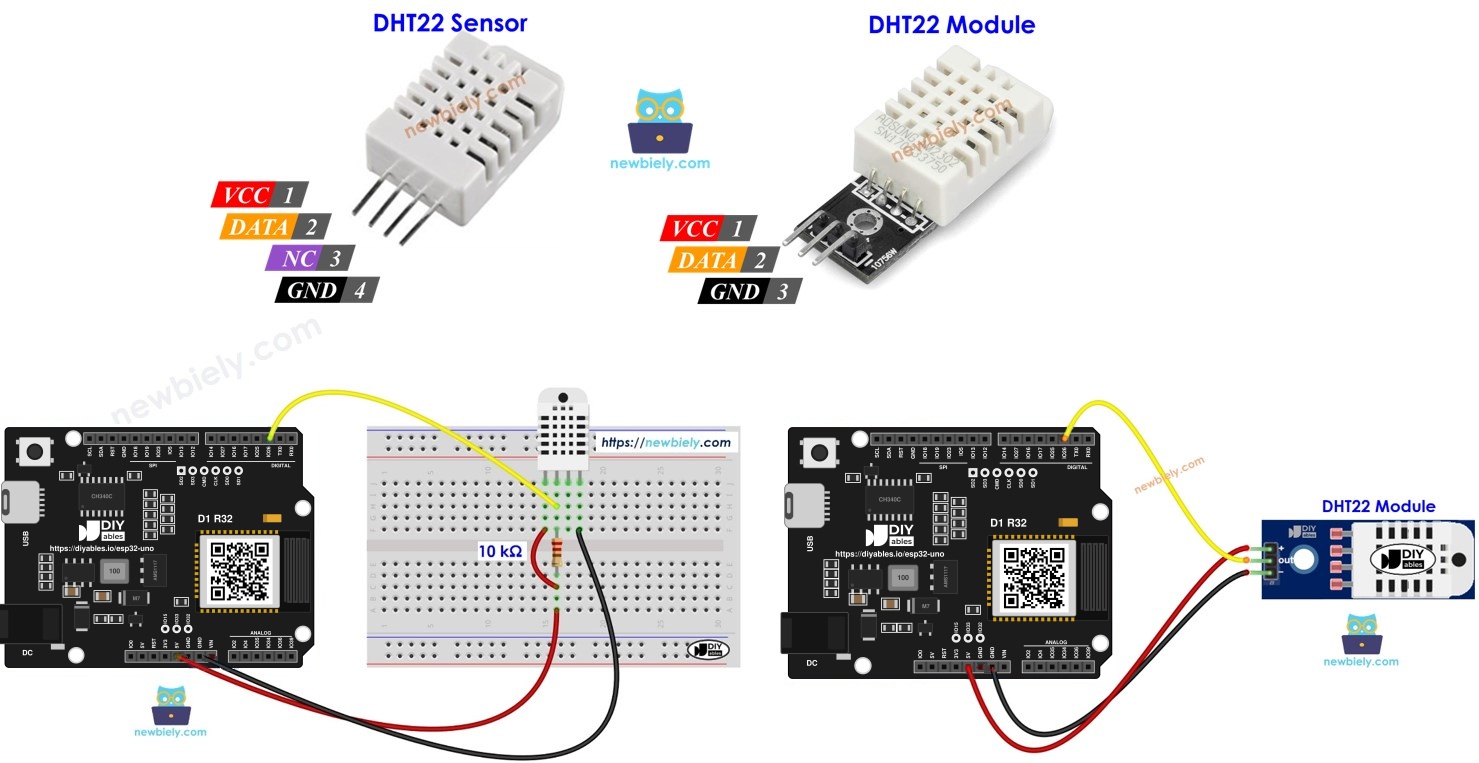
Components You Need
Or you can buy the following kits:
| 1 | × | DIYables Sensor Kit (18 sensors/displays) |
Additionally, some of these links are for products from our own brand, DIYables .
DHT22 at a Glance
After this part, you know what the sensor measures and how fast it can work.
| Spec | DHT22 Value |
|---|---|
| Temperature span | -40°C up to 80°C |
| Temperature error | about ±0.5°C |
| Humidity span | 0% up to 100% RH |
| Humidity error | about ±2 to 5% RH |
| Sample rate | 0.5Hz, one new result per 2 seconds |
| Supply | 3V to 5V |
Good to know: a read faster than every 2 seconds just returns the old value or a failed result, so keep your loop slow.
Pin Layout
The sensor ships in two versions. The sketch is identical for both; only the pin count and the resistor differ.
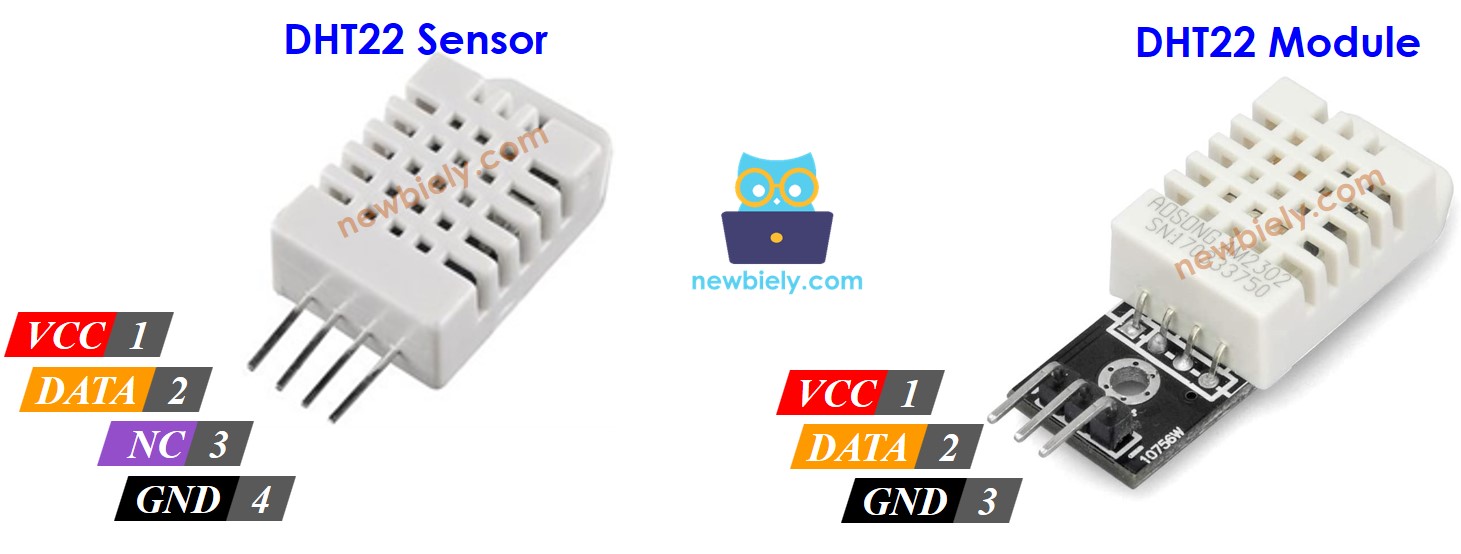
| Pin | Bare Sensor (4 pins) | Module (3 pins) |
|---|---|---|
| VCC or + | Power, 3.3V on this board | Power, 3.3V on this board |
| DATA or OUT | Single-wire data line | Single-wire data line |
| NC | Leave it free | Not present |
| GND or - | Ground (0V) | Ground (0V) |
| Pull-up resistor | You add it | Usually already soldered on |
ESP32 Uno Pinout
The D2 label on the header is not the number you type in the sketch. Look at the picture to find D2, 3.3V and GND, and note that D2 is GPIO26.

How to Connect
When you finish this part, the DATA line sits on D2 (GPIO26) and is held HIGH by a pull-up.
The DATA line needs a 5 kΩ to 10 kΩ pull-up resistor to VCC. Without it, the line floats between messages and the readings fail.
ESP32 Uno - DHT22 Sensor Wiring
For the bare part, put the 10 kΩ resistor across DATA and 3.3V on the breadboard.
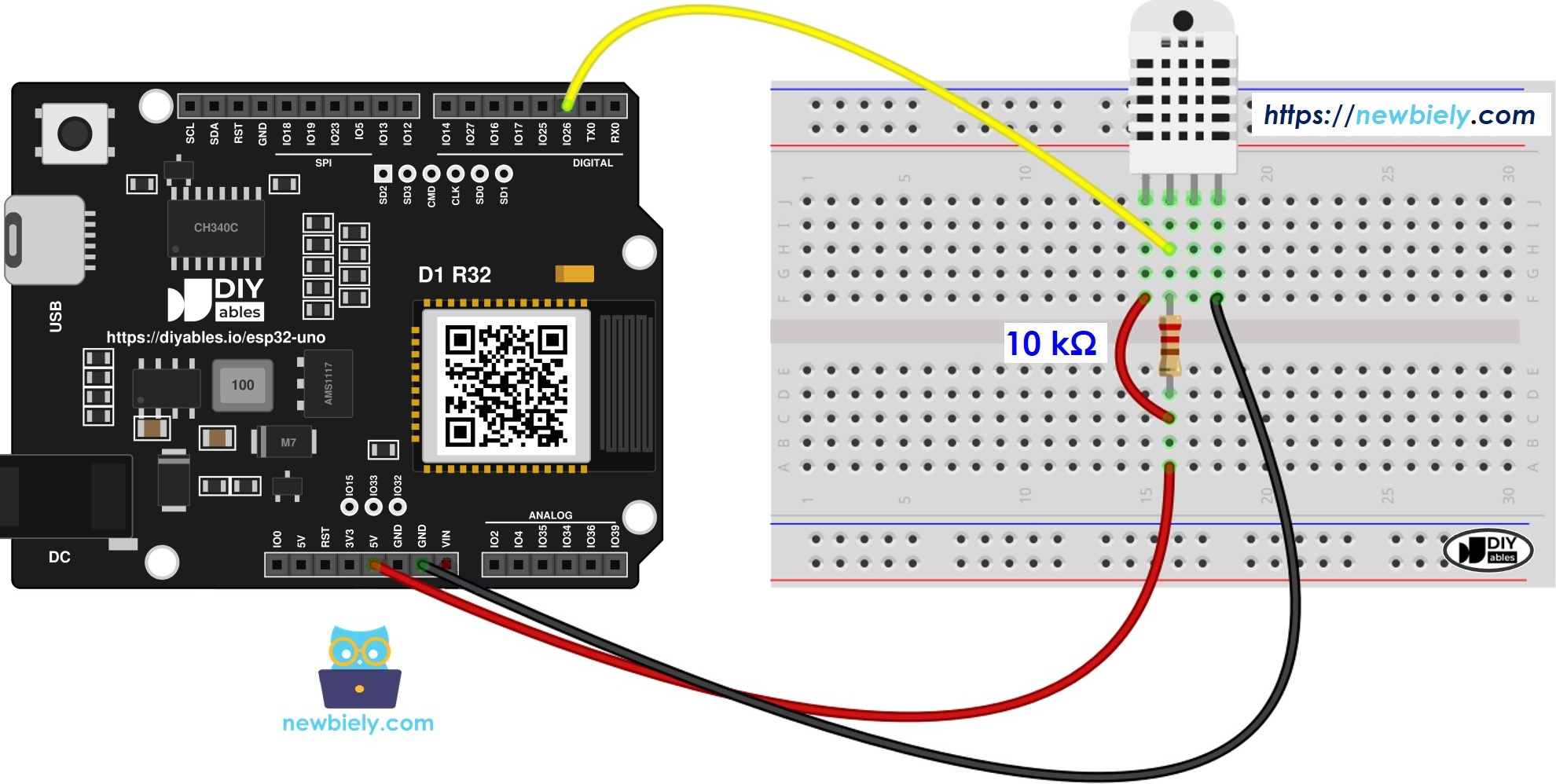
This image is created using Fritzing. Click to enlarge image
| DHT22 Sensor Pin | ESP32 Uno Pin |
|---|---|
| VCC | 3.3V |
| DATA | D2 (GPIO26) + 10 kΩ resistor up to 3.3V |
| NC | no wire |
| GND | GND |
ESP32 Uno - DHT22 Module Wiring
The breakout board already carries the pull-up, so three jumpers are enough.
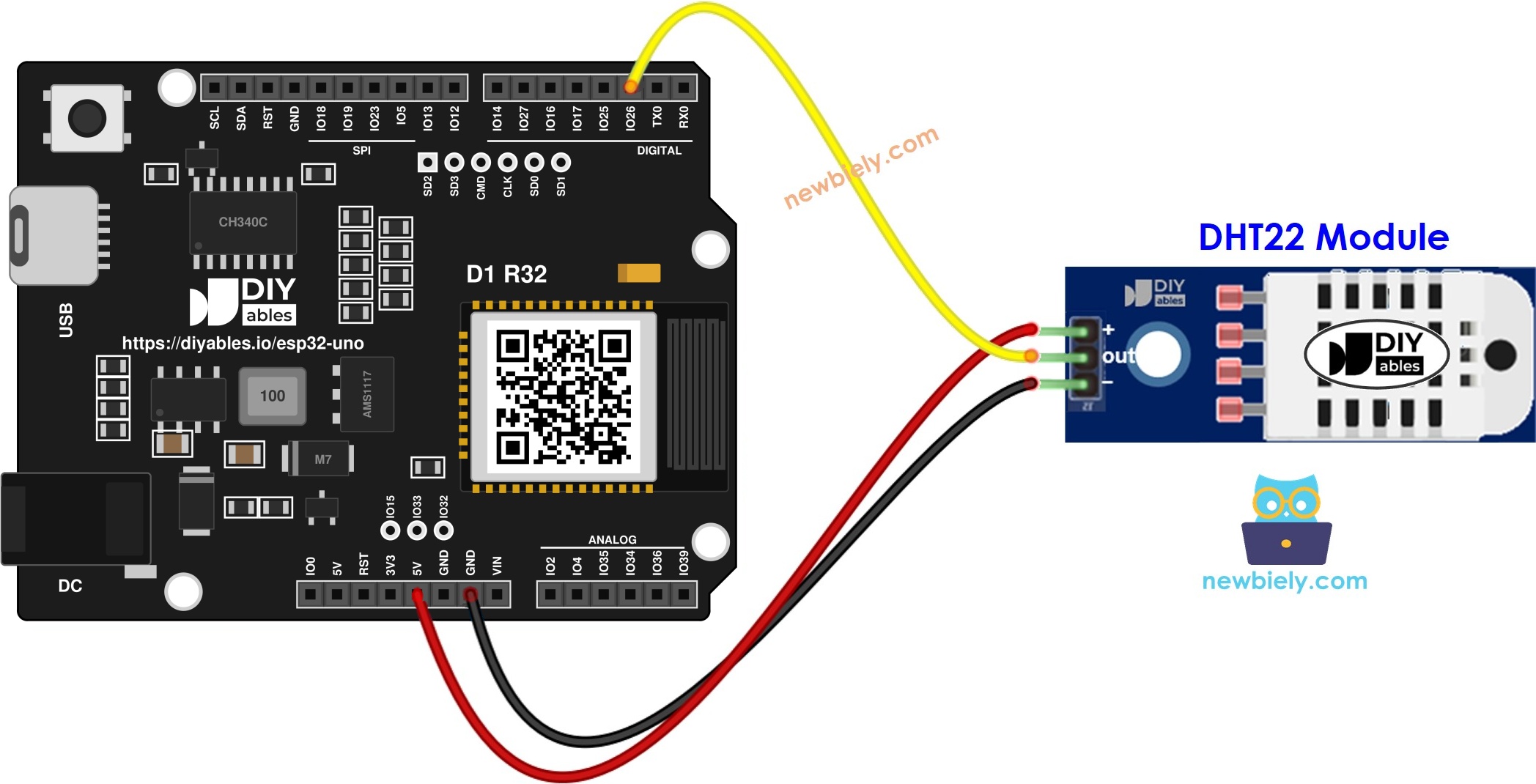
This image is created using Fritzing. Click to enlarge image
| DHT22 Module Pin | ESP32 Uno Pin |
|---|---|
| + (VCC) | 3.3V |
| OUT (DATA) | D2 (GPIO26) |
| * (GND) | GND |
Good to know: ESP32 Uno pins use 3.3V logic and are NOT 5V tolerant.
WARNING
The pull-up ties DATA to the same voltage as VCC. Feed the DHT22 from 5V and GPIO26 sees 5V, which can damage it. Use the 3.3V pin — the DHT22 runs well at 3.3V.
How To Program the DHT22
After this part, you know the six calls the sketch is built from. Sensor and module use the same code.
Step 1 — Load the library
Step 2 — Name the data pin
Write the GPIO number, not the header label. D2 is GPIO26.
Step 3 — Make the sensor object
Step 4 — Start it inside setup()
Step 5 — Get the values
Pass true for Fahrenheit:
ESP32 Uno Code - DHT22
This sketch waits 3 seconds, reads the DHT22, and prints one line with humidity, °C and °F — or an error line if the read fails.
Upload and Test
- First time with this board? Set it up with ESP32 Uno - Getting Started before you continue.
- Build the circuit by following the wiring table above.
- Plug in the USB Type-C cable between the ESP32 Uno and your computer.
- Select the board in Arduino IDE: pick ESP32 Dev Module and the COM port of the board (CH340).
- Open Library Manager with the Libraries icon in the left bar.
- Search "DHT" and pick DHT sensor library by Adafruit, then press Install.
- Search for DHT sensor library created by Adafruit and click the Install button.
- Accept the extra libraries. The IDE asks for dependencies; press Install All.
- Search for Adafruit Unified Sensor created by Adafruit
- Paste the code into a new sketch.
- Press Upload and wait for "Done uploading".
- Open Serial Monitor at 9600 baud.
- Change the air around the sensor: hold it in your fist, or set it near a cup of warm tea.
- Pro tip: put a piece of wet tissue near (not on) the sensor for 30 seconds. Humidity climbs fast, then falls back slowly — a quick way to prove the sensor responds.
Video Tutorial
See the ESP32 Uno build in action in the video below.
Code Explanation
After this part, you know what each block of the sketch does.
| Code Part | What It Does |
|---|---|
| #define DHT22_PIN 26 | Points the library to D2 (GPIO26) |
| dht22.begin() | Gets the data line ready |
| delay(3000) | Keeps reads slower than the 2 second limit |
| readHumidity() / readTemperature() | Return float values, or NaN on a bad read |
| isnan(...) check | Prints an error line instead of garbage numbers |
The result is one clean line every 3 seconds, or a clear failure message you can act on.
ESP32 Uno vs UNO R4 for This Project
Moving this DHT22 build from the UNO R4 to the ESP32 Uno changes only the pin number and the supply rule.
| Item | Arduino UNO R4 | ESP32 Uno |
|---|---|---|
| Logic voltage | 5V | 3.3V |
| DHT22 supply | 3.3V or 5V | 3.3V only (keeps DATA safe) |
| Data pin in code | 2 | 26 (D2 header) |
| Library | Adafruit DHT | Adafruit DHT (same) |
| Arduino IDE board | Arduino UNO R4 WiFi | ESP32 Dev Module |
| WiFi and Bluetooth | WiFi only on the R4 WiFi | WiFi plus Bluetooth Classic and BLE |
The wiring stays on the same header positions. Just move VCC (and the pull-up) to 3.3V.
Go Wireless: A Phone Climate Monitor
After this part, you have an idea for taking the readings off the USB cable.
The ESP32 Uno has WiFi and Bluetooth built in. Send the DHT22 values to a web page or a phone app, and check your room, greenhouse or server cabinet from the sofa. A plotter shows how humidity rises when you cook or shower.
Troubleshooting
| Problem | Possible Cause | Solution |
|---|---|---|
| No COM port shows up | CH340 driver missing or charge-only cable | Install the CH340 driver and try a USB cable that carries data |
| Upload stops at "Waiting for download" | Board did not enter flash mode | Hold the BOOT button while the upload starts, then let go |
| Every line says Failed to read | DATA not on D2 or no supply | Check the jumper on D2 (GPIO26), 3.3V and GND, and that the code says 26 |
| Some reads fail at random | Bare sensor without pull-up | Put a 10 kΩ resistor from DATA to 3.3V |
| DHT.h no such file | Library not added | Install DHT sensor library by Adafruit plus Adafruit Unified Sensor |
| Unreadable symbols in Serial Monitor | Baud rate does not match | Choose 9600 baud |
| Temperature looks 1 to 2°C high | Sensor placed next to the warm board | Use longer wires and keep the sensor a few cm away |
| Humidity stuck at 99.9% | Water drops on the sensor | Let it dry in room air for an hour, keep it out of direct spray |
FAQ
Is the DHT22 the same as the AM2302?
Yes. The AM2302 is the wired version of the DHT22, often with the pull-up inside. It uses the same library and the same code with the DHT22 type.
Should the DHT22 run from 3.3V or 5V on the ESP32 Uno?
Use 3.3V. The pull-up lifts DATA to VCC, and ESP32 Uno pins do not accept 5V. The sensor is rated from 3V, so 3.3V is fine for short wires.
How long can the wires be between the ESP32 Uno and the DHT22?
At 3.3V, keep them under about 1 m. For longer runs, use a lower pull-up (around 4.7 kΩ) and a shielded or twisted cable.
How do I read two DHT22 sensors at once?
Create two DHT objects on two free pins, for example D2 (GPIO26) and D3 (GPIO25), and call begin() on both. Each sensor needs its own data pin.
Why does my D2 pin become 26 in the sketch?
The ESP32 Uno code uses chip GPIO numbers. The Uno header label D2 is wired to GPIO26, so DHT22_PIN must be 26, not 2.
Can I put the DHT22 on A2 to A5 of the ESP32 Uno?
No. A2 to A5 (GPIO35, 34, 36, 39) are input only and have no pull-up. The DHT22 protocol needs the pin to drive the line LOW to start each read.
Which pins should I avoid for the DHT22 data line?
Skip D8 (GPIO12), D10 (GPIO5) and A0 (GPIO2) because they are boot strapping pins, and D0/D1 because they carry USB serial. D2 to D7, D9 and D11 to D13 are all safe.
Does the UNO R4 sketch work on the ESP32 Uno?
Almost. The library and logic are the same; you only change the pin number from 2 to 26 and pick ESP32 Dev Module as the board.
What if my project needs more pins than the Uno headers give?
The ESP32 Uno has extra holes near the power header: GPIO32 and GPIO33 (I/O, PWM, analog on ADC1, so they also work while WiFi is on) and GPIO15 (I/O, PWM, analog on ADC2). Add pin headers with a soldering iron, then type the GPIO number in your sketch. For a second or third DHT22, use GPIO32 or GPIO33. Two warnings: GPIO15 and GPIO0 (the IO0 pin at the unused Uno NC position) are boot strapping pins, and a wrong connection can stop the board from booting or uploading, so use GPIO32/33 first. Never use the six holes under the digital header (SD0 to SD3, CMD, CLK = GPIO6 to GPIO11); they go to the flash chip and using them crashes the board.
Can I log DHT22 data over WiFi with the ESP32 Uno?
Yes. The DHT22 is a digital sensor, so WiFi does not affect it. You can show the values on a web page, send them to a server, or use the web apps listed above.