
ESP32 UNO - Mini Mp3 Player Module
Want your ESP32 Uno to play music, voice prompts or sound effects? Hook up the DIYables mini mp3 player to the ESP32 Uno form board, drop a few mp3 files on a micro SD card, and a small speaker plays them on command. The module uses the YX5200 decoder (the chip found on DFPlayer Mini clones), so the ESP32 Uno only sends short UART commands and never decodes audio itself.
By the end, you can:
- Connect a YX5200 mp3 board and speaker to the ESP32 Uno
- Lay out the micro SD card so tracks play in the right order
- Start, pause, skip and loop tracks with Arduino IDE code
- Change the volume and the track with push buttons
- Drive every player function from the Serial Monitor
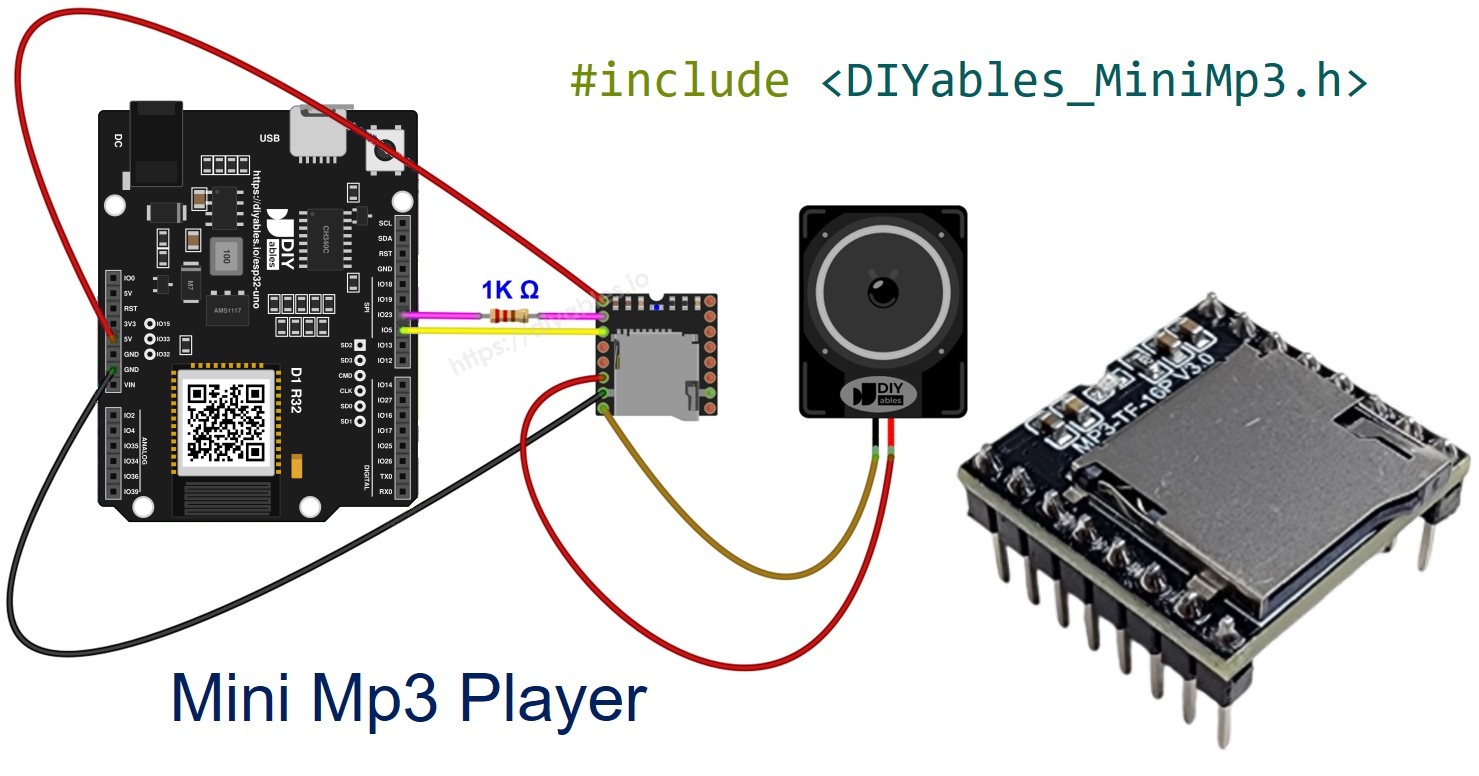
Components You Need
| 1 | × | ESP32 Uno-form Board | |
| 1 | × | USB Cable Type-A to Type-C (for USB-A PC) | |
| 1 | × | USB Cable Type-C to Type-C (for USB-C PC) | |
| 1 | × | DIYables Mini Mp3 Player module | |
| 1 | × | Micro SD Card | |
| 1 | × | Speaker | |
| 1 | × | Breadboard | |
| 1 | × | Jumper Wires |
Or you can buy the following kits:
| 1 | × | DIYables Sensor Kit (18 sensors/displays) |
Additionally, some of these links are for products from our own brand, DIYables .
Mini Mp3 Player Module Overview
After this part, you know what the board does and which of its pins matter for this build.
The DIYables Mini Mp3 Player carries a YX5200-24SS mp3 decoder and a micro SD card slot. Its on-board amplifier pushes up to 3W into a speaker wired to the SPK pins. For louder setups, the DAC pins give a line-level stereo signal that you can feed into a separate amplifier.
| Feature | Value |
|---|---|
| Decoder chip | YX5200-24SS |
| Control link | UART, 9600 baud |
| Supply voltage | 3.2V to 5.0V |
| Speaker output | Mono, up to 3W |
| Line output | DAC_L and DAC_R (stereo) |
| Volume steps | 0 to 30 |
| EQ choices | 6 (Normal to Bass) |
| Play modes | Single track, repeat track, repeat folder, repeat all, shuffle |
| Storage layout | Root files or numbered folders on a micro SD card |
Good to know: the module can also break into a playing song with an "advertisement" clip, and it answers status questions such as the current track number or volume.
Module Pinout
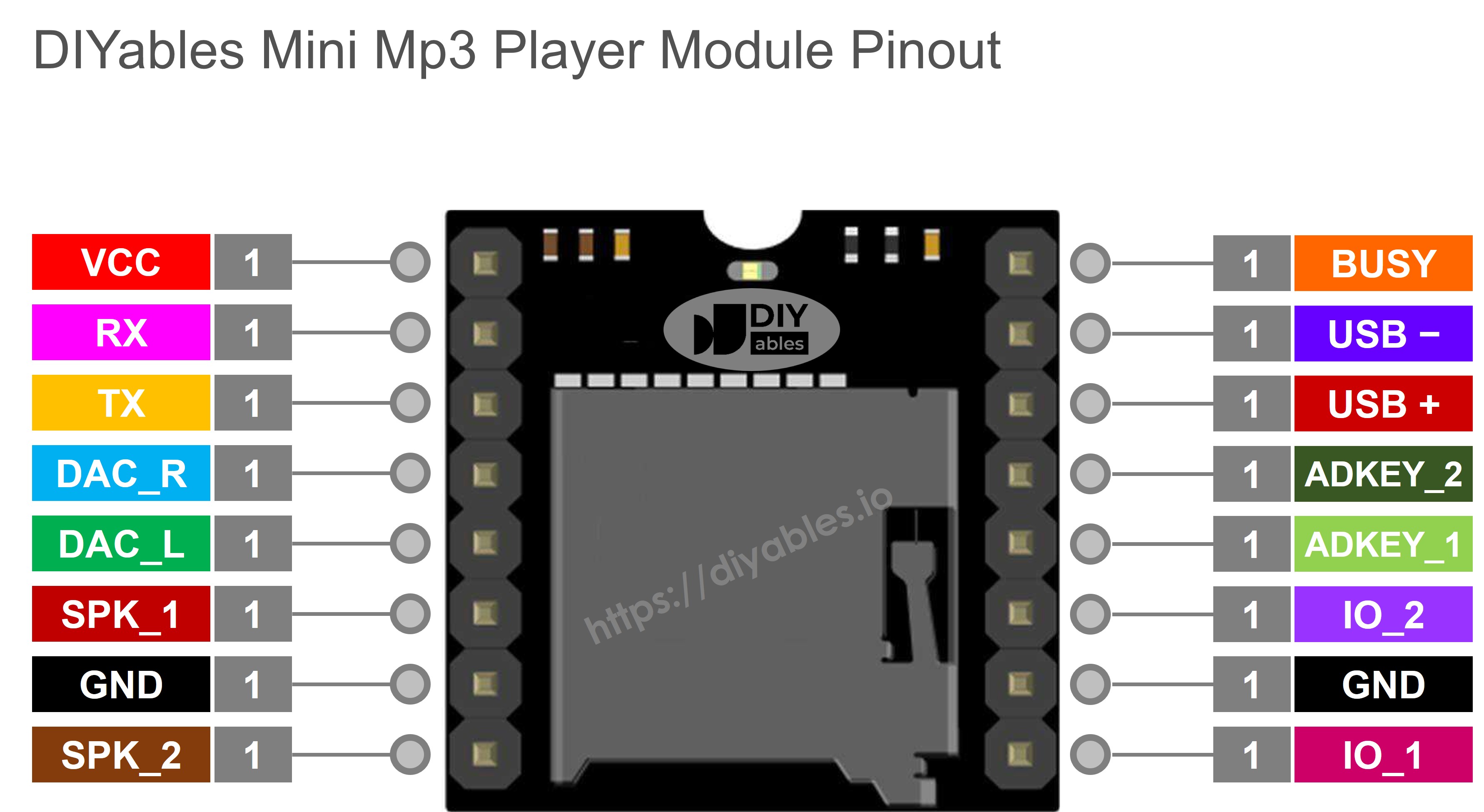
Only six pins are needed here. The rest are optional extras.
| Pin | Role |
|---|---|
| VCC | Supply input, 3.2V to 5.0V |
| GND | Ground |
| RX | Command input from the board, wired through a 1K resistor |
| TX | Reply output to the board RX pin |
| SPK_1 | Speaker + (direct drive, 3W max) |
| SPK_2 | Speaker − (direct drive, 3W max) |
| DAC_R | Right line-level output for an external amplifier |
| DAC_L | Left line-level output for an external amplifier |
| BUSY | Goes LOW while a track plays, HIGH when idle |
| IO_1 | Tap = previous track, hold = volume down |
| IO_2 | Tap = next track, hold = volume up |
ESP32 Uno Pinout
Every header label on the ESP32 Uno form board, like D10 or D11, has its own GPIO number, and the sketch needs that number. Look up both pins in the picture before you plug in the jumper wires.

How to Connect
When this part is done, the module, speaker and board are wired and ready for the first sketch.
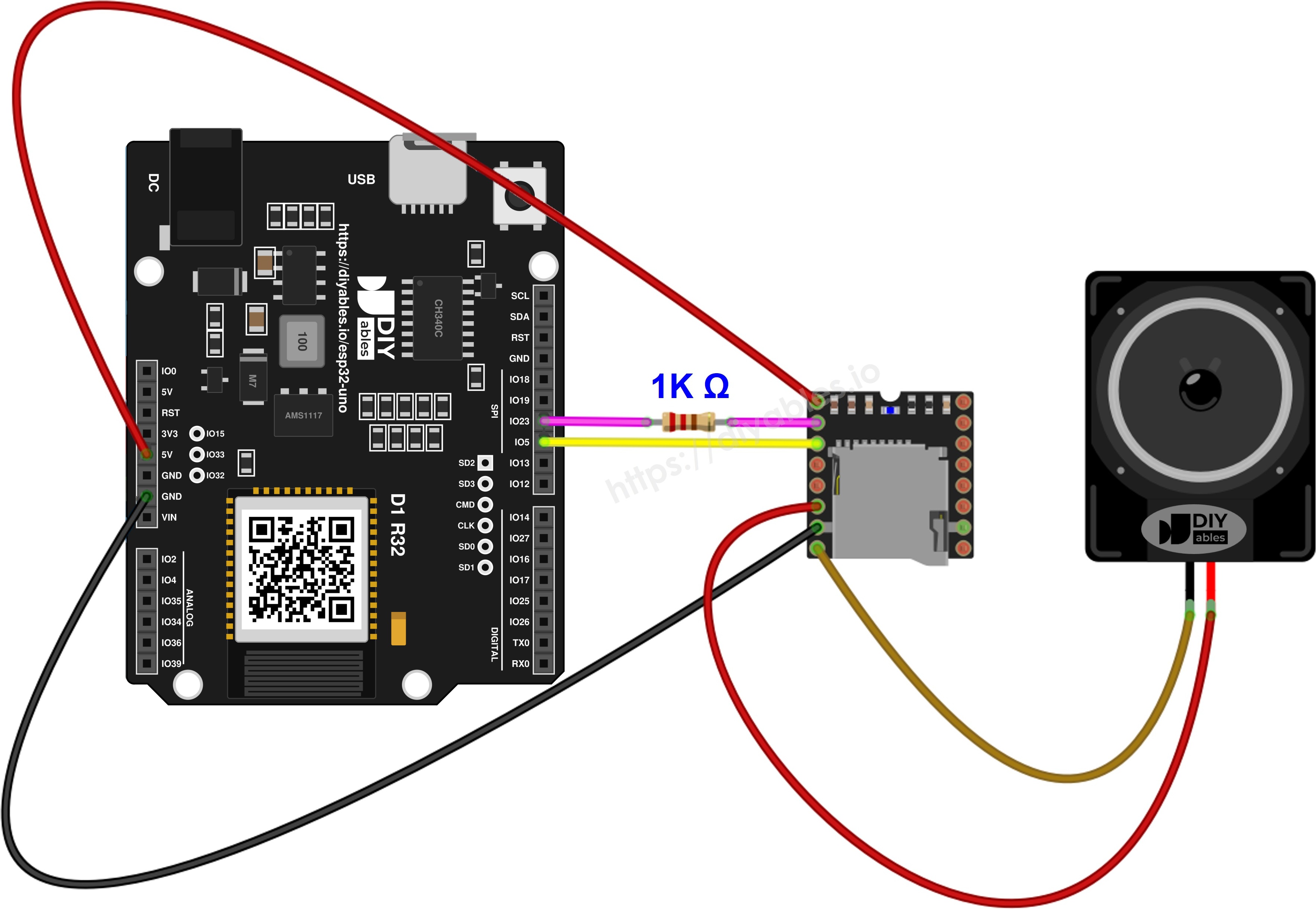
This image is created using Fritzing. Click to enlarge image
| Mini Mp3 Player Pin | ESP32 Uno Pin | Note |
|---|---|---|
| VCC | 5V | |
| GND | GND | |
| RX | D11 (GPIO23) | Put a 1K resistor in series |
| TX | D10 (GPIO5) | |
| SPK_1 | Speaker + | |
| SPK_2 | Speaker − |
WARNING
D10 is GPIO5 on the ESP32 Uno, a boot strapping pin. The chip checks its level at power-up. The module TX line rests HIGH, which matches the default, so the board normally starts fine. If the board ever fails to boot or upload with the module plugged in, pull the TX wire off D10, upload, and plug it back in.
Good to know: ESP32 Uno pins run at 3.3V and are NOT 5V tolerant. The YX5200 uses 3.3V logic on its TX pin even when VCC is 5V, so the D10 (GPIO5) input is safe without a level shifter.
Leave the 1K resistor in series with the module RX pin all the same. It limits the current into the chip and removes most of the hiss this module is known for.
For the button sketches further down, add push buttons to D2 (GPIO26) and D3 (GPIO25). The second leg of each button goes to GND. No resistor is needed, because the code turns on the internal pull-up.
※ NOTE THAT:
SoftwareSerial is not available for the ESP32 Uno. The sketches use the hardware port Serial2 and route it to D10 and D11 with Serial2.begin(9600, SERIAL_8N1, 5, 23). Do not move the module to D0 (GPIO3) or D1 (GPIO1). Those two pins carry the USB serial link, so a module there would block uploads and garble the Serial Monitor.
Setting Up the Micro SD Card
This part makes sure the module finds every file and plays it in the order you expect.
Step 1 — Format the card
Give the micro SD card a fresh FAT32 or FAT16 format. Start from an empty card every time you change the track list.
Step 2 — Copy files to the root
Give each file a three-digit number:
Step 3 — Optional numbered folders
To group sounds, make two-digit folders and put three-digit files inside:
| Rule | Detail |
|---|---|
| First number | Tracks count from 1, never 0 |
| Folder names | Two digits, 01 to 99 |
| Files inside a folder | Three digits, 001 to 255 |
| Track order | Set by copy order, not by file name |
Good to know: the YX5200 reads files in the order they landed on the card. Copy them one at a time, in the order you want to hear them, right after a fresh format.
Add the DIYables_MiniMp3 Library
At the end of this part, Arduino IDE knows how to talk to the module.
- Plug in the board with the USB Type-C cable.
- Pick the board in Arduino IDE: choose ESP32 Dev Module and the CH340 COM port.
- Open the Libraries panel with the Libraries icon on the left bar.
- Search for "DIYables_MiniMp3" and find the entry by DIYables.
- Press Install and wait until it finishes.
- Search for DIYables_MiniMp3 created by DIYables
and click the Install button.
The library needs no other packages.
ESP32 Uno Code - First Sound Test with One Track
Use this first sketch as a wiring test: it sets the volume to 25 and plays 001.mp3 one time.
| Code Part | What It Does |
|---|---|
| Serial2.begin(9600, SERIAL_8N1, 5, 23) | Opens the hardware UART on D10 (RX) and D11 (TX) |
| mp3.begin(Serial2) | Hands that port to the library |
| delay(1000) | Waits while the module scans the SD card |
| mp3.setVolume(25) | Sets the loudness out of 30 |
| mp3.play(1) | Starts 001.mp3 |
After upload, the first track plays once and the board sits idle.
Upload and Test
- First time with this board? Set it up with ESP32 Uno - Getting Started before you continue.
- Load the SD card with 001.mp3, 002.mp3 and so on, and push it into the module slot.
- Build the circuit by following the wiring table above.
- Plug in the USB Type-C cable between the ESP32 Uno and your computer.
- Select the board in Arduino IDE: pick ESP32 Dev Module and the COM port of the board (CH340).
- Paste the sketch into a new Arduino IDE window.
- Click Upload and wait for "Done uploading".
- Listen: 001.mp3 comes out of the speaker.
- Pro tip: a silent speaker with the message on screen usually means a missing SD card or a loose speaker wire, not a code fault. Re-seat the card first.
Playback Commands
| Function | What It Does | Usage |
|---|---|---|
| play(trackNum) | Starts the given track | mp3.play(1) |
| playNext() | Jumps one track ahead | mp3.playNext() |
| playPrevious() | Moves back one track | mp3.playPrevious() |
| pause() | Holds the current track | mp3.pause() |
| resume() | Continues a held track | mp3.resume() |
| stop() | Ends playback | mp3.stop() |
ESP32 Uno Code - Three-Track Playlist
This sketch turns the first three files into a looping playlist with a set gap between starts.
| Code Part | What It Does |
|---|---|
| totalTracks = 3 | Number of files in the playlist |
| trackDuration = 5000 | Time in ms before the next start |
| millis() check | Waits without blocking loop() |
| currentTrack > totalTracks | Jumps back to track 1 |
The result is 1, 2, 3, 1, 2, 3 and so on, every 5 seconds.
Upload and Test
- Check the card holds at least 001.mp3, 002.mp3 and 003.mp3.
- Flash the sketch onto the board.
- Watch the Serial Monitor (9600 baud) for the track numbers.
- Pro tip: set trackDuration to the length of your longest clip in milliseconds, plus about 500 ms, so no song gets cut off.
ESP32 Uno Code - Repeat One Track Forever
Use this one for background music or an alarm: it repeats 001.mp3 with the flat EQ preset.
| Code Part | What It Does |
|---|---|
| mp3.setEQ(EQ_NORMAL) | Picks the flat sound profile |
| mp3.loopTrack(1) | Tells the module to repeat 001.mp3 |
| Empty loop() | Free for your own code |
The module handles the repeat by itself, so the ESP32 Uno stays free for other jobs.
Upload and Test
- Flash this code onto the board.
- Listen: 001.mp3 restarts every time it ends.
- Pro tip: for a seamless loop, trim the silence at the start and end of the mp3 file in an audio editor.
Repeat and Shuffle Commands
| Function | What It Does | Usage |
|---|---|---|
| loopTrack(trackNum) | Repeats one track with no end | mp3.loopTrack(1) |
| loopFolder(folder) | Repeats every file in one folder | mp3.loopFolder(1) |
| loopAll() | Repeats the whole card | mp3.loopAll() |
| stopLoop() | Ends any repeat mode | mp3.stopLoop() |
| shuffle() | Plays the whole card in random order | mp3.shuffle() |
ESP32 Uno Code - Numbered Folder Playback
This sketch pulls clips from folder 01 and folder 02, which is handy when you keep music and voice prompts apart.
| Code Part | What It Does |
|---|---|
| mp3.playFolder(1, 1) | Plays /01/001.mp3 |
| mp3.playFolder(1, 2) | Plays /01/002.mp3 |
| mp3.playFolder(2, 1) | Plays /02/001.mp3 |
| delay(5000) | Gap between the clips |
Three clips play once, then the sketch stops.
Upload and Test
- Make folders 01 and 02 on the card, each with 001.mp3 and 002.mp3.
- Upload this code.
- Listen to the three clips in order.
- Pro tip: name your folders by theme in a text note on your PC (01 = music, 02 = alarms) so you remember what each number holds.
Folder Commands
| Function | What It Does | Usage |
|---|---|---|
| playFolder(folder, track) | Plays a file from a folder (99 folders, 255 files each) | mp3.playFolder(1, 1) |
| playLargeFolder(folder, track) | Plays from a big folder (15 folders, 3000 files each) | mp3.playLargeFolder(1, 1500) |
| playFromMP3Folder(trackNum) | Picks a numbered file inside /mp3 | mp3.playFromMP3Folder(1) |
ESP32 Uno Code - Typed Commands in the Serial Monitor
No buttons needed here: type one-character commands in the Serial Monitor to test every feature.
| Code Part | What It Does |
|---|---|
| Serial.available() | Checks for a typed character |
| switch (cmd) | Picks the action for that character |
| cmd - '0' | Turns the digit into a track number |
| case '?' | Asks the module for volume, track, state and count |
Each command runs at once and prints a short confirmation.
Upload and Test
- Upload the sketch, then open the Serial Monitor at 9600 baud.
- Send a command from this list:
| Key | Action |
|---|---|
| 1–9 | Start track 1 to 9 |
| + | Louder |
| − | Quieter |
| p | Pause |
| r | Resume |
| s | Stop |
| n | Next track |
| b | Previous track |
| ? | Show the status |
- Pro tip: you can type several keys in one line, like "3++?", and the sketch runs them one after another.
ESP32 Uno vs UNO R4 for This Project
This table shows what changes when you move the mp3 player build from the UNO R4 to the ESP32 Uno.
| Item | Arduino UNO R4 | ESP32 Uno |
|---|---|---|
| Logic voltage | 5V | 3.3V |
| Serial link to the module | SoftwareSerial on pins 10 and 11 | Hardware Serial2 on GPIO5 and GPIO23 |
| Module TX wire | D10 | D10 (GPIO5) |
| Module RX wire | D11 | D11 (GPIO23) |
| Button pins | D2 and D3 | D2 (GPIO26) and D3 (GPIO25) |
| Arduino IDE board | Arduino UNO R4 WiFi or Minima | ESP32 Dev Module |
| WiFi and Bluetooth | WiFi only on the R4 WiFi | WiFi and Bluetooth Classic and BLE |
The wires stay on the same header positions, so the same breadboard layout works. Only the code changes: drop SoftwareSerial and use Serial2 with GPIO5 and GPIO23.
Equalizer Presets
Use this part to change the tone of the sound with one line of code.
| Constant | ID | Sound Profile |
|---|---|---|
| DIYables_MiniMp3::EQ_NORMAL | 0 | Flat |
| DIYables_MiniMp3::EQ_POP | 1 | Pop |
| DIYables_MiniMp3::EQ_ROCK | 2 | Rock |
| DIYables_MiniMp3::EQ_JAZZ | 3 | Jazz |
| DIYables_MiniMp3::EQ_CLASSIC | 4 | Classical |
| DIYables_MiniMp3::EQ_BASS | 5 | Extra low end |
Reading the Player Status
With these calls, your ESP32 Uno code can react to the player, for example start a new song only when the old one ends.
A query can block for as long as 100 ms. A result of −1 means the module did not reply in time or sent an error.
| Function | Return Type | Result |
|---|---|---|
| isPlaying() | bool | Returns true during playback |
| getVolume() | int16_t | Present volume (0–30) |
| getEQ() | int16_t | Present EQ preset (0–5) |
| getTrackCount() | int16_t | Files on the SD card |
| getCurrentTrack() | int16_t | Number of the running track |
| getFolderCount() | int16_t | Folders on the SD card |
| getTrackCountInFolder(folder) | int16_t | Files in one folder |
Go Wireless: A Phone Remote for Your Mp3 Player
This idea turns the ESP32 Uno into a small music box you control from a phone.
The ESP32 Uno has WiFi and Bluetooth built in, so the buttons can move to a screen. A slider in a web page or the Bluetooth app can set the volume from 0 to 30, and a text box can send the same one-letter commands as the Serial Monitor sketch. You can also show the current track and volume on the phone. Keep the module on Serial2 (GPIO5 and GPIO23) as in the main code.
Troubleshooting
| Problem | Possible Cause | Solution |
|---|---|---|
| No COM port shows up in Arduino IDE | CH340 driver missing or charge-only cable | Install the CH340 driver and use a USB cable that carries data |
| Upload stops at "Waiting for download" | Board did not enter flash mode | Hold the BOOT button while the upload starts, then let go |
| Board does not boot or upload with the module connected | D10 (GPIO5) is a boot strapping pin and was pulled the wrong way | Unplug the TX wire from D10 while uploading, then reconnect it |
| Speaker is silent and nothing is printed | Wrong board or port, or the sketch did not upload | Pick ESP32 Dev Module and the CH340 port, then upload again |
| Message prints but no sound | Card missing, card in exFAT, or speaker loose | Format the card as FAT32, re-seat it and check SPK_1 and SPK_2 |
| Module ignores every command | TX and RX lines crossed the wrong way | Module TX goes to D10 (GPIO5), module RX goes to D11 (GPIO23) through 1K |
| Strong buzz or hiss | No series resistor on RX or a weak supply | Fit the 1K resistor and feed VCC from the 5V pin |
| ESP32 Uno restarts at high volume | Speaker draws too much current from USB | Lower the volume, use a 3W or smaller speaker, or a stronger 5V supply |
| Compile error SoftwareSerial.h not found | Sketch written for another board | Use the Serial2 sketches from this page |
| Status calls give −1 | Query sent while the module was busy | Wait a moment after a command and check the D10 wire |
FAQ
Is the YX5200 module the same as a DFPlayer Mini?
They use the same YX5200 decoder chip and the same command set, so most DFPlayer Mini guides apply. The DIYables board has its own pin layout, so follow the pinout table on this page when you wire it.
How loud can this mp3 module get with the ESP32 Uno?
The on-board amplifier gives up to 3W into a small speaker, which fills a room. For more power, take the line signal from DAC_L and DAC_R and feed it into an external amplifier.
Which audio files does the module play?
It plays mp3 files (and WAV on many units) from a micro SD card formatted as FAT16 or FAT32. Give the files numbered names like 001.mp3, and keep folder names to two digits.
Do I need a level shifter between the module and the ESP32 Uno?
No. The YX5200 sends 3.3V logic on its TX pin even when VCC is 5V, so it is safe for the ESP32 Uno 3.3V input. The 1K series resistor on module RX still helps against noise.
Why does the ESP32 Uno code use Serial2 and GPIO5 and GPIO23?
The ESP32 Uno core has no SoftwareSerial, but the chip has spare hardware UARTs that can use almost any pin. Serial2 is set to GPIO5 (D10) for RX and GPIO23 (D11) for TX, so the wires stay on the same header spots as the wiring diagram.
Can I run an UNO R4 mp3 sketch on the ESP32 Uno without changes?
No. An UNO R4 sketch uses SoftwareSerial with pin numbers 10 and 11, which fails to compile on the ESP32 Uno. Remove SoftwareSerial, start Serial2 with GPIO5 and GPIO23, and pass Serial2 to mp3.begin(). The library calls stay the same.
Is it a problem that D10 is a strapping pin on the ESP32 Uno?
Usually not. GPIO5 must be HIGH at boot, and the module TX line rests HIGH. If a board still fails to start or upload, unplug the D10 wire during the upload and plug it back in afterward.
Can I wire the push buttons to A2 to A5 on the ESP32 Uno?
You can, but A2 to A5 (GPIO35, GPIO34, GPIO36, GPIO39) are input only and have no internal pull-up. INPUT_PULLUP does nothing there, so each button needs an external 10kΩ resistor to 3.3V. D2 and D3 are simpler because their pull-up is built in.
What if my project needs more pins than the Uno headers give?
The ESP32 Uno has extra holes near the power header: GPIO32 and GPIO33 (I/O, PWM, analog on ADC1, so they also work while WiFi is on) and GPIO15 (I/O, PWM, analog on ADC2). Solder pin headers there and write the GPIO number in code. For more buttons or a BUSY pin input in this project, use GPIO32 and GPIO33 first. Two warnings: GPIO15 and GPIO0 (the IO0 pin at the unused Uno NC spot) are boot strapping pins, so a wrong connection can stop the board from booting or uploading. And never use the six holes under the digital header (SD0 to SD3, CMD, CLK = GPIO6 to GPIO11), because they connect to the flash chip and using them crashes the board.
How can I tell when a song has finished?
Call isPlaying() in loop() and start the next track when it returns false. Another way is to wire the module BUSY pin to a free GPIO, because BUSY goes HIGH when playback stops.
Can I control the mp3 player from my phone with the ESP32 Uno?
Yes. The ESP32 Uno has WiFi and Bluetooth, so a web page or the DIYables Bluetooth app can send volume and track commands. See the Go Wireless section above for matching tutorials.