
ESP32 UNO - Actuator with Feedback
Need a linear actuator that knows where it is? Use the ESP32 Uno with a feedback linear actuator and stop the rod at an exact length, measured in millimeters. A small potentiometer inside the motor housing reports the rod position, and the ESP32 Uno form board turns that voltage into a number you can act on.
A plain linear actuator without feedback can only run to one end or the other. With feedback, your code can halt it anywhere along the travel.
By the end, you can:
- Name the five wires of a feedback actuator and what each one carries
- Hook the actuator to the ESP32 Uno through an L298N driver
- Calibrate the position sensor with analogRead()
- Show the position of the linear actuator in millimeters
- Control the position of the linear actuator with a target value in code
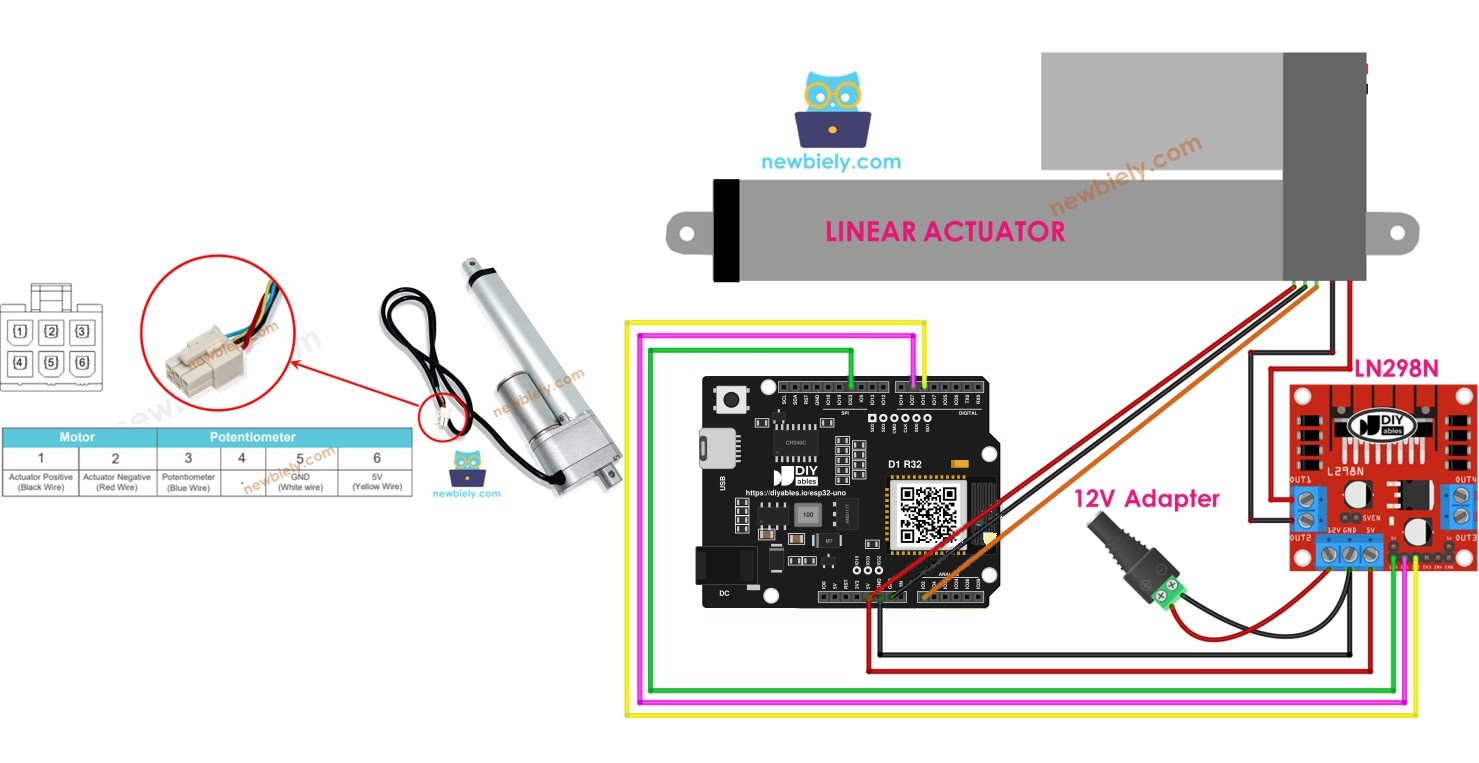
Components You Need
Or you can buy the following kits:
| 1 | × | DIYables Sensor Kit (18 sensors/displays) |
Additionally, some of these links are for products from our own brand, DIYables .
What Is a Feedback Linear Actuator?
After this part, you know what makes this actuator different from a basic one.
It is a DC motor with a lead screw that pushes a rod out and pulls it back, plus one extra part: a position sensor. That sensor is a potentiometer linked to the rod. As the rod travels, the wiper slides, and the output voltage rises or falls with it.
| Part | Job |
|---|---|
| DC motor and lead screw | Moves the rod in or out |
| Feedback potentiometer | Gives a voltage that follows the rod position |
| End limit switches (inside) | Cut the motor at full travel on both ends |
Feedback Linear Actuator Pinout
By the end of this part, you can tell the motor wires from the sensor wires.
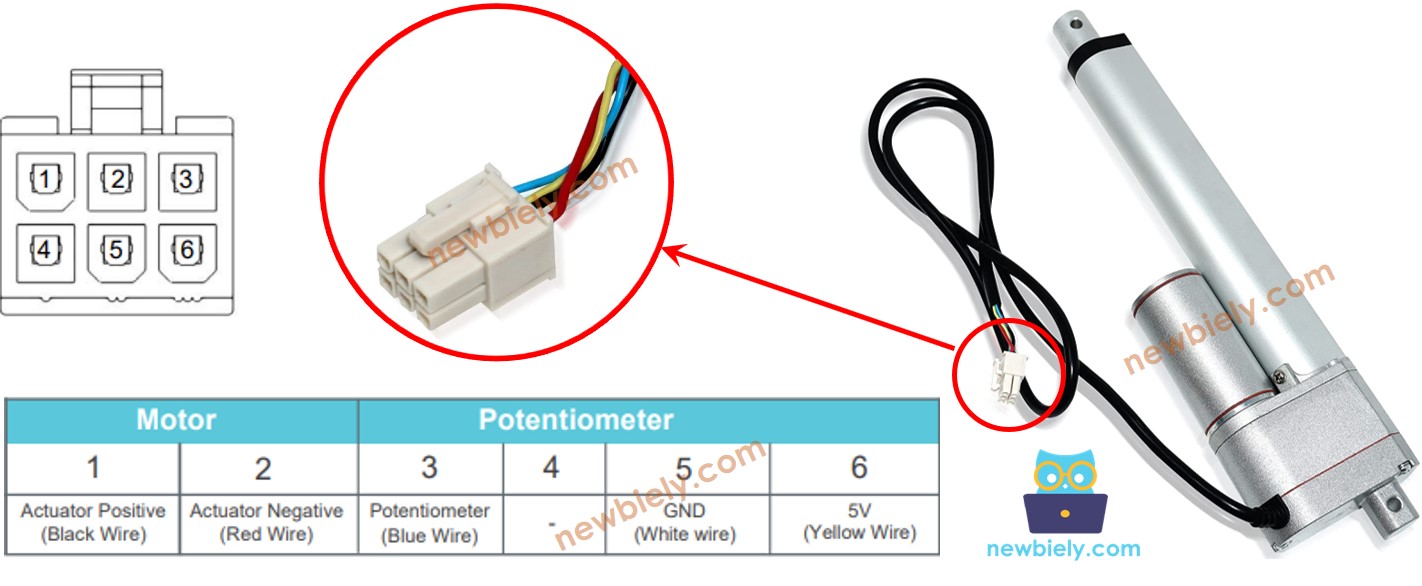
| Wire | Role | Goes To |
|---|---|---|
| Positive (motor) | High-voltage motor supply, 12V / 24V / 48V by model | L298N OUT1 |
| Negative (motor) | Return path of the motor | L298N OUT2 |
| 5V (sensor supply) | Powers the feedback potentiometer, works at 5V or 3.3V | ESP32 Uno 3.3V |
| GND (sensor) | Ground of the feedback potentiometer | ESP32 Uno GND |
| Potentiometer (feedback output) | Voltage that changes with the stroke position | ESP32 Uno A0 (GPIO2) |
Good to know: the motor wires carry 12V or more. Keep them away from every ESP32 Uno pin; only the L298N touches them.
How It Works
After this part, you know how polarity sets the direction and how the sensor reports the rod.
| Positive Wire | Negative Wire | Result |
|---|---|---|
| High voltage (12V, 24V, 48V…) | GND | Rod extends at full speed up to the end stop |
| GND | High voltage (12V, 24V, 48V…) | Rod retracts at full speed up to the end stop |
| GND | GND (power removed) | Rod halts at its present spot |
※ NOTE THAT:
- Motor voltage differs from model to model. Read the label or datasheet of your unit before you apply power.
- With the power off, the screw locks the rod in place, so it holds a load without any current.
While the rod moves, the feedback wire moves along with it. Read that wire with an analog pin and you get the rod position at any moment.
ESP32 Uno Pinout
Every Uno-style header on the ESP32 Uno form board hides a GPIO number, and that number is what goes into your sketch. Find D5, D6, D11 and A0 on this diagram first.

How to Connect the Actuator to the ESP32 Uno
When this part is done, the L298N, the actuator and the board share one circuit and one ground.
Pull all three jumpers off the L298N board before you connect anything.
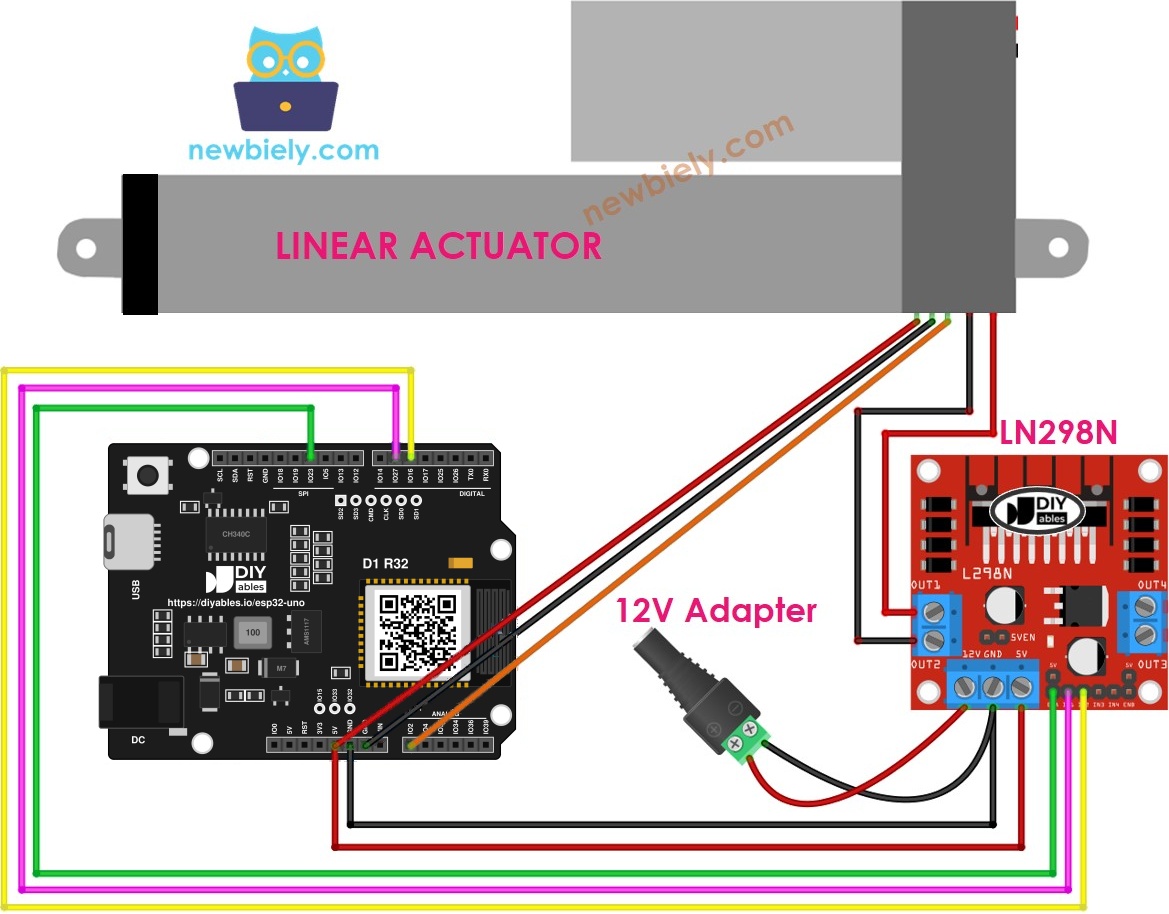
This image is created using Fritzing. Click to enlarge image
| Component Pin | ESP32 Uno Pin |
|---|---|
| L298N ENA | D11 (GPIO23) |
| L298N IN1 | D6 (GPIO27) |
| L298N IN2 | D5 (GPIO16) |
| L298N GND | GND |
| Actuator potentiometer (feedback) wire | A0 (GPIO2) |
| Actuator 5V wire | 3.3V |
| Actuator GND wire | GND |
| Other Connection | To |
|---|---|
| Actuator positive wire | L298N OUT1 |
| Actuator negative wire | L298N OUT2 |
| 12V adapter + (through the DC power jack) | L298N 12V input |
| 12V adapter - (through the DC power jack) | L298N GND |
WARNING
The chip samples A0 (GPIO2) at every reset because it is a boot strapping pin, and it must be LOW or floating to enter upload mode. When the rod sits far out, the feedback wire is near 3.3V and can block the upload. If an upload stalls, retract the rod fully first, or unplug the A0 wire while you upload, then plug it back in.
WARNING
No ESP32 Uno pin can take 5V (they are NOT 5V tolerant). Feed the actuator's sensor wire (labeled 5V) from the 3.3V pin. On a 5V supply, the feedback output can climb to 5V near full extension and damage A0.
Good to know: the L298N sees 3.3V as a valid HIGH, so D5, D6 and D11 can drive it directly. A shared GND between the L298N and the board is a must.
How to Extend and Retract the Actuator
Plain in-and-out motion is covered in its own guide. Start with the ESP32 Uno - Linear Actuator page if you have never run the motor before.
How to Read the Actuator Position
By the end of this part, your sketch turns the sensor voltage into millimeters.
You need three numbers for that conversion: the full stroke length, the reading with the rod all the way in, and the reading with the rod all the way out.
Calibration
After this part, you have the real min and max readings of your own unit.
Step 1 — Get the stroke length
Measure the full travel of the rod with a ruler, or take it from the datasheet. The example unit travels 102 mm.
Step 2 — Run the calibration sketch
This sketch drives the rod out for 20 seconds, prints the reading, then drives it back for 20 seconds and prints the reading again.
Step 3 — Note the two values
Open the Serial Monitor at 9600 baud and wait for both moves to finish. A run on our bench printed:
Good to know: the ESP32 Uno ADC is 12-bit, so the numbers fall between 0 and 4095, not 0 and 1023.
Step 4 — Check the direction
If MAX comes out smaller than MIN, the motor wires are reversed in code. Swap the IN1_PIN and IN2_PIN values and run the sketch once more.
Step 5 — Copy the numbers
Write STROKE_LENGTH, POTENTIOMETER_MAX and POTENTIOMETER_MIN into the next two sketches.
Good to know: every sketch here calls analogSetAttenuation(ADC_11db) in setup(). The 11 dB setting lets the ESP32 Uno analog pin read the whole 0V to about 3.3V span. With a narrower span, the value hits 4095 long before full extension and the millimeter result is wrong.
ESP32 Uno Code to Calculate the Actuator Position
This sketch pushes the rod out and prints its position in millimeters on every loop.
- Enter your calibration numbers in the three #define lines at the top.
- Upload the sketch to the ESP32 Uno.
- Watch the Serial Monitor as the number climbs with the rod.
How to Move the Actuator to a Set Position
After this part, the rod drives itself to a target length and stays there.
Upload and Test
- First time with this board? Set it up with ESP32 Uno - Getting Started before you continue.
- Build the circuit by following the wiring table above.
- Plug in the USB Type-C cable between the ESP32 Uno and your computer.
- Select the board in Arduino IDE: pick ESP32 Dev Module and the COM port of the board (CH340).
- Paste your calibration values into the sketch and set targetPosition_mm to the length you want.
- Upload the code, then switch on the 12V adapter.
- Open the Serial Monitor at 9600 baud. The rod runs toward the target and stops inside the tolerance band.
- Pro tip: mark the 50 mm point on the rod with a strip of tape. When the motor stops, you can see at a glance how close the real stop is to the target.
Video Tutorial
See the ESP32 Uno build in action in the video below.
Code Explanation
This table covers the control sketch, which builds on the other two.
| Code Part | What It Does |
|---|---|
| analogSetAttenuation(ADC_11db) | Opens the A0 input range to about 3.3V |
| map(potentiometer_value, MIN, MAX, 0, STROKE_LENGTH) | Turns the raw 0-4095 reading into millimeters |
| stroke_pos below target minus TOLERANCE | Calls ACTUATOR_extend() to push the rod out |
| stroke_pos above target plus TOLERANCE | Calls ACTUATOR_retract() to pull the rod in |
| Inside the band | Calls ACTUATOR_stop() and both IN pins go LOW |
The result is a simple on-off position loop. A bigger TOLERANCE gives a calm stop, while a very small one can make the rod hunt back and forth around the target.
ESP32 Uno vs UNO R4 for This Project
This table lists what changes when you move this build from the UNO R4 to the ESP32 Uno.
| Item | Arduino UNO R4 | ESP32 Uno |
|---|---|---|
| Logic voltage | 5V | 3.3V |
| L298N control pins | D11 / D6 / D5 | D11 (GPIO23) / D6 (GPIO27) / D5 (GPIO16) |
| Feedback pin | A0 | A0 (GPIO2), a boot strapping pin |
| ADC range | 0 to 1023 (10-bit) | 0 to 4095 (12-bit) |
| Extra code line | None | analogSetAttenuation(ADC_11db) |
| Sensor supply | 5V or 3.3V | 3.3V only |
| Arduino IDE board | Arduino UNO R4 WiFi or Minima | ESP32 Dev Module |
The wiring positions stay the same. Two things need attention: power the sensor from 3.3V, and run the calibration again, because the old 10-bit values are useless on a 12-bit ADC.
Wrap-Up
You connected a feedback linear actuator through an L298N to the ESP32 Uno, measured its min and max readings, printed the rod length in millimeters and made it stop at a chosen point. Use the same loop for a TV lift, a sliding hatch, a solar panel tilt or a desk that remembers its height.
Go Wireless: Set the Rod Length from Your Phone
After this part, you have an idea for adjusting the actuator without a USB cable.
The ESP32 Uno has WiFi and Bluetooth (Classic and BLE) on board. Put a slider on your phone and send its value to targetPosition_mm, and the rod follows your finger. The DIYables Web Apps library gives you that slider in a browser, and the DIYables Bluetooth App gives you the same in a phone app.
WARNING
A0 (GPIO2) is on ADC2, and ADC2 gives no readings while WiFi is running. For the WiFi version, move the feedback wire to an ADC1 pin such as A2 (GPIO35) or GPIO32, and change POTENTIOMETER_PIN to match.
Try These Next
- Add two push buttons that move the target up and down by 10 mm.
- Average five analogRead() samples before map() to steady the position value.
- Drive ENA with analogWrite() and slow the rod down as it gets near the target.
- Save the last target in flash with the Preferences library so it comes back after a reset.
Language References
Troubleshooting
| Problem | Possible Cause | Solution |
|---|---|---|
| Board not listed under Tools then Port | CH340 driver not installed or a charge-only USB cable | Install the CH340 driver and try a USB cable that carries data |
| Upload stops at "Failed to connect" or "Waiting for download" | Board did not enter upload mode | Hold the BOOT button while the upload starts, release it once writing begins |
| Board does not boot or upload with the actuator connected | A0 (GPIO2) is a strapping pin and the feedback wire is high | Retract the rod fully, or unplug the A0 wire during upload, then reconnect it |
| Rod never moves | 12V adapter off, ENA wire loose or no common GND | Check the adapter, the D11 to ENA wire and the GND link between the L298N and the board |
| Reading jumps to 4095 before full extension | Sensor fed from 5V or attenuation line missing | Move the sensor supply to 3.3V and keep analogSetAttenuation(ADC_11db) in setup() |
| Millimeter value falls while the rod extends | IN1 and IN2 swapped | Swap the IN1_PIN and IN2_PIN numbers and calibrate again |
| Millimeter value is far from the ruler | Calibration numbers copied from another board | Run the calibration sketch on this ESP32 Uno and enter its values |
| Rod keeps twitching near the target | TOLERANCE too tight or a noisy reading | Raise TOLERANCE to 6 or 8 mm, or average several readings |
| Garbage characters in the Serial Monitor | Baud rate mismatch | Pick 9600 baud in the Serial Monitor |
FAQ
How accurate is the position from a feedback actuator?
It depends on the potentiometer and on noise. With a 12-bit reading over about 100 mm, one ADC step is far smaller than a millimeter, but noise usually limits you to roughly 1 to 3 mm. Averaging a few samples helps.
Does the feedback actuator need its own library?
No. The sketches use only built-in functions: analogRead(), map(), digitalWrite() and pinMode(). Install the esp32 by Espressif Systems core and nothing else.
Which pin of the actuator should go to 3.3V on the ESP32 Uno?
The sensor supply wire, often marked 5V. On the ESP32 Uno it must go to 3.3V, so the feedback output never rises above 3.3V. The potentiometer works the same at the lower voltage.
Is it safe to drive the L298N inputs from a 3.3V board?
Yes. The L298N accepts about 2.3V as HIGH, so the 3.3V outputs on D5, D6 and D11 switch it fine. Connect the grounds of both boards.
Why does the code call analogSetAttenuation(ADC_11db)?
This line widens what the analog input can measure to roughly 0 to 3.3V, which spreads the whole feedback swing over 0 to 4095. With a smaller range, the reading saturates long before the rod reaches the end. The UNO R4 has no such call; only the ESP32 Uno needs it. Keep the feedback signal at 3.3V or lower.
Why are my calibration numbers around 4000 instead of around 1000?
The ESP32 Uno reads analog pins with 12 bits, so the scale ends at 4095. A 10-bit board ends at 1023. Always calibrate on the board you will use.
Why does uploading sometimes fail when the actuator is plugged in?
A0 is GPIO2, a boot strapping pin. If the rod is extended, the feedback voltage on GPIO2 is high at reset, and the chip may not enter upload mode. Retract the rod or unplug the A0 wire while you upload.
Can I read the position over WiFi with the ESP32 Uno?
Yes, but not on A0. A0 (GPIO2) and A1 (GPIO4) belong to ADC2, and ADC2 cannot be read while WiFi is on. Move the feedback wire to A2 to A5 (GPIO35, 34, 36, 39) or to GPIO32/33, and update POTENTIOMETER_PIN.
Can I run the same sketch on the ESP32 Uno that I used on an UNO R4?
Almost. Change the pin numbers to GPIO numbers (23, 27, 16 and 2), add the attenuation line, and redo the calibration, because the old values are on a 10-bit scale.
How do I make the actuator move slower?
Keep the ENA jumper off and replace digitalWrite(ENA_PIN, HIGH) with analogWrite(ENA_PIN, value). PWM output is available on D11 (GPIO23). A slower rod also stops closer to the target.
What if my project needs more pins than the Uno headers give?
The ESP32 Uno has extra holes near the power header: GPIO32 and GPIO33 (I/O, PWM, analog on ADC1, so they still read while WiFi is on) and GPIO15 (I/O, PWM, analog on ADC2). Add header pins there and use the plain GPIO number in your sketch. For a second actuator's feedback wire, or for a WiFi build, GPIO32/33 are the best choice. Two warnings: GPIO15 and GPIO0 (the IO0 pin at the unused Uno NC spot) are boot strapping pins, so a wrong connection can stop the board from booting or uploading, which is why you should use GPIO32/33 first. Never use the six holes under the digital header (SD0 to SD3, CMD, CLK = GPIO6 to GPIO11), because they are wired to the flash chip and using them crashes the board.