
Arduino Nano ESP32 - Web Apps
DIYables ESP32 WebApps Library
The DIYables ESP32 WebApps Library provides a set of ready-made browser-based interfaces for the Arduino Nano ESP32. Rather than writing HTML, JavaScript, and WebSocket code from scratch, you include the library, register the pages you need, and connect callbacks to your sketch logic.
The board runs an HTTP server and a WebSocket server simultaneously. Browsers open a page over HTTP, then switch to a WebSocket connection for all real-time updates. The library routes incoming messages to the correct registered page automatically.
You can interact with your Arduino Nano ESP32 through a browser on a smartphone or PC using three approaches:
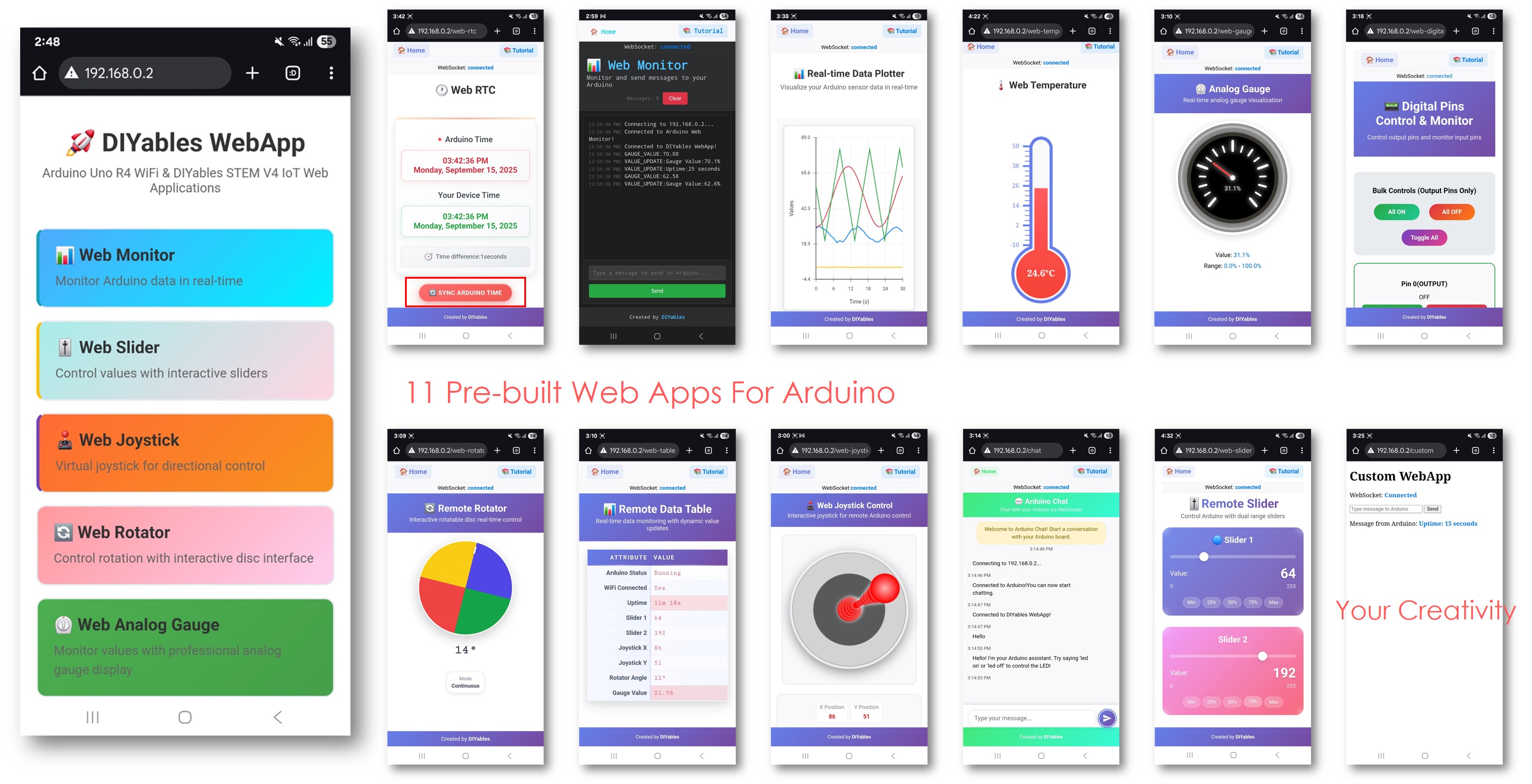
- Pre-built apps: Use any of the 11 provided applications with no web programming required
- Customized apps: Modify the HTML, CSS, or JavaScript in the pre-built pages to fit your needs
- Custom apps: Build your own pages by extending DIYablesWebAppPageBase
Key Features
- Modular design — include only the pages your project needs
- 11 ready-to-use web applications covering monitoring, control, and visualization
- Minified HTML/CSS/JS to minimize flash usage; unminified source provided for editing
- Custom app template with WebSocket message routing built in
- WebSocket-based real-time updates with automatic browser reconnection
- Responsive layout — pages work on desktop, tablet, and mobile
- Callback API — no polling; the library calls your code when events occur
- Multiple pages active simultaneously on one server instance
Installation
Install the library through the Arduino IDE Library Manager:
- Open Arduino IDE
- Navigate to the Libraries icon on the left bar of the Arduino IDE.
- Search "DIYables ESP32 WebApps", then find the DIYables ESP32 WebApps Library by DIYables
- Click Install button to install the library.
- Search for DIYables ESP32 WebApps created by DIYables and click the Install button.
- You will be asked for installing some other library dependencies
- Click Install All button to install all library dependencies.
Dependencies
- DIYables_ESP32_WebServer — provides the underlying HTTP and WebSocket server
Available Web Applications
Home Page (`/`)
Central navigation page showing links to all registered applications. Displays connection status and updates automatically when apps are added or removed.
Web Monitor (`/webmonitor`)
Browser-based serial monitor with bidirectional text. Supports command input with history, message timestamps, and message counting.
Web Chat (`/webchat`)
Two-way messaging interface between the browser and the board. Each side can send and receive plain text messages.
Web Digital Pins (`/webdigitalpins`)
Control and read digital pins 0–13. Each pin is individually enabled in code as either WEB_PIN_INPUT or WEB_PIN_OUTPUT. The page shows only enabled pins and supports bulk operations.
Web Slider (`/webslider`)
Two independent sliders with a 0–255 range. Suitable for PWM duty cycle, brightness, speed, or any other 8-bit analog output.
Web Joystick (`/webjoystick`)
Virtual 2D joystick returning X/Y values in the range –100 to +100. Supports both touch and mouse input. Auto-return to center is configurable in code.
Web Analog Gauge (`/web-gauge`)
Circular gauge for real-time sensor monitoring. The range, units, and precision are set once in the constructor. Color-coded zones indicate operating regions.
Web Rotator (`/web-rotator`)
Rotatable disc for controlling servo or stepper position. Supports continuous (0–360°) and limited-range modes. Returns the current angle over WebSocket.
Web Temperature (`/web-temperature`)
Mercury-style thermometer visualization. The temperature range and unit (°C, °F, or K) are configured in the constructor. Updates in real time via WebSocket.
Web RTC (`/web-rtc`)
Real-time clock display. The browser can synchronize its local time to the board with one click. Shows the time difference between browser and board clocks.
Web Table (`/web-table`)
Two-column attribute-value table. Column names and row labels are defined in setup; values update at runtime without a page reload. Supports up to 20 rows by default.
Web Plotter (`/webplotter`)
Streaming line chart supporting up to 8 data series. The Y-axis auto-scales or uses fixed bounds. Title and axis labels are configurable.
Custom Web App Template (`/custom`)
Starting point for user-defined pages. The template handles WebSocket message routing, reconnection, and home page card registration. Modify the HTML, CSS, and message handlers for your use case.
URL Reference
| | Application | URL Path | |
|---|
| |---|---| |
| | Home Page | / | |
| | Web Monitor | /webmonitor | |
| | Web Chat | /webchat | |
| | Web Digital Pins | /webdigitalpins | |
| | Web Slider | /webslider | |
| | Web Joystick | /webjoystick | |
| | Web Analog Gauge | /web-gauge | |
| | Web Rotator | /web-rotator | |
| | Web Temperature | /web-temperature | |
| | Web RTC | /web-rtc | |
| | Web Table | /web-table | |
| | Web Plotter | /webplotter | |
| | Custom (template) | /custom | |
Access any page at http://[board-ip][path] after the board connects to WiFi.
Modular Architecture
The library is structured so that each web application is an independent class. Only the classes you instantiate and register are compiled into your binary. If you do not call addApp(&joystickPage), that page's code does not run and its HTML does not occupy flash memory.
This example registers only a slider and a gauge page, omitting the rest:
Pages can also be added or removed during runtime using addApp() and removeApp().
API Reference
Full class and method documentation: DIYables ESP32 WebApps Library API Reference
Example Tutorials
Advanced Usage
Runtime Page Management
Pages can be conditionally registered based on hardware presence or runtime state:
Custom Pages
Extend DIYablesWebAppPageBase to create a page with any HTML and any WebSocket message format:
Troubleshooting
WiFi does not connect
- Confirm the SSID and password are correct
- The board supports 2.4 GHz networks only; 5 GHz networks are not supported
- Check signal strength at the board's physical location
Browser cannot reach the page
- Confirm the IP address printed in the Serial Monitor
- Ensure the browser and board are on the same network
- Disable VPN if active
WebSocket disconnects frequently
- Check for webAppsServer.loop() being called on every iteration of loop()
- Avoid blocking calls (delay(), slow I2C reads) that stall the event loop
- Check available heap memory in the Serial Monitor
High memory usage
- Remove any pages not needed by the project
- Reduce setMaxSamples() on the plotter page
- Reduce the maximum rows on the table page