
ESP32 S3 - Motion Sensor MP3 Player
This tutorial shows you how to combine an HC-SR501 PIR motion sensor and a serial MP3 player module with the ESP32 S3 to automatically play a pre-recorded audio file whenever human presence is detected. This project is versatile and can be adapted for many real-world scenarios, such as delivering automated audio announcements, playing warning tones, or triggering themed sound effects whenever motion is identified within the sensor's field of view.
What you'll build:
- A circuit connecting an HC-SR501 PIR motion sensor and a serial MP3 player module to the ESP32 S3
- A sketch that monitors the motion sensor output pin and sends playback commands to the MP3 module over UART
- A system that automatically starts playing audio when motion is detected and stops when motion is no longer present
- A foundation for building motion-activated announcement systems, security alerts, or interactive audio installations
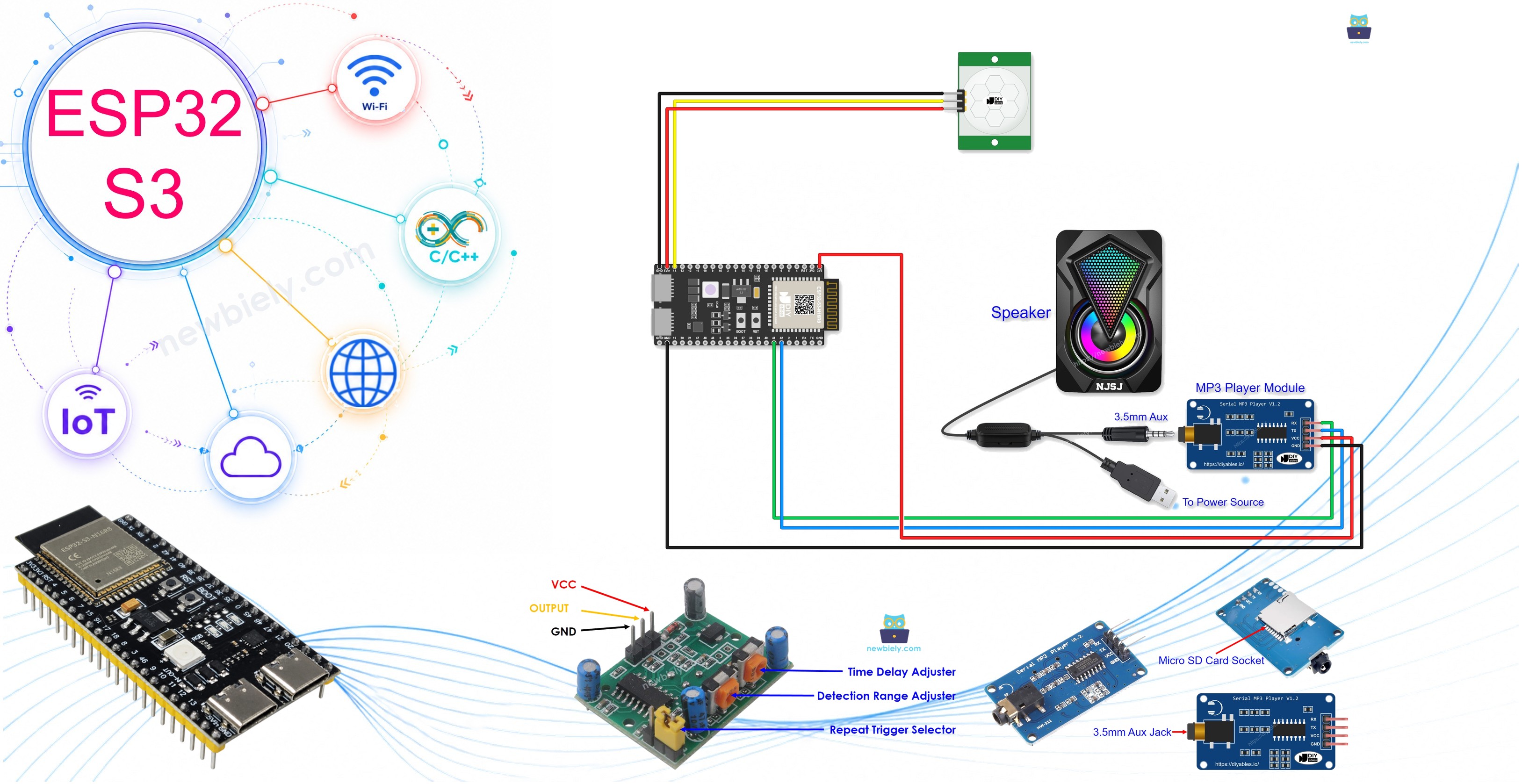
Hardware Preparation
Or you can buy the following kits:
| 1 | × | DIYables ESP32 S3 Starter Kit (ESP32 S3 included) | |
| 1 | × | DIYables Sensor Kit (18 sensors/displays) |
Additionally, some of these links are for products from our own brand, DIYables .
Overview of Motion Sensor and MP3 Player
The HC-SR501 PIR motion sensor and serial MP3 player module are an effective pairing for building motion-activated audio projects on the ESP32 S3. The PIR sensor detects changes in infrared radiation emitted by a moving person or animal, outputs a HIGH signal on its data pin, and the ESP32 S3 reads that signal to trigger serial playback commands to the MP3 module, which decodes the audio and sends it to the connected speaker.
Key Specifications
We have dedicated tutorials covering each component in depth. Each tutorial contains detailed information about hardware pinout, working principle, wiring connection to the ESP32 S3, and Arduino code. Learn more at the following links:
Wiring Diagram
Connect the motion sensor's output pin and the MP3 module's UART pins to your ESP32 S3 by following the diagram below. Double-check all connections before applying power, paying particular attention to the RX/TX polarity on the MP3 module and the sensor's VCC supply voltage requirement.
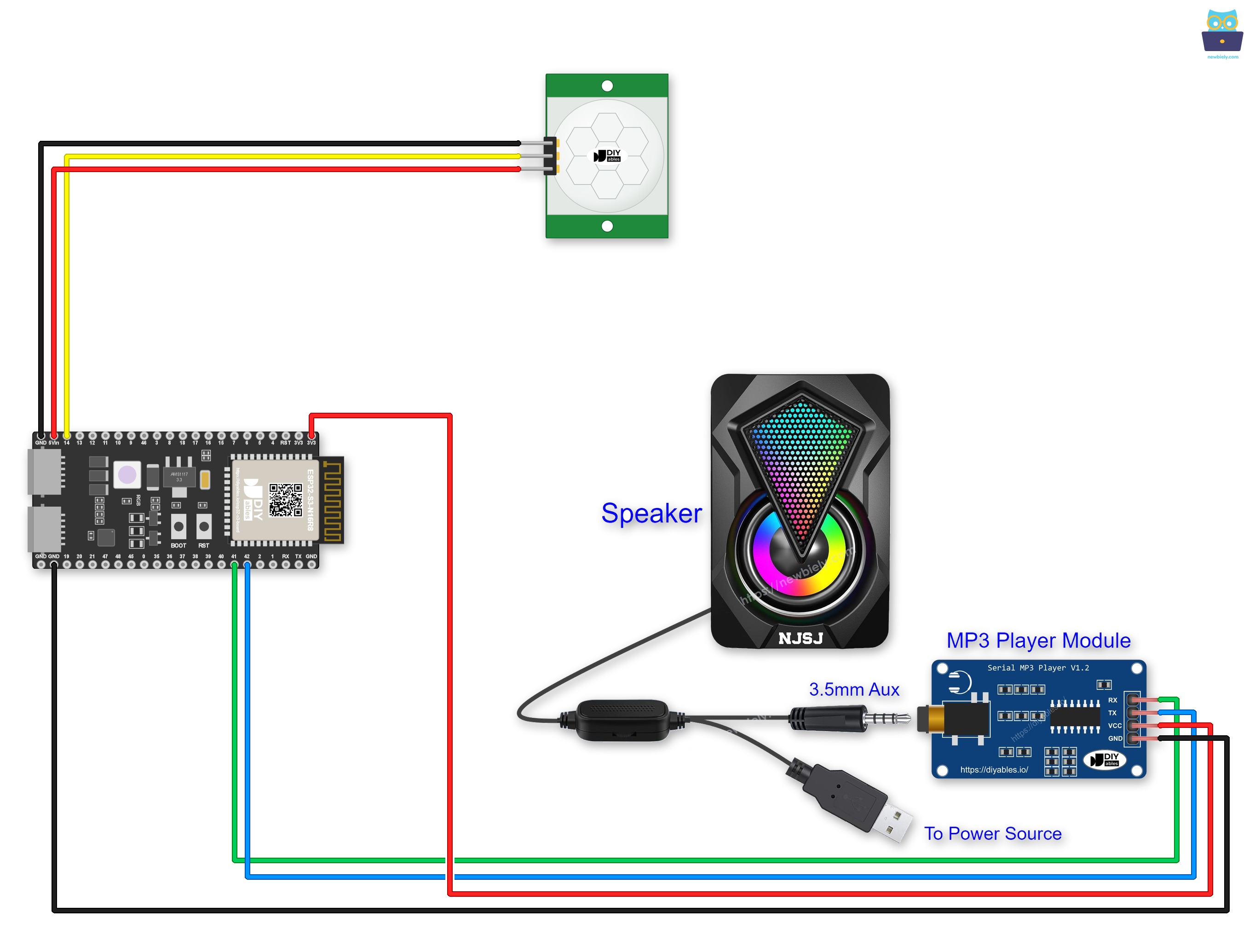
This image is created using Fritzing. Click to enlarge image
Safety Notes
The HC-SR501 motion sensor requires a supply voltage between 5 V and 20 V on its VCC pin — use the 5 V output available on the ESP32 S3 board to power the sensor while keeping its signal output compatible with the 3.3 V GPIO input. Never connect the speaker's amplifier power directly to the ESP32 S3's 3.3 V rail; use a dedicated 5 V source to protect the board and ensure sufficient current for the speaker.
Preparation
Before uploading code, complete the following hardware setup steps to ensure the system works correctly from the first power-on.
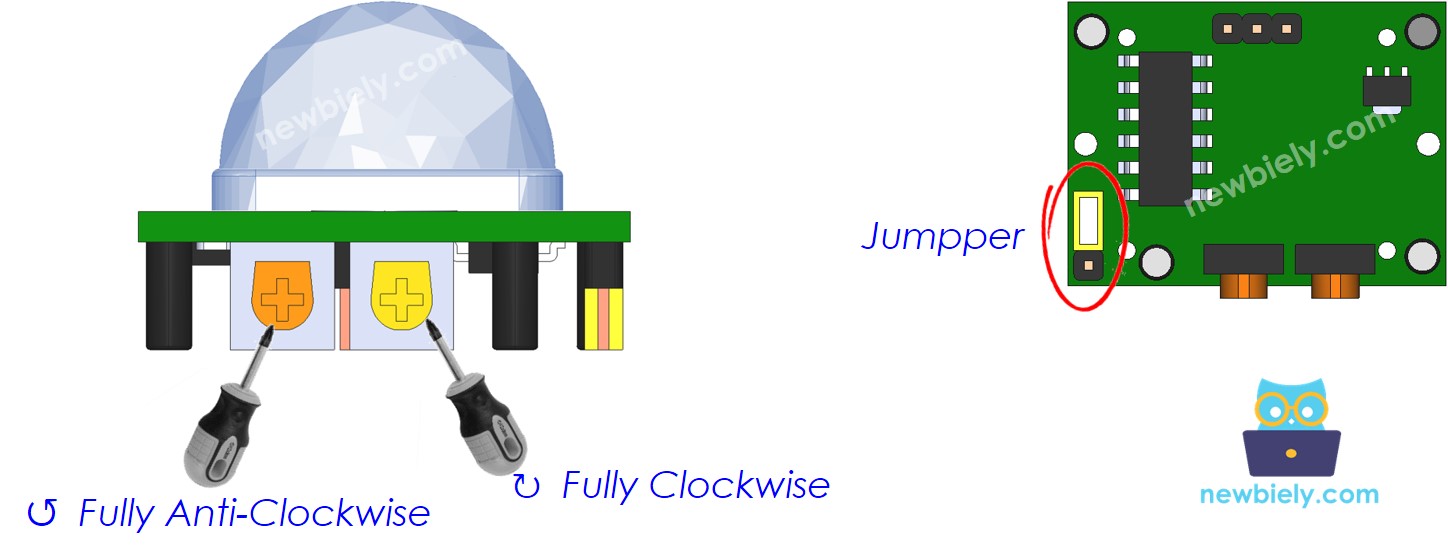
| Time Delay Adjuster | Screw it in anti-clockwise direction fully. |
| Detection Range Adjuster | Screw it in clockwise direction fully. |
| Repeat Trigger Selector | Put jumper as shown on the image. |
Pre-store your recorded MP3 file on the Micro SD Card, insert the card into the MP3 player module, connect the speaker to the MP3 module's 3.5mm Aux jack, and ensure the speaker is connected to a power source before proceeding.
ESP32 S3 Code - Motion Sensor Controls MP3 Player
The following code monitors the HC-SR501 motion sensor output on the ESP32 S3 and sends a play command to the serial MP3 module as soon as motion is detected, then sends a stop command when the sensor output returns LOW. The sensor's onboard time-delay trimmer controls how long the output stays HIGH after motion is detected, so you can fine-tune the hold time at the hardware level without modifying the code.
Detailed Instructions
- New to ESP32 S3? Complete our Getting Started with ESP32 S3 guide first.
- Pre-store the MP3 file you want to play on the Micro SD Card and insert it into the MP3 player module.
- Wire the components following the wiring diagram shown above.
- Connect the ESP32 S3 board to your PC using a USB Type-C cable.
- Open Arduino IDE on your PC.
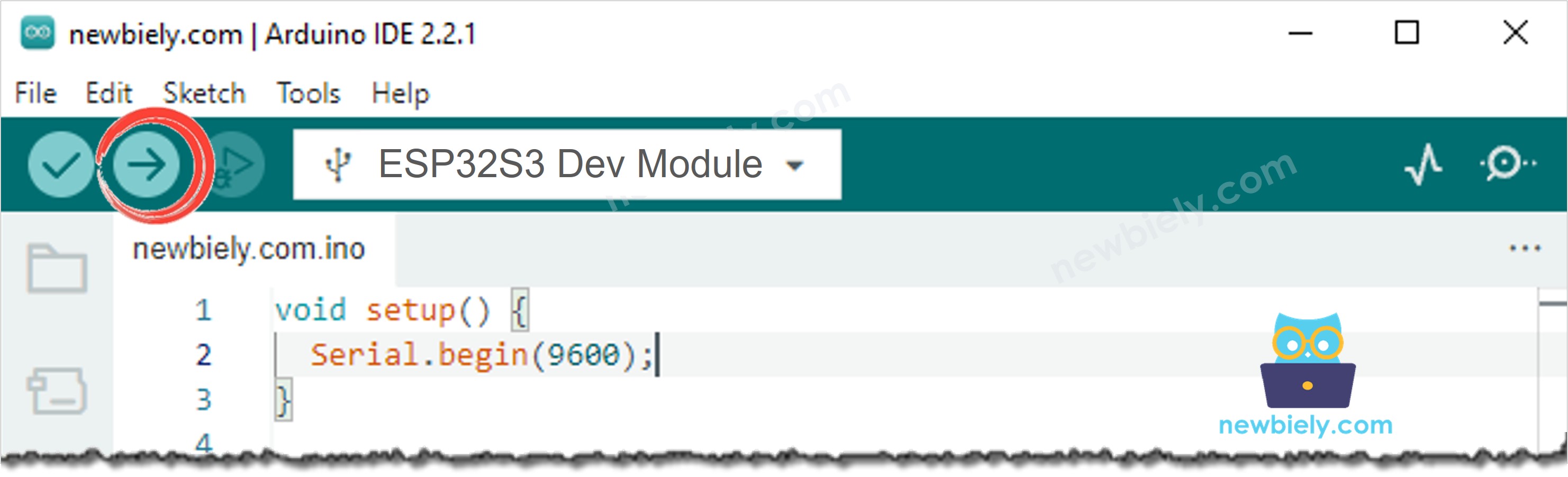
- Select the correct ESP32 S3 board and COM port from the Tools menu.
- Copy the above code and paste it into Arduino IDE.
- Click the Upload button to compile and upload the code to the ESP32 S3.
- Move your hand in front of the motion sensor.
- Listen for audio playback from the speaker when motion is detected.
- Stay still and observe playback stop after the sensor's time-delay period expires.
- Check the Serial Monitor to see the live detection state and playback commands printed in real time.
- Pro Tip: Adjust the two onboard trimmers on the HC-SR501 — the sensitivity trimmer sets the detection range (up to about 7 metres) and the time-delay trimmer sets how long the output stays HIGH after motion stops — fine-tune both for your installation environment before finalising the project.
Serial Monitor Output
The following Serial Monitor output shows the ESP32 S3 reading motion data from the HC-SR501 sensor and issuing commands to the MP3 module in real time. Each line displays the current motion state and the corresponding playback action taken by the sketch.
Application and Project Ideas
Once you can trigger MP3 audio from a motion sensor on the ESP32 S3, you can extend this pattern to a broad range of motion-activated audio and notification projects.
- Automated announcements: Play a pre-recorded welcome message or safety instruction whenever a person enters a specific area such as a shop entrance or warehouse zone.
- Security deterrent: Trigger a loud alarm tone or spoken warning via the MP3 module when an intruder is detected in a restricted area.
- Interactive exhibit: Activate themed sound effects or narration in a museum, escape room, or trade show display when a visitor approaches a specific point of interest.
- Smart doorbell: Play a custom chime or greeting message through a speaker whenever someone approaches the front door.
- Motion-activated toy: Build an interactive toy or prop that speaks, plays music, or makes sound effects whenever a child moves in front of it.
- Wildlife monitoring station: Trigger audio recordings or alerts at an outdoor monitoring post whenever an animal passes through the sensor's detection zone.
Video Tutorial
Watch the step-by-step video walkthrough for this ESP32 S3 project below.
Challenge Yourself
Now that you can trigger MP3 playback from a motion sensor on the ESP32 S3, try these progressively challenging extensions to build more capable motion-activated audio systems.
- Beginner: Add an LED that lights up while the MP3 module is playing, giving a clear visual indication of active playback state alongside the audio output.
- Beginner: Store multiple MP3 files on the Micro SD Card and modify the code to play a randomly selected track each time motion is detected, so the audio varies with each trigger event.
- Intermediate: Add a push button that allows the user to enable or disable motion-triggered playback at runtime, with an LED indicating whether the system is armed or disarmed.
- Intermediate: Connect an I2C OLED display to the ESP32 S3 and show a live counter of how many motion-triggered playback events have occurred in the current session alongside the current detection state.
- Advanced: Send an MQTT message or HTTP request to a home automation platform each time motion triggers playback, using the ESP32 S3 Wi-Fi connection to log events or notify a remote dashboard.
- Advanced: Build a multi-zone system with two HC-SR501 sensors on separate GPIO pins and map each zone to a different MP3 track, so the audio played depends on which zone detects motion first.